IP Routing
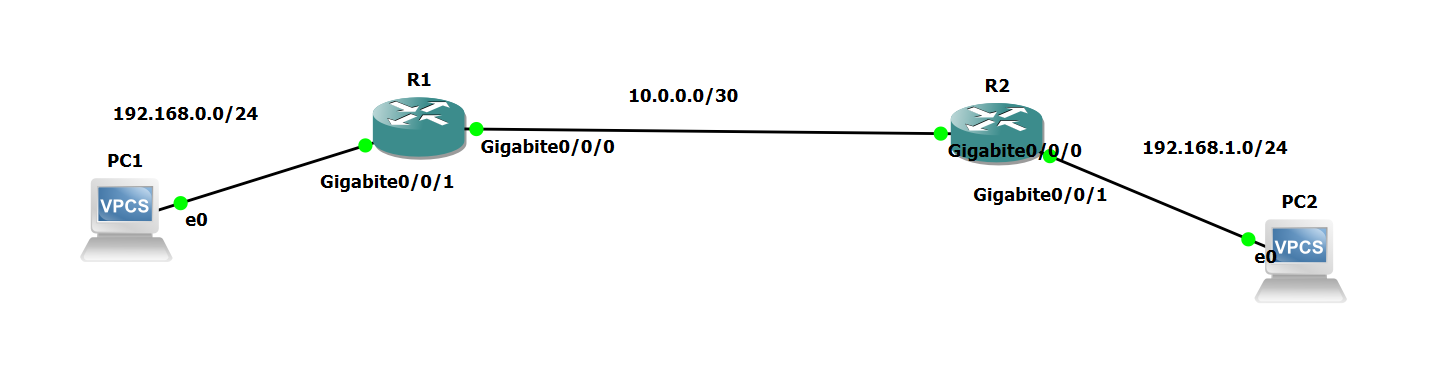 R1
R1
 1
 2
 3
 4
 5
 6
 7
 8
 9
10
11
| ! Configure IP address
int g0/0/1
ip address 192.168.0.254 24
quit
int g0/0/0
ip address 10.0.0.1 30
quit
! Configure route
ip route-static 192.168.1.0 24 g0/0/0 10.0.0.2
|
R2
 1
 2
 3
 4
 5
 6
 7
 8
 9
10
11
| ! Configure IP address
int g0/0/1
ip address 192.168.1.254 24
quit
int g0/0/0
ip address 10.0.0.2 30
quit
! Configure route
ip route-static 192.168.0.0 24 g0/0/0 10.0.0.1
|
PC1
1
| ip 192.168.0.1 255.255.255.0 192.168.0.254
|
PC2
1
| ip 192.168.1.1 255.255.255.0 192.168.1.254
|
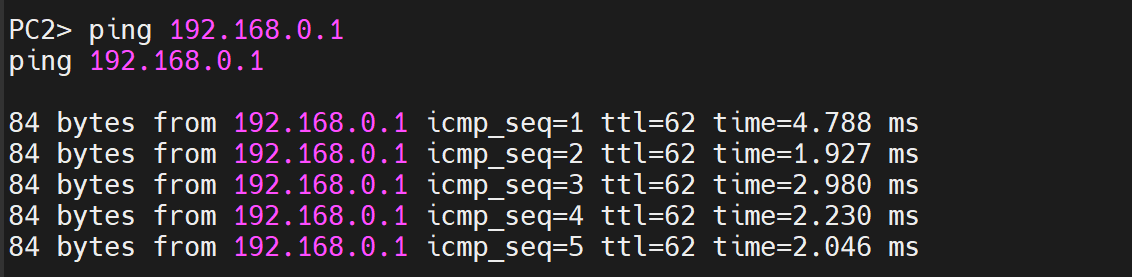
Verify by pinging
OSPF Basics
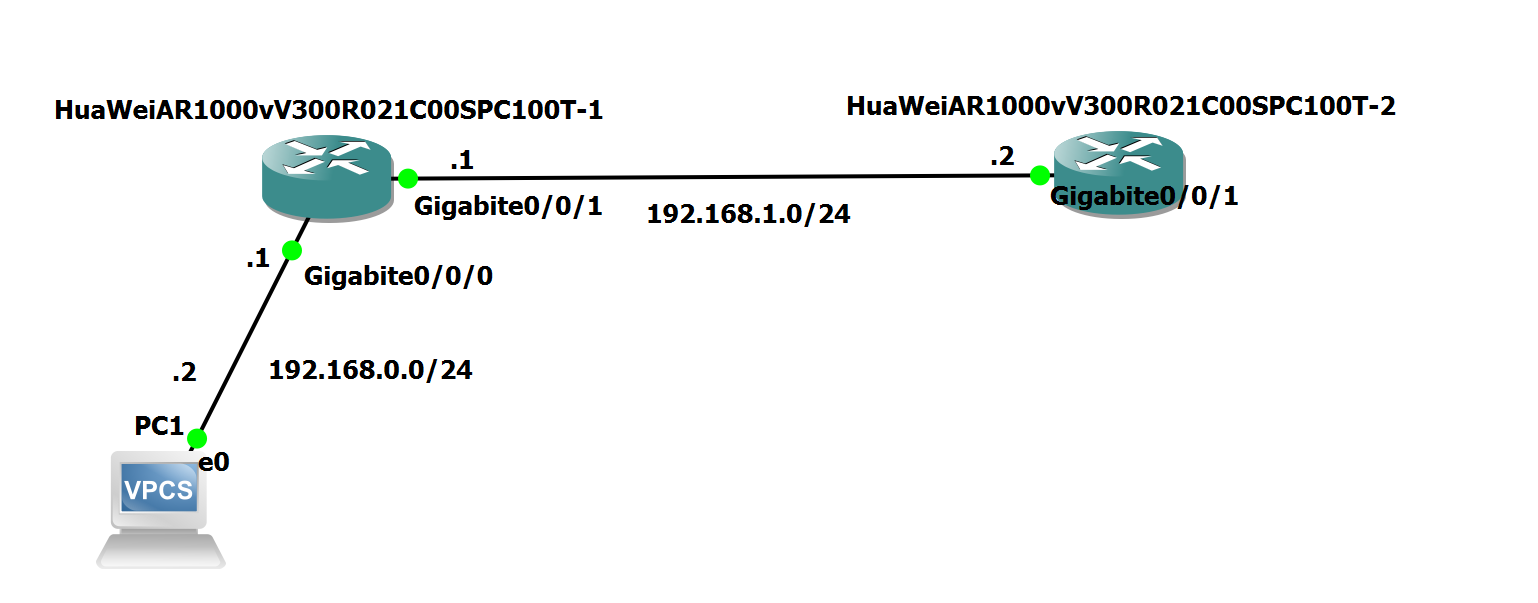 R1
R1
 1
 2
 3
 4
 5
 6
 7
 8
 9
10
11
12
13
14
15
16
17
18
| ! R1 is the DR
! This interface will face R2
int g0/0/1
ip address 192.168.1.1 24
undo shutdown
quit
! Configure OSPF
ospf 1 router-id 1.1.1.1
area 0
network 192.168.0.0 0.0.0.255
network 192.168.1.0 0.0.0.255
quit
! Set OSPF priority (Necessary in this case)
int g0/0/1
ospf dr-priority 10
quit
|
R2
 1
 2
 3
 4
 5
 6
 7
 8
 9
10
11
12
13
| ! R2 is the BDR
! This interface will face R2
int g0/0/1
undo ip address
ip address 192.168.1.2 24
undo shutdown
quit
! Configure OSPF
ospf 1 router-id 2.2.2.2
area 0
network 192.168.1.0 0.0.0.255
quit
|
Output:
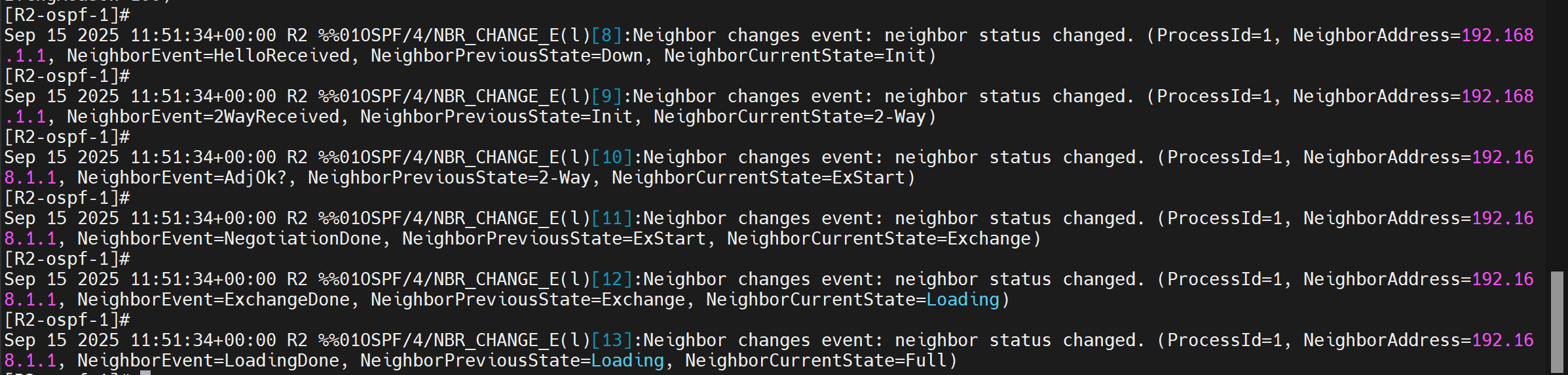 Verify by pinging 192.168.0.2 from R2.
Inter-VLAN Communication
Layer 3 Switch
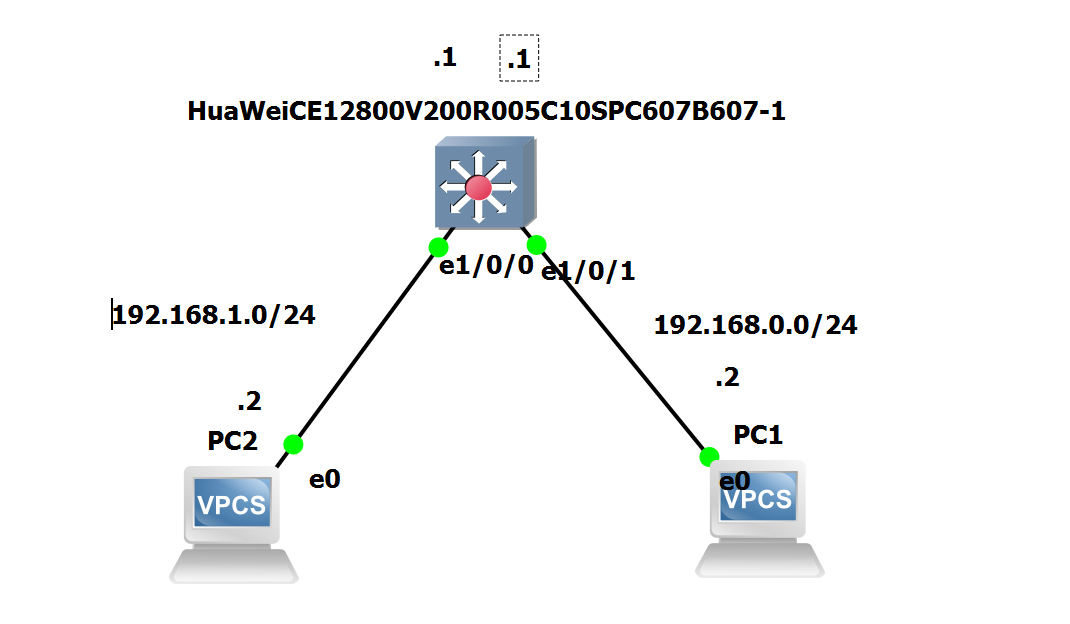 S1
S1
 1
 2
 3
 4
 5
 6
 7
 8
 9
10
11
12
13
14
15
16
17
18
19
20
21
| ! Add VLAN
vlan batch 10 20
! Configure access ports
int g1/0/1
port link-type access
port default vlan 10
quit
int g1/0/0
port link-type access
port default vlan 20
quit
! Configure VLAN interface
interface vlanif 10
ip address 192.168.0.1 24
quit
interface vlanif 20
ip address 192.168.1.1 24
quit
|
To verify, ping from PC2 to PC1
ROAS
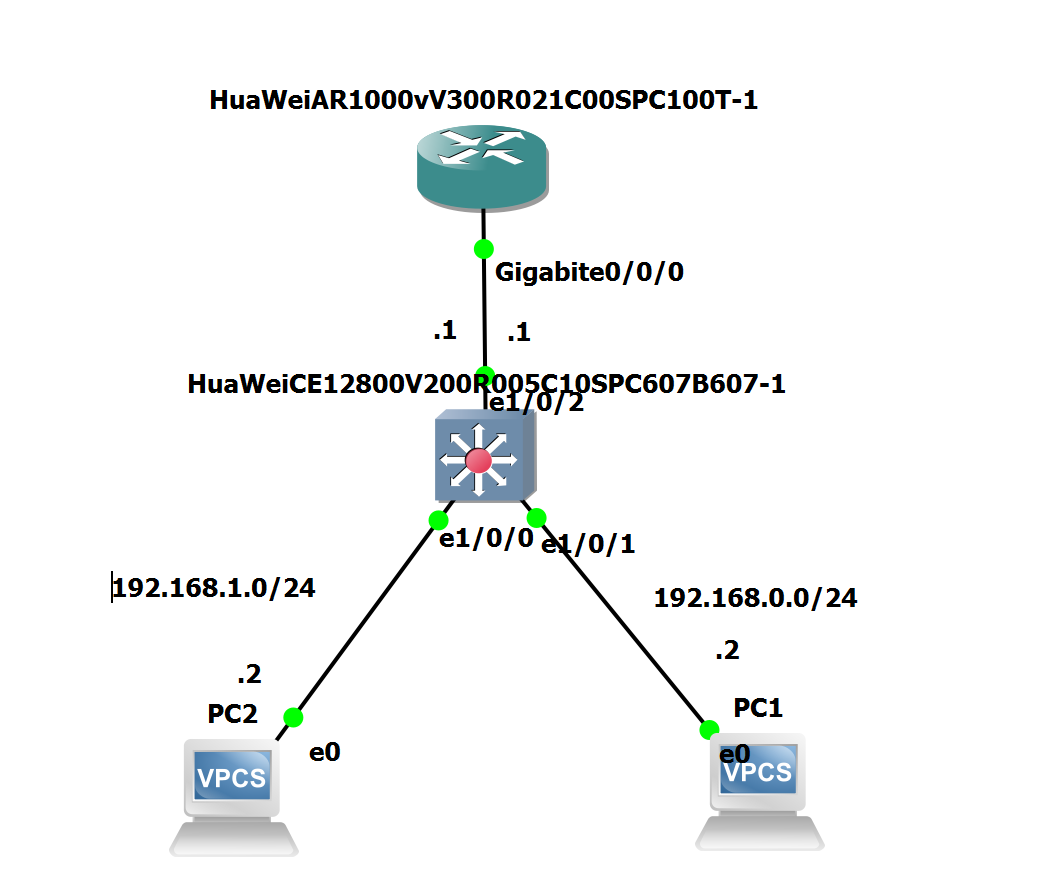 S1
S1
 1
 2
 3
 4
 5
 6
 7
 8
 9
10
11
12
13
14
15
16
17
18
19
| ! declare vlans
vlan batch 10 20 99
! Configure access ports
int g1/0/0
port link-type access
port default vlan 20
quit
int g1/0/1
port link-type access
port default vlan 10
quit
! Configure trunk port
int g1/0/2
port link-type trunk
port trunk allow-pass vlan 10 20
port trunk pvid vlan 99
quit
|
R1
 1
 2
 3
 4
 5
 6
 7
 8
 9
10
11
12
13
14
15
16
| int g0/0/0
undo ip address
quit
! Configure subinterface
int g0/0/0.10
ip address 192.168.0.1 24
dot1q termination vid 10
arp broadcast enable
quit
int g0/0/0.20
ip address 192.168.1.1 24
dot1q termination vid 20
arp broadcast enable
quit
|
To verify
1
2
3
4
5
6
7
8
| PC1> ping 192.168.1.2
ping 192.168.1.2
84 bytes from 192.168.1.2 icmp_seq=1 ttl=63 time=4.934 ms
84 bytes from 192.168.1.2 icmp_seq=2 ttl=63 time=1.734 ms
84 bytes from 192.168.1.2 icmp_seq=3 ttl=63 time=2.006 ms
84 bytes from 192.168.1.2 icmp_seq=4 ttl=63 time=1.820 ms
84 bytes from 192.168.1.2 icmp_seq=5 ttl=63 time=1.477 ms
|
ROAS (Hybrid)
S1
 1
 2
 3
 4
 5
 6
 7
 8
 9
10
11
12
13
14
15
16
17
18
19
20
21
| ! declare vlans
vlan batch 10 20 99
! Configure access ports
int g1/0/0
port link-type hybrid
port hybrid pvid vlan 20
port hybrid untagged vlan 20
quit
int g1/0/1
port link-type hybrid
port hybrid pvid vlan 10
port hybrid untagged vlan 10
quit
! Configure trunk port
int g1/0/2
port link-type hybrid
port hybrid pvid vlan 99
port hybrid tagged vlan 10 20
quit
|
R1
 1
 2
 3
 4
 5
 6
 7
 8
 9
10
11
12
13
14
15
16
| int g0/0/0
undo ip address
quit
! Configure subinterface
int g0/0/0.10
ip address 192.168.0.1 24
dot1q termination vid 10
arp broadcast enable
quit
int g0/0/0.20
ip address 192.168.1.1 24
dot1q termination vid 20
arp broadcast enable
quit
|
To verify
1
2
3
4
5
6
7
8
| PC1> ping 192.168.1.2
ping 192.168.1.2
84 bytes from 192.168.1.2 icmp_seq=1 ttl=63 time=4.934 ms
84 bytes from 192.168.1.2 icmp_seq=2 ttl=63 time=1.734 ms
84 bytes from 192.168.1.2 icmp_seq=3 ttl=63 time=2.006 ms
84 bytes from 192.168.1.2 icmp_seq=4 ttl=63 time=1.820 ms
84 bytes from 192.168.1.2 icmp_seq=5 ttl=63 time=1.477 ms
|
Eth-Trunk
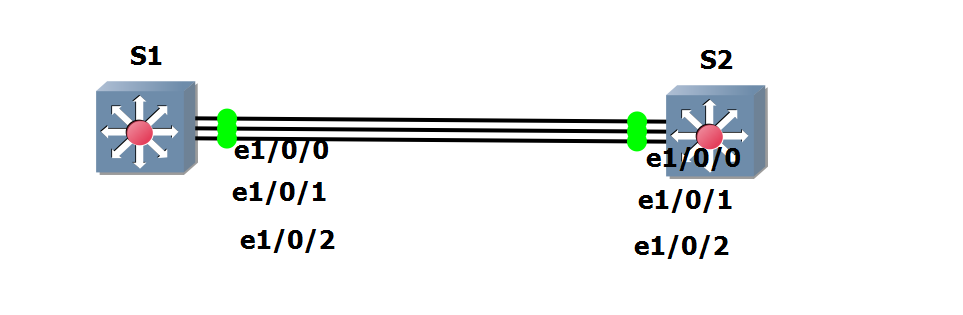 S1
S1
 1
 2
 3
 4
 5
 6
 7
 8
 9
10
11
12
13
14
15
16
17
18
19
20
21
22
23
24
25
26
27
28
| ! Enter eth-trunk interface config
interface Eth-Trunk 1
! Configure eth-trunk mode
mode lacp-static
! Configure member interfaces
! My version of switch does not allow ranges
trunkport g1/0/0
trunkport g1/0/1
trunkport g1/0/2
! Configure switchport info for all int
port link-type trunk
port trunk pvid vlan 1
least active-linknumber 3
quit
! Configure LACP Actor
lacp priority 65535
int g1/0/0
distribute-weight 3
int g1/0/1
distribute-weight 3
int g1/0/2
distribute-weight 3
int vlanif 1
ip address 192.168.0.1 24
quit
|
S2
 1
 2
 3
 4
 5
 6
 7
 8
 9
10
11
12
13
14
15
16
17
18
| ! Enter eth-trunk interface config
interface Eth-Trunk 1
! Configure eth-trunk mode
mode lacp-static
! Configure member interfaces
! My version of switch does not allow ranges
trunkport g1/0/0
trunkport g1/0/1
trunkport g1/0/2
! Configure switchport info for all int
port link-type trunk
port trunk pvid vlan 1
least active-linknumber 3
quit
int vlanif 1
ip address 192.168.0.2 24
quit
|
To verify,
1
| [S1]display lacp statistics eth-trunk 1
|

- You can also try pinging from S1 to S2.
Access Control List
Allow ping only
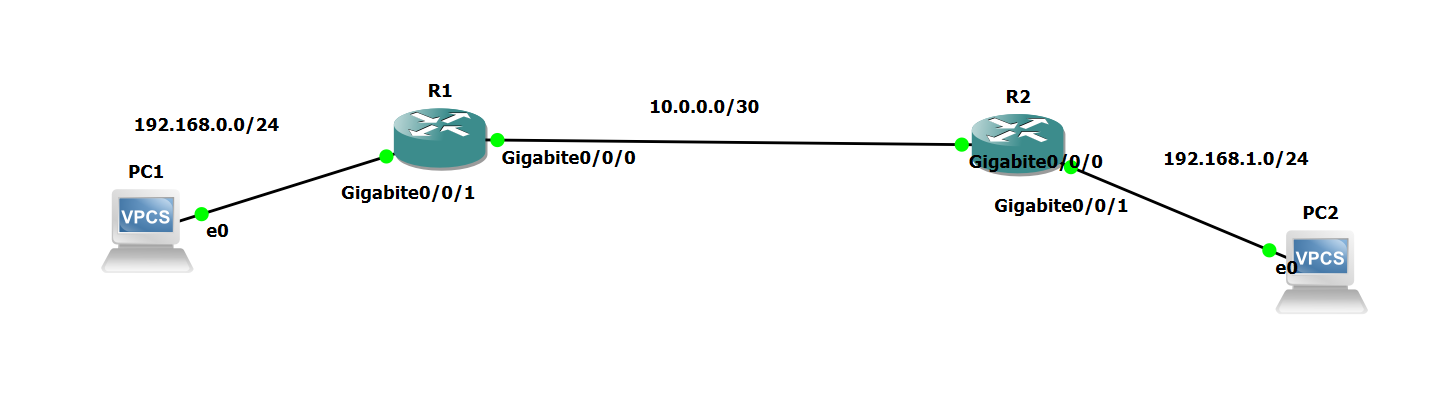 R1
R1
 1
 2
 3
 4
 5
 6
 7
 8
 9
10
11
| acl 3000
! Allow ping from 192.168.1.0/24 to 192.168.0.0/24 only
rule permit icmp source 192.168.1.0 0.0.0.255 destination 192.168.0.0 0.0.0.255
! Deny all packets to 192.168.0.0/24
rule deny ip source any destination 192.168.0.0 0.0.0.255
quit
! Apply on interface
int g0/0/0
traffic-filter inbound acl 3000
quit
|
AAA
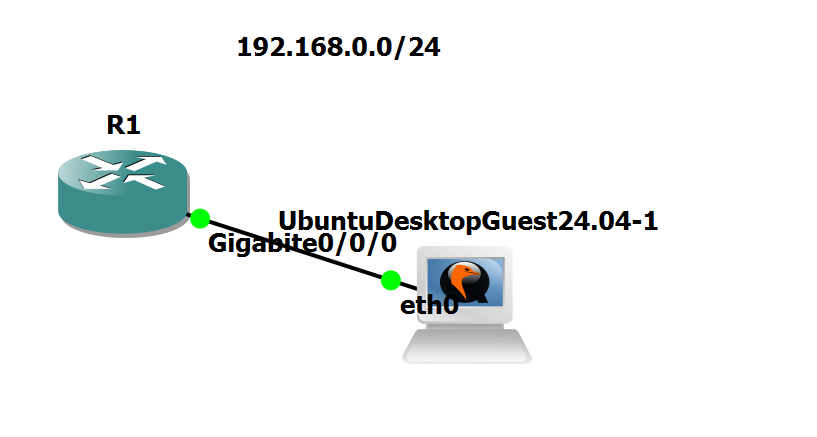
 1
 2
 3
 4
 5
 6
 7
 8
 9
10
11
12
13
14
15
16
17
18
19
| int g0/0/0
ip address 192.168.0.2 24
quit
aaa
! Create a local user
local-user superman password cipher huawei123
! This user can access via telnet
local-user superman service-type telnet
! This user can also ping and whatnot
local-user superman privilege level0
quit
! Start SSH server
stelnet server enable
!apply AAA on the VTY
user-interface vty 0 4
authentication-mode aaa
|
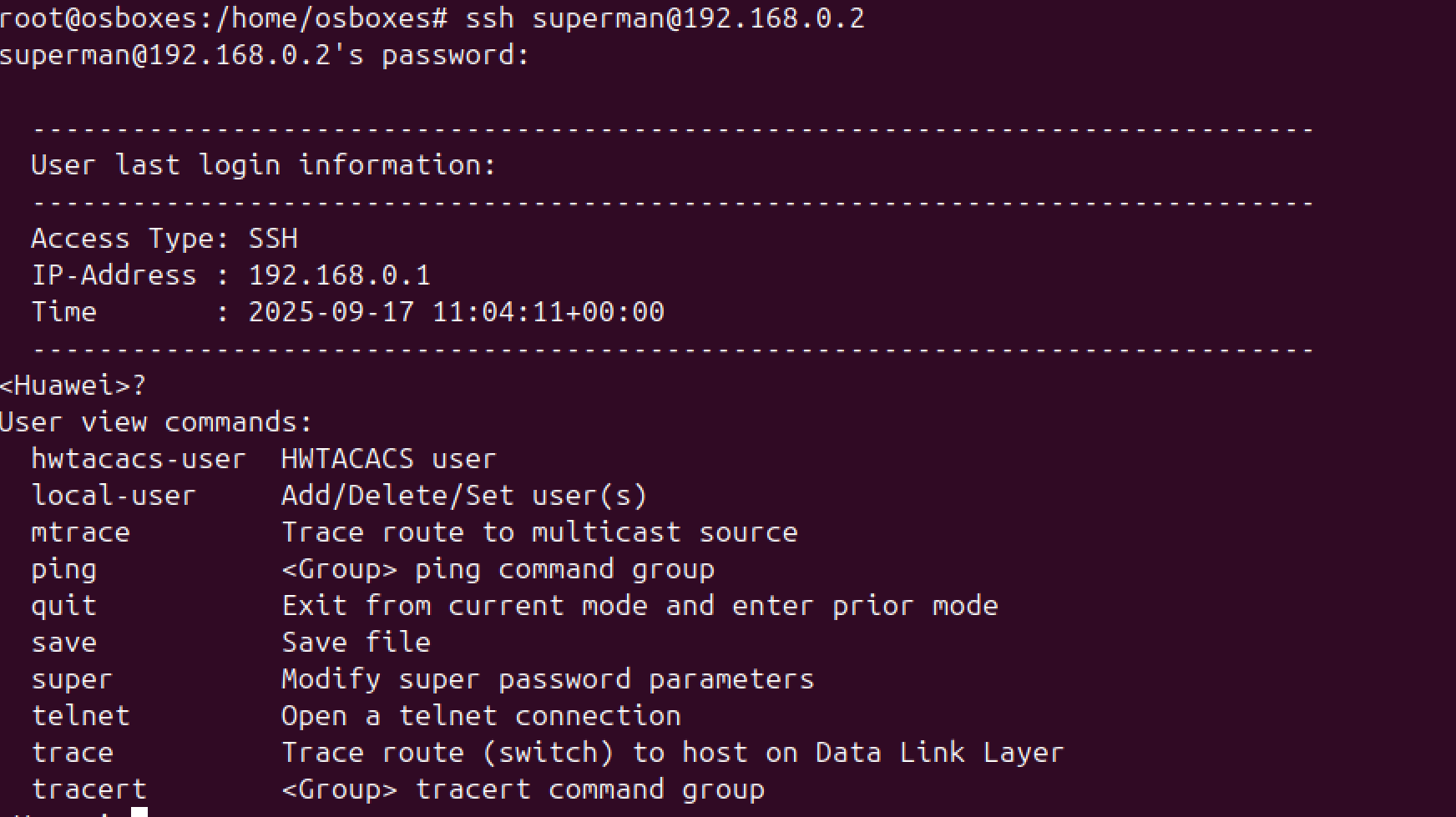
To verify, SSH into the server and see what commands are allowed.
Network Address Translation
Static NAT
 1
 2
 3
 4
 5
 6
 7
 8
 9
10
| ! Configure interfaces IP
int g0/0/0
ip address 12.0.0.1 24
quit
int g0/0/1
ip address 192.168.0.1 24
quit
! Configure NAT Pool
nat
|
To verify, on the ubuntu server, run sudo tcpdump -i ens3 icmp -n, then ping from PC1.
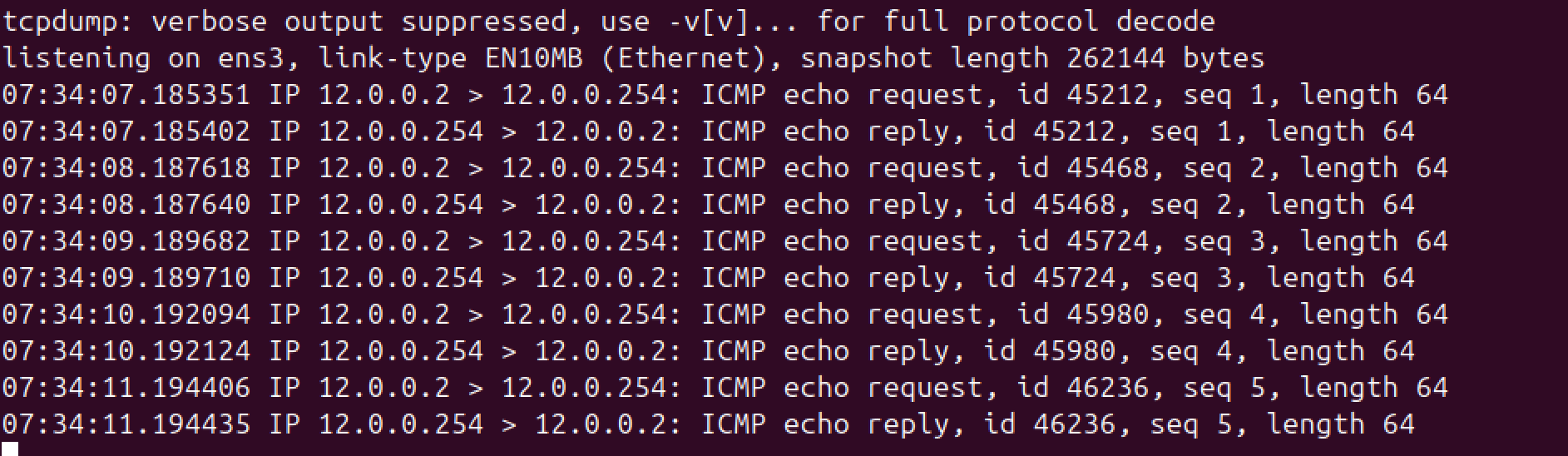 As you can see, Ubuntu thinks that it received packets from 12.0.0.2.
Dynamic NAT
 1
 2
 3
 4
 5
 6
 7
 8
 9
10
11
12
13
14
15
16
17
18
19
20
| ! Configure interfaces IP
int g0/0/0
ip address 12.0.0.1 24
quit
int g0/0/1
ip address 192.168.0.1 24
quit
! Configure NAT Pool
nat address-group 1 12.0.0.3 12.0.0.10
! Configure ACL
acl 2000
rule permit source 192.168.0.0 0.0.0.255
quit
! Configure exit interface
int g0/0/0
nat outbound 2000 address-group 1 no-pat
quit
|
To confirm,
1
2
3
4
5
6
7
8
| [Huawei]display nat outbound interface g0/0/0
NAT Outbound Information:
--------------------------------------------------------------------------
Interface Acl Address-group/IP/Interface Type
--------------------------------------------------------------------------
GigabitEthernet0/0/0 2000 1 no-pat
--------------------------------------------------------------------------
Total : 1
|
To verify, on the ubuntu server, run sudo tcpdump -i ens3 icmp -n, then ping from PC1.
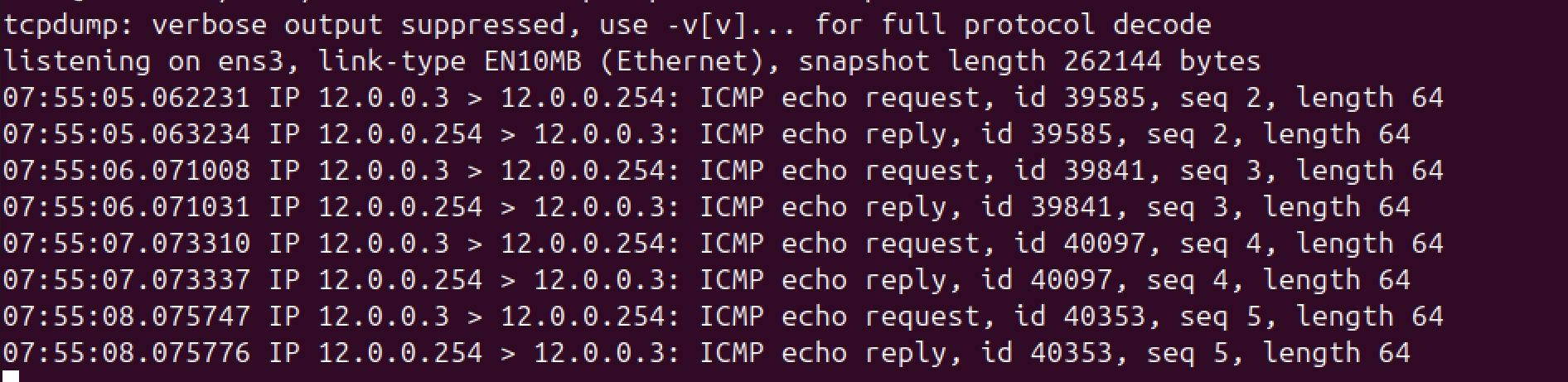 As you can see, Ubuntu thinks that it received packets from 12.0.0.3.
NAPT
- To configure NAPT,
 1
 2
 3
 4
 5
 6
 7
 8
 9
10
11
12
13
14
15
16
17
18
19
20
| ! Configure interfaces IP
int g0/0/0
ip address 12.0.0.1 24
quit
int g0/0/1
ip address 192.168.0.1 24
quit
! Configure NAT Pool
nat address-group 2 12.0.0.11 12.0.0.12
! Configure ACL
acl 2000
rule permit source 192.168.0.0 0.0.0.255
quit
! Configure exit interface
int g0/0/0
nat outbound 2000 address-group 2
quit
|
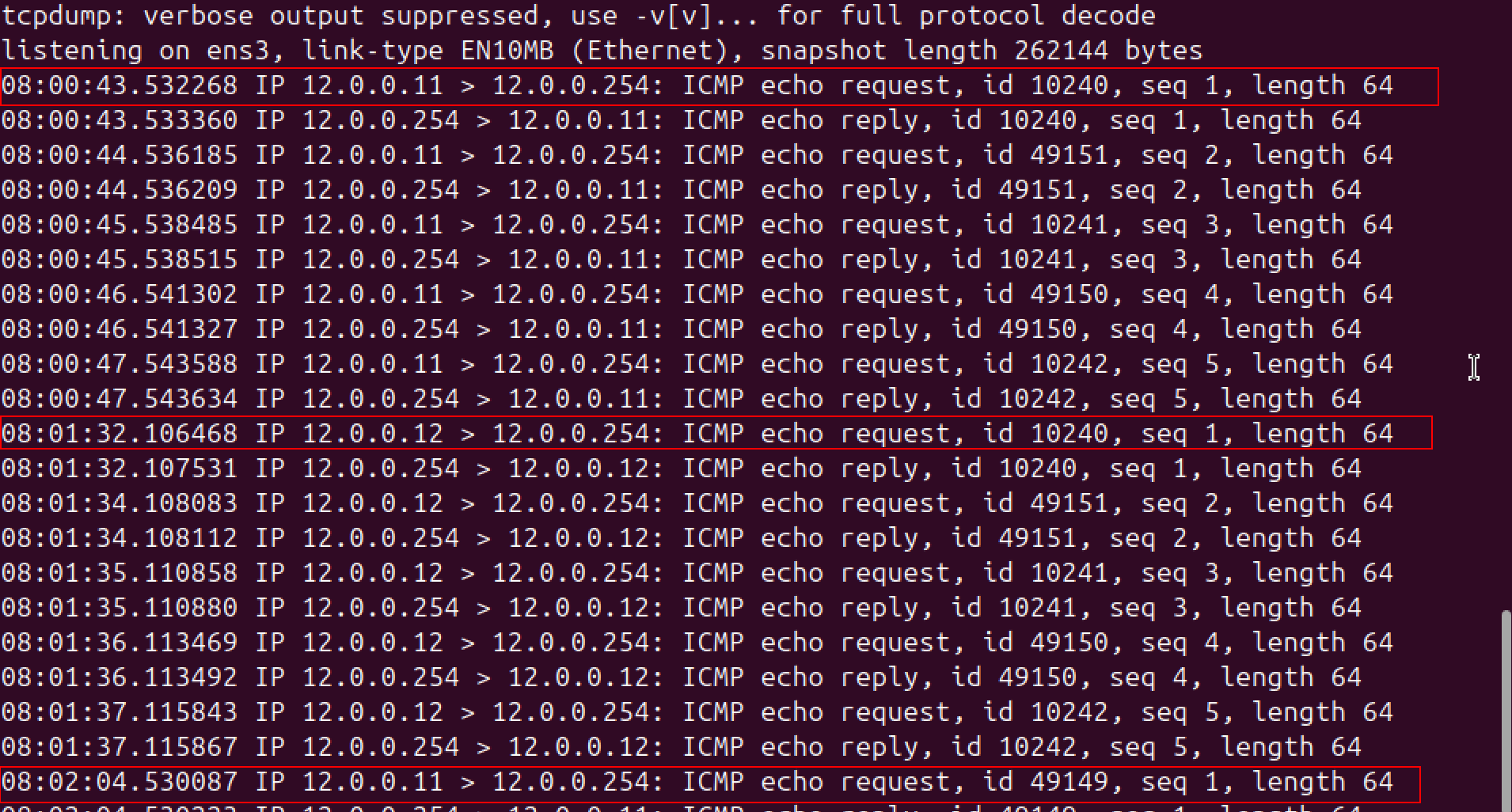
To verify the finding, on the ubuntu server, run sudo tcpdump -i ens3 icmp -n, then ping from PC1. Change the IP of the PC1 thrice.
Easy IP

 1
 2
 3
 4
 5
 6
 7
 8
 9
10
11
12
13
14
15
16
17
18
19
20
21
| ! Configure interfaces IP
int g0/0/0
ip address 12.0.0.1 24
quit
int g0/0/1
ip address 192.168.0.1 24
quit
! Configure ACL
acl 2000
rule permit source 192.168.0.0 0.0.0.255
quit
! Configure exit interface
int g0/0/0
nat outbound 2000
quit
int g0/0/0
undo nat outbound 2000 address-group 2
quit
|
To verify, on the ubuntu server, run sudo tcpdump -i ens3 icmp -n, then ping from PC1.
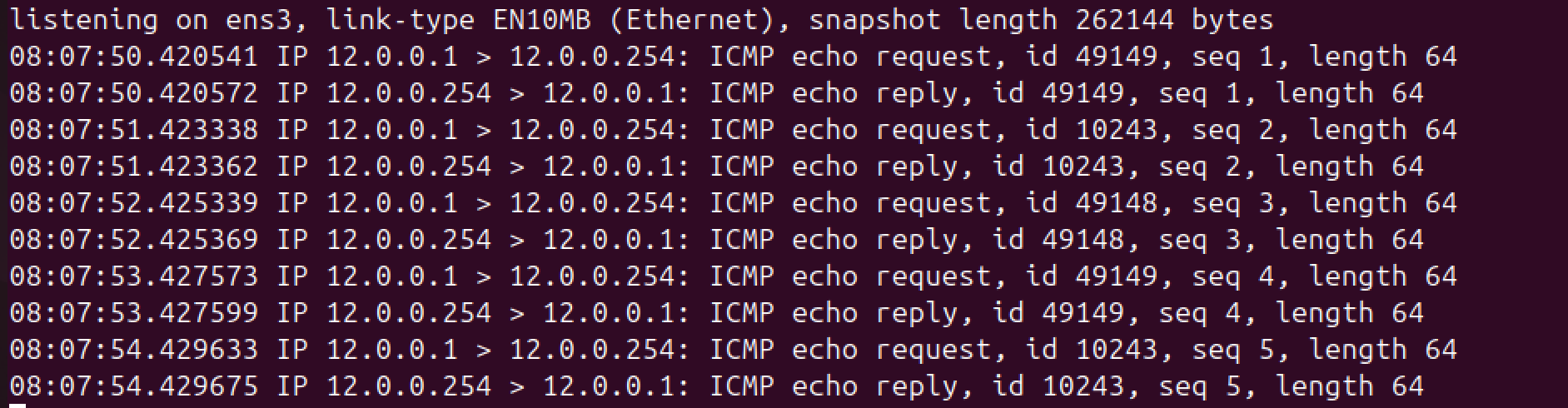
- The server receives ICMP packets whose source IP address is that of the interface.
Network Services
FTP
 1
 2
 3
 4
 5
 6
 7
 8
 9
10
11
12
13
14
15
16
17
18
19
| int g0/0/0
ip address 12.0.0.1 24
quit
int Loopback 1
ip address 1.1.1.1 32
quit
! Solves "Error: Before enabling the service, configure the function of logging in to the device through a specified interface."
ftp server permit interface all
ftp server-source -i Loopback 1
ftp server-source -a 1.1.1.1
ftp server enable
aaa
local-user john password irreversible-cipher john1234
local-user john service-type ftp
local-user john privilege level 3
local-user john ftp-directory flash:/superman
quit
|
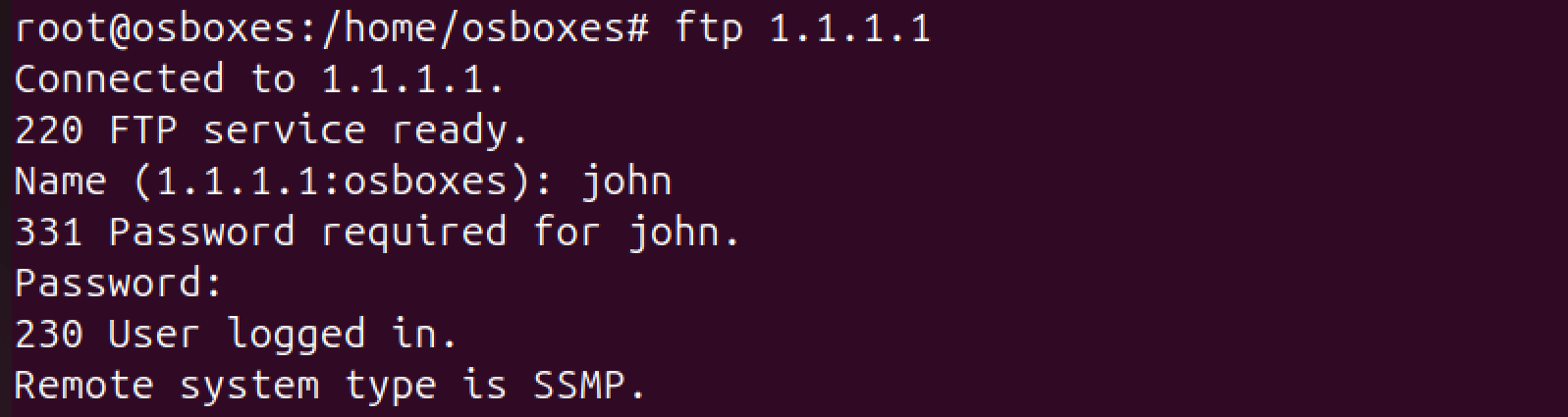
Output:
Telnet
 1
 2
 3
 4
 5
 6
 7
 8
 9
10
11
12
13
14
15
16
17
18
19
20
| ! Configure interface
int g0/0/0
ip address 12.0.0.1 24
quit
int Loopback 1
ip address 1.1.1.1 32
quit
! Configure telnet Server
telnet server permit interface all
telnet server-source -a 1.1.1.1
telnet server-source -i Loopback 1
telnet server enable
! telnet server
aaa
local-user jack password irreversible-cipher jack1234
local-user jack service-type telnet
local-user jack privilege level 3
quit
|
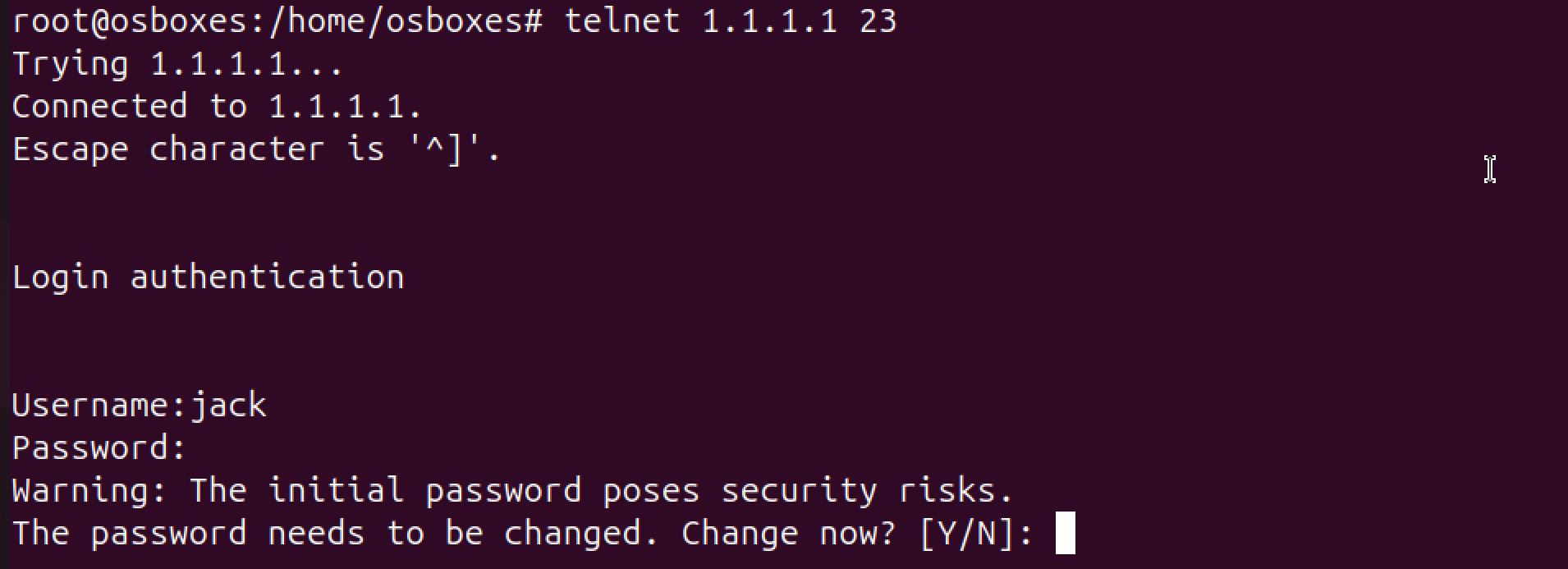
Output:
DHCP
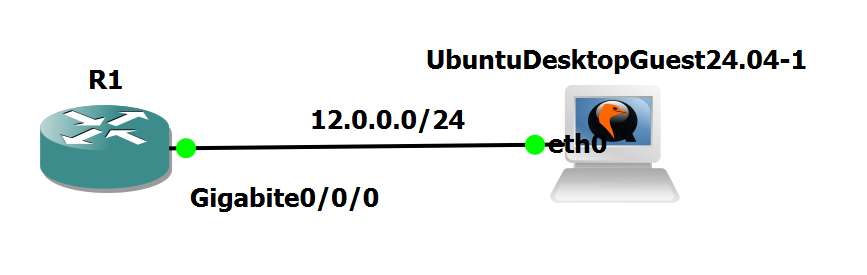
 1
 2
 3
 4
 5
 6
 7
 8
 9
10
11
12
13
14
| ! Enable DHCP
dhcp enable
! Configure DHCP
ip pool supercool
network 12.0.0.0 mask 255.255.255.0
gateway-list 12.0.0.1
dns-list 8.8.8.8
quit
! Enable interface for DHCP
int g0/0/0
dhcp select global
quit
|
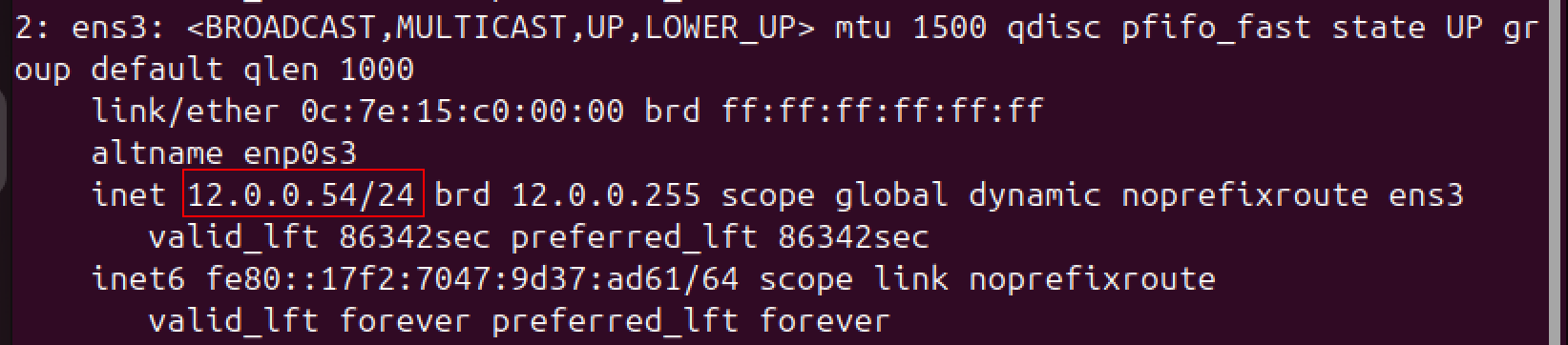
Output:
PPPOE
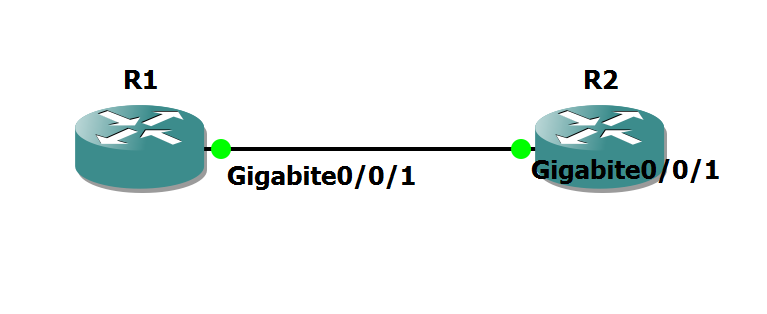 R1 (Server)
 1
 2
 3
 4
 5
 6
 7
 8
 9
10
11
12
13
14
15
16
17
18
| aaa
local-user superman password cipher huawei123
local-user superman service-type ppp
quit
ip pool POOL1
network 192.168.0.0 mask 24
quit
int virtual-template 1
ip address 192.168.0.254 24
remote address pool POOL1
ppp authentication-mode chap
quit
int g0/0/1
pppoe-server bind virtual-template 1
quit
|
R2 (Client)
 1
 2
 3
 4
 5
 6
 7
 8
 9
10
11
12
13
14
15
16
| dialer-rule
dialer-rule 1 ip permit
quit
int dialer 1
dialer user superman
dialer-group 1
dialer bundle 1
ppp chap user superman
ppp chap password cipher huawei123
ip address ppp-negotiate
quit
int g0/0/1
pppoe-client dial-bundle-number 1
quit
|
Verify
1
2
3
4
| [R2]display pppoe-client session summary
PPPoE Client Session:
ID Bundle Dialer Intf Client-MAC Server-MAC State
1 1 1 GE0/0/1 0ce6d0910001 0c27735f0001 UP
|
Network Management and Operations and Maintenance
SNMPv2c
1
2
3
4
5
6
7
8
9
| int Loopback 1
ip address 1.1.1.1 32
quit
snmp-agent //Start the SNMP agent service.
snmp-agent sys-info version v2c //Set the SNMP version to v2c.
snmp-agent mib-view included View_ALL iso //Create a MIB view View_ALL.
snmp-agent community read cipher Public123 mib-view View_ALL //Configure a read community name and set the rights of the MIB view.
snmp-agent protocol source-interface Loopback 1 //This step must be performed in V200R020 and later versions
|
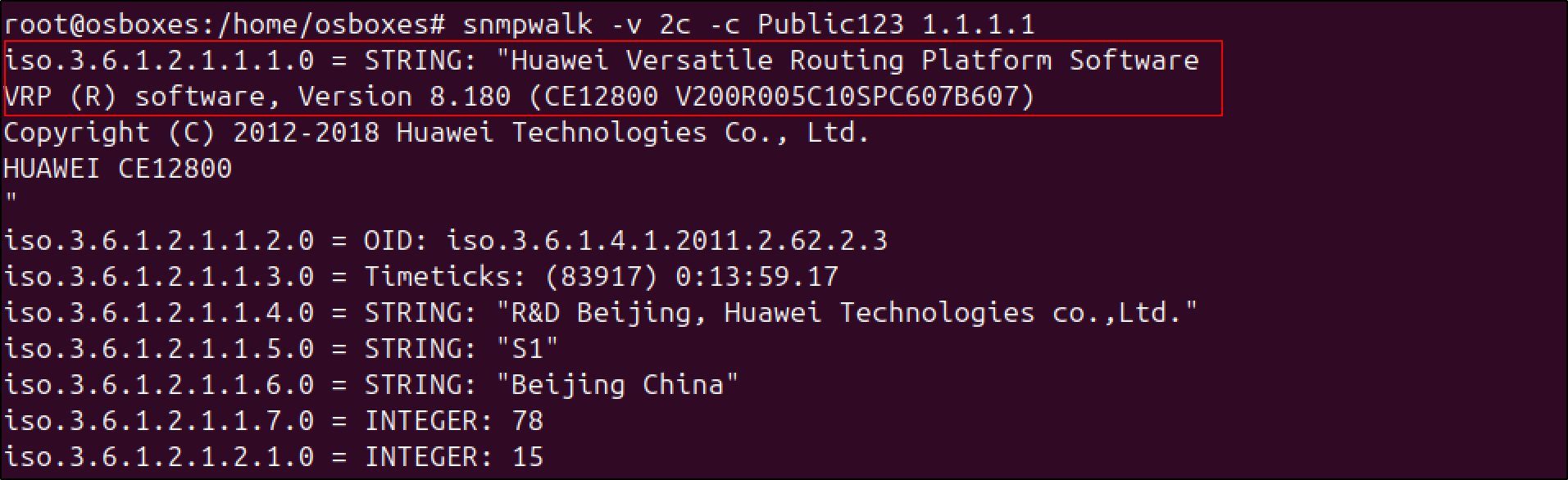
On the host,
1
| snmpwalk -v 2c -c Public123 1.1.1.1
|
Output:
SNMPv3
 1
 2
 3
 4
 5
 6
 7
 8
 9
10
11
12
13
14
15
16
17
18
19
20
21
22
23
24
| int Loopback 1
ip address 1.1.1.1 32
quit
int g0/0/0
ip address 192.168.0.254 24
quit
! Enable SNMP version 3
snmp-agent sys-info version v3
! Configure MIB view
snmp-agent mib-view isoview include iso
! Configure the user group
snmp-agent group v3 company_admin privacy read-view isoview write-view isoview notify-view isoview
! Configure user
snmp-agent usm-user v3 superman group company_admin
! Configure authentication password (and hash)
snmp-agent usm-user v3 superman authentication-mode sha
! (superman123)
! Configure sync encryption
snmp-agent usm-user v3 superman privacy-mode aes128
! superman1234
! Configure admin contact info
snmp-agent sys-info contact I just call to say I love you
|
On the host,
1
| snmpwalk -u superman -a sha -A superman123 1.1.1.1
|
Output:
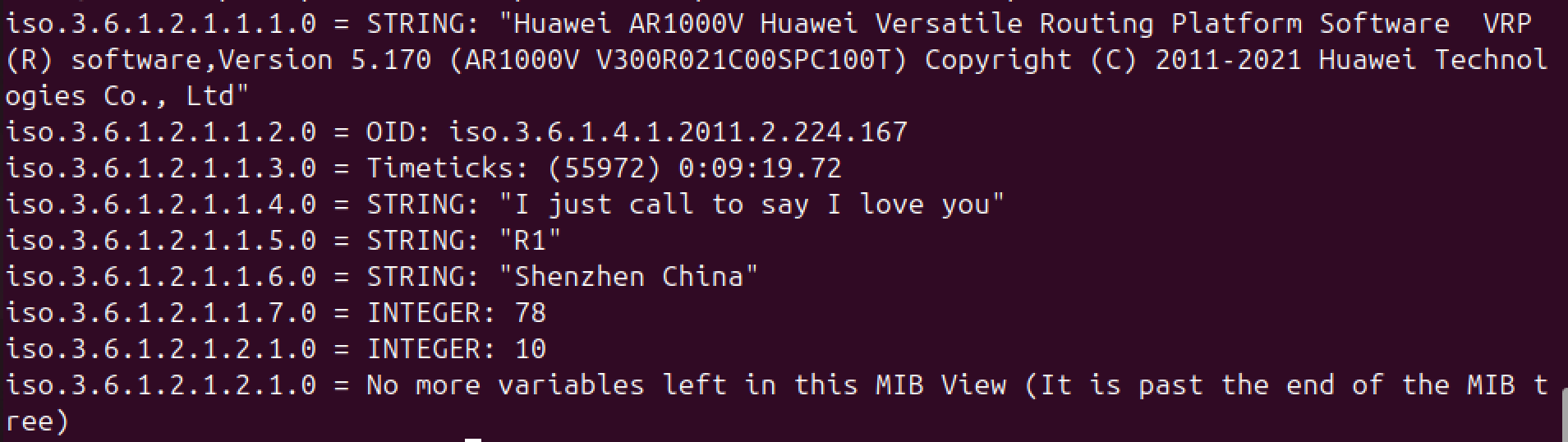 To verify,
1
| <R1>display snmp-agent sys-info
|
Output:
1
2
3
4
5
6
7
8
| The contact person for this managed node:
I just call to say I love you
The physical location of this node:
Shenzhen China
SNMP version running in the system:
SNMPv3
|
and
1
| <R1>display snmp-agent usm-user
|
Output:
1
2
3
4
5
6
7
8
| User name: superman
Engine ID: 800007DB03000000000000
Group name: company_admin
Authentication mode: sha, Privacy mode: aes128
Storage type: nonVolatile
User status: active
Total number is 1
|
IPv6
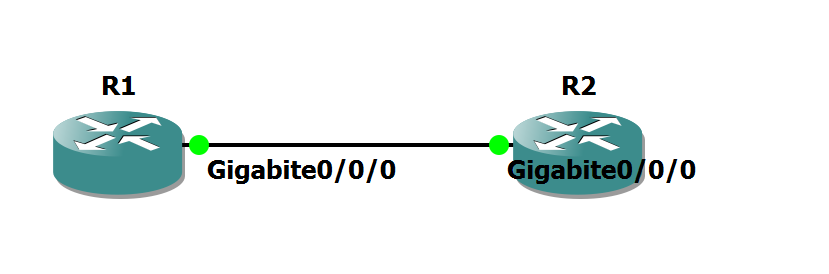 R1
R1
1
2
3
4
5
6
7
| ipv6
int g0/0/0
ipv6 enable
ipv6 address auto link-local
ipv6 address 2001::1 64
quit
|
R2
1
2
3
4
5
6
7
| ipv6
int g0/0/0
ipv6 enable
ipv6 address auto link-local
ipv6 address 2001::2 64
quit
|
To verify
 1
 2
 3
 4
 5
 6
 7
 8
 9
10
11
12
13
14
15
16
17
18
| [R1]ping ipv6 2001::2
PING 2001::2 : 56 data bytes, press CTRL_C to break
Reply from 2001::2
bytes=56 Sequence=1 hop limit=64 time = 8 ms
Reply from 2001::2
bytes=56 Sequence=2 hop limit=64 time = 2 ms
Reply from 2001::2
bytes=56 Sequence=3 hop limit=64 time = 1 ms
Reply from 2001::2
bytes=56 Sequence=4 hop limit=64 time = 3 ms
Reply from 2001::2
bytes=56 Sequence=5 hop limit=64 time = 2 ms
--- 2001::2 ping statistics ---
5 packet(s) transmitted
5 packet(s) received
0.00% packet loss
round-trip min/avg/max = 1/3/8 ms
|